
1. Introduction
This manual provides essential information for the proper installation, operation, and maintenance of your new ClimaTek Furnace Vent Air Pressure Switch Replacement For Part # 9371VO-HS-0130 .80" WC. Please read this manual thoroughly before use to ensure safe and efficient performance. Keep this manual for future reference.
2. Product Overview
The ClimaTek Furnace Vent Air Pressure Switch is a high-quality aftermarket replacement part designed for furnace vent air pressure systems. It is engineered to meet or exceed the specifications of the original part, ensuring reliable performance in HVAC applications.
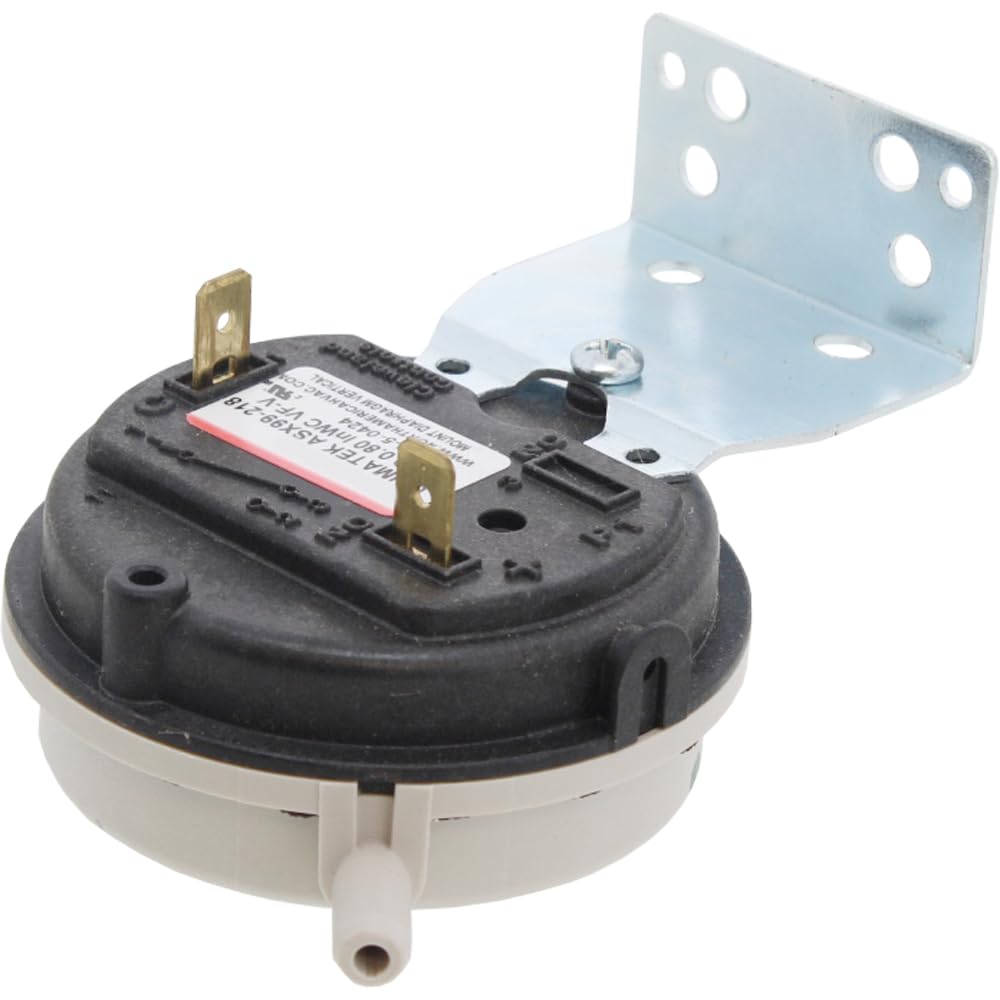
Image: A ClimaTek furnace vent air pressure switch, black and beige, with two brass electrical terminals and a hose barb, mounted on a silver L-shaped metal bracket.
Key Features:
- Aftermarket Replacement: Designed as a direct replacement for part # 9371VO-HS-0130.
- Pressure Rating: Operates at .80" WC (Water Column).
- Quality Construction: Made with durable materials for long-lasting performance.
- Compatibility: Suitable for various furnace and HVAC systems requiring this specific pressure switch.
3. Setup and Installation
Important Safety Information: Before attempting any installation, ensure the power to the furnace or HVAC system is completely disconnected at the circuit breaker. Failure to do so can result in electrical shock, injury, or death. If you are unsure about any step, consult a qualified HVAC technician.
- Power Disconnection: Turn off all power to the furnace unit at the main electrical panel. Verify power is off using a voltage tester.
- Locate Existing Switch: Identify the current pressure switch on your furnace. Note its orientation and how it is connected.
- Disconnect Hoses and Wires: Carefully remove the rubber or silicone hoses connected to the pressure switch ports. Disconnect the electrical wires from the terminals. It is recommended to take a photo before disconnecting for reference.
- Remove Old Switch: Unscrew or unclip the old pressure switch from its mounting bracket.
- Install New Switch: Mount the new ClimaTek pressure switch in the same location and orientation as the old one. Ensure it is securely fastened.
- Reconnect Hoses and Wires: Reattach the hoses to the appropriate ports on the new switch. Connect the electrical wires to the terminals. Ensure connections are snug and correct.
- Verify Connections: Double-check all connections for proper fit and security.
- Restore Power: Once installation is complete and verified, restore power to the furnace unit.
4. Operating Principles
The furnace vent air pressure switch is a safety device that monitors the negative pressure (vacuum) created by the inducer motor in the furnace's vent system. When the inducer motor operates correctly, it pulls combustion gases out of the furnace and creates a specific negative pressure. The pressure switch senses this pressure. If the pressure is within the specified range (.80" WC for this model), the switch closes, allowing the furnace's ignition sequence to proceed. If the pressure is too low (indicating a blocked vent, faulty inducer, or other issue), the switch remains open, preventing the furnace from firing, thus ensuring safe operation and preventing carbon monoxide buildup.
5. Maintenance
The ClimaTek pressure switch is designed for reliable, long-term operation with minimal maintenance. However, periodic checks of the associated components can help ensure its continued functionality:
- Hose Inspection: Annually inspect the rubber or silicone hoses connected to the pressure switch for cracks, blockages, or deterioration. Replace if necessary.
- Vent System Check: Ensure the furnace's vent system is clear of obstructions (e.g., bird nests, debris) that could affect pressure readings.
- Inducer Motor Function: Listen for proper operation of the inducer motor. Any unusual noises or lack of operation could indicate a problem affecting the pressure switch's function.
- Electrical Connections: Periodically check that electrical connections to the switch are secure and free of corrosion.
Note: Do not attempt to adjust or tamper with the internal components of the pressure switch. It is a sealed unit calibrated at the factory.
6. Troubleshooting
If your furnace is not operating and you suspect an issue with the pressure switch, consider the following common scenarios:
| Symptom | Possible Cause | Solution |
|---|---|---|
| Furnace clicks but doesn't ignite. | Pressure switch not closing (open circuit). | Check for blocked vent, faulty inducer motor, cracked hoses, or water in hoses. Verify proper wiring. If all else fails, the switch may be faulty. |
| Furnace runs for a short time, then shuts off. | Intermittent pressure switch fault or vent issue. | Inspect vent for partial blockages. Check hoses for loose connections or small cracks. |
| Error code related to pressure switch. | Specific furnace error indicating pressure switch issue. | Consult your furnace's user manual for the specific error code. Follow diagnostic steps. |
Disclaimer: Troubleshooting HVAC systems can be complex and dangerous. If you are not comfortable performing these checks, or if the problem persists, contact a certified HVAC professional.
7. Specifications
- Part Number: Replacement for 9371VO-HS-0130
- Pressure Rating: .80" WC (Water Column)
- Product Dimensions: 9 x 6 x 4 inches
- Item Weight: 3 ounces
- Model Number: CECOMINOD023506
- Manufacturer: Universal (Aftermarket by ClimaTek)
- Country of Origin: USA
8. Warranty Information
This ClimaTek aftermarket replacement part typically comes with a standard manufacturer's warranty against defects in materials and workmanship. For specific warranty terms and conditions, please refer to the documentation provided with your purchase or contact the seller directly. Keep your proof of purchase for warranty claims.
Return Policy: This product is subject to a 30-day return policy for refund or replacement, as per seller terms.
9. Support and Contact
For technical assistance, installation questions, or warranty inquiries, please contact the seller or manufacturer of this aftermarket part. Refer to your purchase receipt or the product packaging for contact details.
You can also visit the ClimaTek Store on Amazon for more information on their products.