
1. Introduction
Thank you for choosing the VOLTCRAFT ET-200 Insulation Tester. This device is designed for precise measurement of insulation resistance, standard resistance, and AC/DC voltage. It features multiple test voltages and advanced functions like Polarization Index (PI) and Dielectric Absorption Ratio (DAR) calculations, making it an essential tool for electrical professionals. Please read this manual thoroughly before operation to ensure safe and correct use.
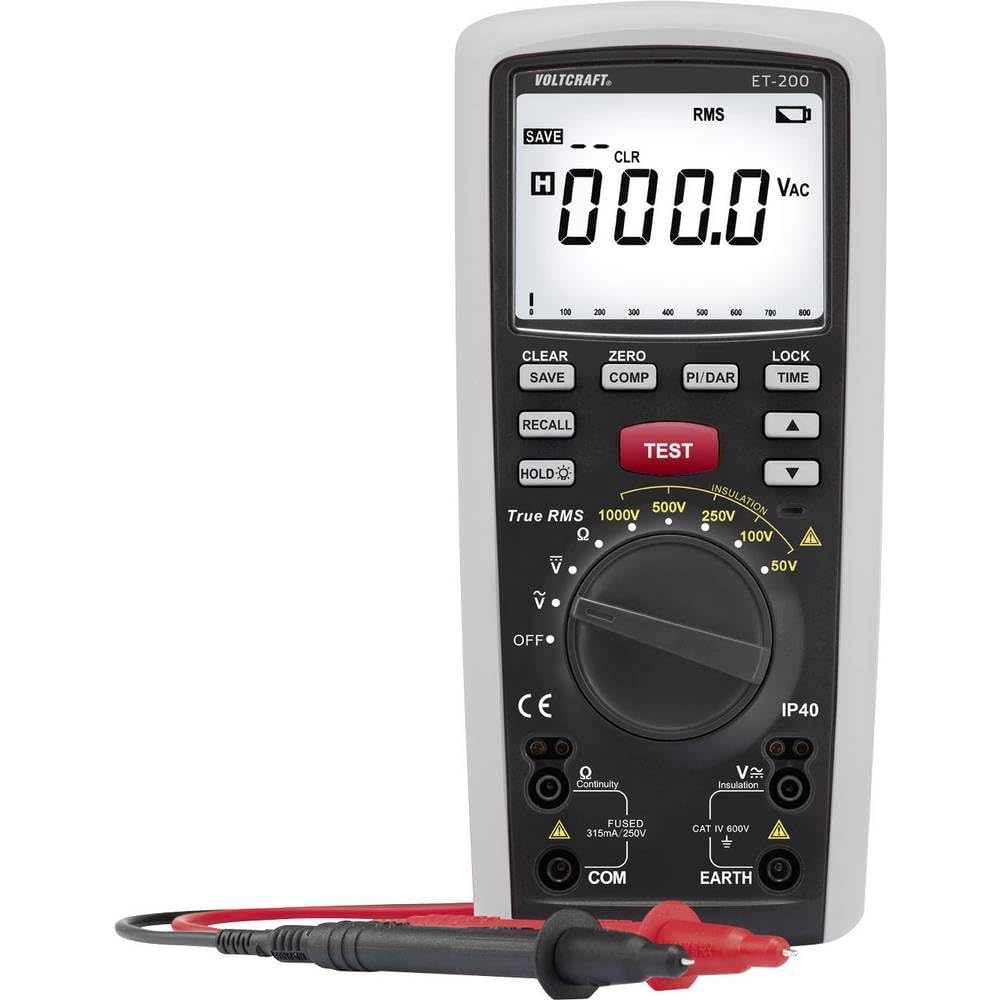
Figure 1: Front view of the VOLTCRAFT ET-200 Insulation Tester.
2. Safety Information
Always observe the following safety precautions to prevent electric shock, injury, or damage to the device:
- Do not use the device if it appears damaged or if the insulation on the test leads is compromised.
- Ensure the device is switched off before connecting or disconnecting test leads.
- Never apply more than the rated voltage between terminals or between any terminal and earth ground.
- The device is rated for CAT IV 600V. Adhere to all local and national safety codes.
- Do not operate the device in explosive atmospheres or in the presence of flammable gases or dust.
- Always wear appropriate personal protective equipment (PPE), such as safety glasses and insulated gloves.
- Before measuring insulation resistance, ensure the circuit under test is de-energized and discharged.
3. Product Features
The VOLTCRAFT ET-200 offers a comprehensive set of features for various electrical testing needs:
- Multiple Test Voltages: Selectable insulation test voltages of 50V, 100V, 250V, 500V, and 1000V.
- High Insulation Resistance Range: Measures insulation resistance up to 20 GΩ.
- Standard Resistance Measurement: Measures resistance from 0.01 Ω to 20 kΩ.
- Voltage Measurement: Capable of measuring DC and AC voltages up to 600V (CAT IV).
- PI and DAR Calculation: Automatically calculates Polarization Index (PI) and Dielectric Absorption Ratio (DAR) to assess insulation quality.
- Rugged Design: Equipped with soft rubber protection for enhanced durability and impact resistance.
- Optional Remote Trigger: Supports an optional remote trigger test lead for convenient measurement initiation at the probe tip.
4. Package Contents
Please check the contents of your package upon receipt. It should include:
- VOLTCRAFT ET-200 Insulation Tester
- Test Leads (Red and Black)
- Alligator Clips
- User Manual
- Batteries (pre-installed or separate, depending on region)
If any items are missing or damaged, please contact your retailer.
5. Setup
5.1. Battery Installation
The ET-200 is powered by batteries. To install or replace batteries:
- Ensure the device is turned off.
- Locate the battery compartment on the rear of the device.
- Open the compartment cover using a screwdriver if necessary.
- Insert the required batteries, observing correct polarity (+/-).
- Close the battery compartment securely.
5.2. Connecting Test Leads
Connect the test leads to the appropriate terminals on the device:
- Insert the red test lead into the V/Ω/GΩ terminal.
- Insert the black test lead into the COM (common) terminal.
- For insulation resistance measurements, an additional EARTH terminal may be used with a separate lead if required by the test procedure.

Figure 2: VOLTCRAFT ET-200 with test leads connected to terminals.
6. Operating Instructions
6.1. Power On/Off
To turn the device on, rotate the function selector dial to the desired measurement mode. To turn off, rotate the dial to the 'OFF' position.
6.2. Insulation Resistance Measurement (GΩ)
This mode is used to measure the insulation resistance of electrical systems and components.
- Ensure the circuit under test is de-energized and safely discharged.
- Rotate the function selector dial to one of the insulation test voltage settings (e.g., 50V, 100V, 250V, 500V, 1000V).
- Connect the test leads to the circuit or component being tested. Typically, the red lead to the live/phase conductor and the black lead to the neutral/earth.
- Press and hold the TEST button to initiate the measurement. The test voltage will be applied.
- Read the insulation resistance value displayed on the LCD.
- Release the TEST button to stop the measurement. The circuit will be discharged automatically.
6.3. Polarization Index (PI) and Dielectric Absorption Ratio (DAR)
The ET-200 can calculate PI and DAR, which are indicators of insulation quality.
- To perform a PI or DAR test, select the appropriate insulation test voltage.
- Press the dedicated PI/DAR button (if available) or follow the on-screen prompts after initiating an insulation test.
- The device will automatically take measurements at specific time intervals (e.g., 30s, 60s, 10min) and calculate the ratios.
6.4. Resistance Measurement (Ω/kΩ)
This mode measures standard resistance values.
- Rotate the function selector dial to the Ω or kΩ position.
- Ensure the component or circuit is de-energized.
- Connect the test leads across the component to be measured.
- Read the resistance value on the display.
6.5. Voltage Measurement (ACV/DCV)
This mode measures AC or DC voltage.
- Rotate the function selector dial to the ACV or DCV position.
- Connect the test leads in parallel with the circuit or power source to be measured.
- Read the voltage value on the display.
6.6. Data Hold Function
Press the HOLD button to freeze the current reading on the display. Press it again to release.
7. Maintenance
7.1. Cleaning
Wipe the device with a soft, damp cloth. Do not use abrasive cleaners or solvents. Ensure the device is dry before storage or next use.
7.2. Battery Replacement
Replace batteries when the low battery indicator appears on the display. Refer to section 5.1 for instructions.
7.3. Storage
If the device will not be used for an extended period, remove the batteries to prevent leakage. Store the device in a cool, dry place, away from direct sunlight and extreme temperatures.
8. Troubleshooting
| Problem | Possible Cause | Solution |
|---|---|---|
| Device does not power on | Dead or incorrectly installed batteries | Replace batteries, check polarity |
| No reading or 'OL' (Overload) displayed | Open circuit, incorrect range, or leads not connected properly | Check connections, ensure circuit is closed, select appropriate range |
| Inaccurate readings | Poor lead contact, external interference, or device needs calibration | Ensure good contact, move away from interference, consider professional calibration |
| Display shows 'Lo Batt' | Low battery voltage | Replace batteries immediately |
If the problem persists after attempting these solutions, please contact customer support.
9. Specifications
| Parameter | Value |
|---|---|
| Brand | VOLTCRAFT |
| Model Number | ET-200 |
| Insulation Test Voltages | 50 V, 100 V, 250 V, 500 V, 1000 V |
| Insulation Resistance Range | Up to 20 GΩ |
| Resistance Measurement Range | 0.01 Ω - 20 kΩ |
| DC/AC Voltage Measurement | Up to 600 V |
| Overvoltage Category | CAT IV 600V |
| Product Dimensions (L x W x H) | 22.5 x 10.3 x 5.9 cm |
| Weight | 9.07 grams |
| Power Source | Battery powered |
10. Warranty and Support
VOLTCRAFT products are manufactured to high-quality standards and are covered by a manufacturer's warranty. Please refer to the warranty card included with your product for specific terms and conditions.
For technical support, service, or warranty claims, please contact your local VOLTCRAFT distributor or visit the official VOLTCRAFT website for contact information.


