
Introduction
This manual provides essential information for the use and care of your Brother Genuine P-touch TZe Laminated Label Tapes. These tapes are designed for customization, long-lasting performance, and durability with compatible Brother P-touch Label Makers. They are suitable for both indoor and outdoor applications, featuring a unique seven-layer lamination technology that protects printed text from wear and tear. The tapes are resistant to sunlight fading, abrasion, water, and various chemicals, and can withstand temperatures from freezing to boiling. They offer durable adhesion with Easy Peel backings for easy application on smooth, round, and textured surfaces.

Image: Brother Genuine P-Touch TZe-231 Laminated Label Tape, 1/2 inch (12mm), Black on White, shown in a 2-pack. This is the primary product packaging.
Setup: Loading the Label Tape
To begin using your Brother TZe-231 label tape, you must properly install the cartridge into a compatible Brother P-touch label maker. Ensure your label maker is powered off before proceeding.
- Open the tape cassette cover on your P-touch label maker. The location of this cover may vary by model; refer to your label maker's specific manual for exact instructions.
- Insert the TZe-231 tape cassette into the tape compartment. Ensure it clicks firmly into place. The tape should feed smoothly into the label maker's print head.
- Close the tape cassette cover securely.
- Turn on your label maker. It may perform a self-test or prompt you to enter text.

Image: A hand inserting a Brother TZe label tape cartridge into a compatible P-touch label maker. This demonstrates the correct way to load the tape.
Video: This video demonstrates the process of loading a Brother TZe label tape cartridge into a P-touch label maker, showing the steps from opening the cover to securing the cartridge.
Operation: Printing and Applying Labels
Once the tape cartridge is loaded, you can begin creating and applying labels.
- Create Label: Use your P-touch label maker's keyboard to type the desired text. You can also select various fonts, sizes, and frames as supported by your specific label maker model.
- Print Label: Press the print button on your label maker. The label will be printed and dispensed from the tape exit slot.
- Cut Label: Manually or automatically cut the label, depending on your label maker's features.
- Peel Backing: The TZe-231 tape features an Easy Peel split backing. Bend the label lengthwise to separate the backing from the adhesive side.
- Apply Label: Carefully align the label and press it firmly onto the desired clean, dry surface. Ensure even pressure is applied across the entire label for optimal adhesion.

Image: A person's hands demonstrating the Easy Peel split backing feature of a Brother TZe label, making it simple to remove the protective layer before application.
Video: This video illustrates the easy peel feature of the label tape and its strong adhesion when applied to various surfaces.
Durability Features
- Laminated Protection: The unique seven-layer lamination protects the printed text, ensuring labels remain legible even in harsh conditions.
- Water Resistance: Labels can withstand exposure to water, making them suitable for items that may get wet or require washing.
- Temperature Resistance: The tape maintains integrity across a wide range of temperatures, from freezing to boiling, ideal for food storage or outdoor use.
- Abrasion Resistance: Designed to resist scratching and scuffing, ensuring the label remains clear over time.
- Fade Resistance: Labels are resistant to fading from sunlight, preserving their appearance for extended periods.
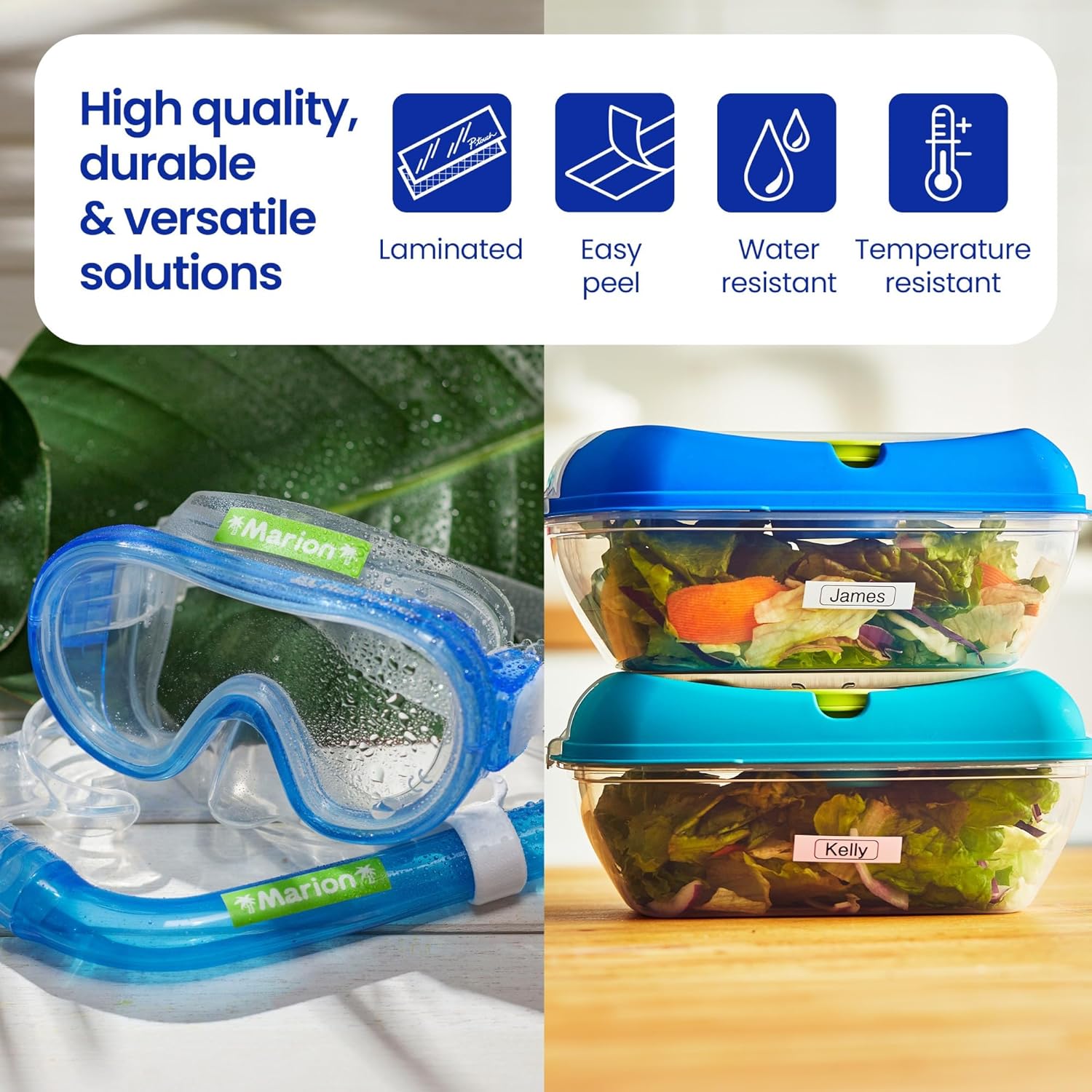
Image: Labels applied to swimming goggles and food containers, illustrating the tape's water and temperature resistance in everyday use.

Image: Labels used on plant pots in an outdoor setting, showcasing the tape's resistance to environmental factors like sunlight and moisture.
Maintenance
Proper maintenance ensures the longevity of your label tape and the optimal performance of your label maker.
- Tape Storage: Store unused TZe-231 tape cartridges in a cool, dry place away from direct sunlight and extreme temperatures. Keep them in their original packaging until ready for use to prevent dust accumulation.
- Label Maker Cleaning: Regularly clean the print head and tape cutter of your P-touch label maker. Refer to your label maker's manual for specific cleaning instructions. Use a soft, dry cloth to wipe away dust and debris. Avoid using abrasive cleaners or solvents.
- Avoid Contamination: Prevent dust, dirt, or liquids from entering the tape cartridge or the label maker's tape compartment, as this can affect print quality and tape feeding.
Troubleshooting
If you encounter issues with your TZe-231 label tape, consider the following common solutions:
- Poor Print Quality:
- Ensure the tape cartridge is correctly installed.
- Clean the print head of your label maker.
- Check if the tape is old or has been stored improperly. Replace with a new cartridge if necessary.
- Tape Not Feeding:
- Verify the tape cartridge is fully inserted and latched.
- Check for any tape jams or obstructions in the tape exit slot.
- Ensure the tape is not twisted or damaged within the cartridge.
- Labels Not Sticking:
- Ensure the application surface is clean, dry, and smooth.
- Apply firm, even pressure across the entire label during application.
- Avoid touching the adhesive side of the label before application.
- Confirm the tape is genuine Brother TZe tape, as off-brand tapes may have inconsistent adhesive quality.
- Label Maker Not Recognizing Tape:
- Remove and reinsert the tape cartridge.
- Ensure you are using a genuine Brother TZe tape, as some label makers may not recognize third-party cartridges.
Specifications
| Feature | Detail |
|---|---|
| Model Number | TZE2312PK |
| Tape Width | 1/2 inch (0.47 inches / 12mm) |
| Tape Length | 26.2 ft (8m) per roll |
| Print Color | Black |
| Tape Color | White |
| Material Type | Laminated Paper |
| Adhesive Type | Standard |
| Durability | Water, Fade, Abrasion, Chemical, Temperature Resistant |
| Compatibility | Brother P-touch Label Makers that use 1/2" (12mm) TZe tapes |
| Included Components | 2 Multipurpose Label Tapes |
| Item Weight | 3.2 ounces |

Image: A hand holding a Brother TZe label tape cartridge, with dimensions indicated as 2.7 inches (6 cm) in height, providing a visual reference for its size.
Warranty Information
Brother Genuine P-touch TZe-231 Laminated Label Tapes come with a 1 Year Limited Warranty. This warranty covers defects in materials and workmanship under normal use. For specific terms and conditions, please refer to the warranty documentation included with your product or visit the official Brother support website.
Support
For further assistance, technical support, or to inquire about other Brother products, please visit the official Brother support website or contact their customer service. You can find detailed FAQs, driver downloads, and contact information on their website.
Brother Support Website: www.brother-usa.com/support


