
1. Introduction
Thank you for choosing the Altai Outdoor Siren. This powerful and weather-resistant siren is designed for outdoor use, providing a loud alarm signal for various security applications. This manual provides essential information for the safe and effective installation, operation, and maintenance of your siren.
2. Safety Information
- High Sound Level: This siren produces a sound level of 120 dB, which can be harmful to hearing if exposed for prolonged periods at close range. Exercise caution during testing.
- Electrical Safety: Ensure the power supply is disconnected before installation or maintenance. Connect the siren only to a 6-12V DC power source as specified. Incorrect voltage can damage the unit or pose a fire hazard.
- Mounting: Mount the siren securely using the provided bracket to prevent it from falling.
- Water Resistance: While designed to be weather-resistant, avoid submerging the unit in water. Ensure all connections are properly sealed if exposed to the elements.
3. Setup and Installation
3.1 Package Contents
- Altai Outdoor Siren
- Adjustable Mounting Bracket
- Mounting Hardware (screws, anchors - may vary)
3.2 Mounting the Siren
The siren comes with an adjustable mounting bracket for secure installation on a wall or other suitable surface. Choose a location that provides optimal sound projection and is protected from direct physical impact.
- Position the mounting bracket at the desired location and mark the drilling points.
- Drill pilot holes suitable for your mounting hardware.
- Securely attach the mounting bracket to the surface using appropriate screws and anchors.
- Attach the siren to the mounting bracket, ensuring it is firmly in place. The bracket allows for angle adjustment to direct the sound.
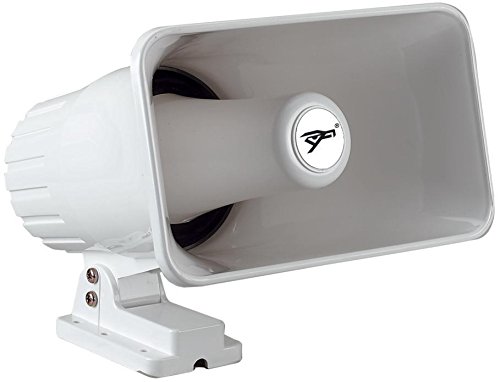
Figure 1: Altai Outdoor Siren showing its compact design and integrated mounting bracket. The siren features a durable, weather-resistant casing suitable for external installation.
3.3 Wiring Instructions
The Altai siren operates on a 6-12V DC power supply. Proper wiring is crucial for functionality and safety.
- Identify Wires: The siren typically has two wires: a positive (+) wire (often red) and a negative (-) wire (often black or white).
- Connect to Power Source: Connect the positive (+) wire of the siren to the positive (+) terminal of your 6-12V DC power source (e.g., alarm panel, battery). Connect the negative (-) wire of the siren to the negative (-) terminal of your power source.
- Secure Connections: Ensure all electrical connections are secure and insulated to prevent short circuits and protect against weather elements if installed outdoors.
- Test: Once wired, briefly apply power to test the siren's functionality. Disconnect power immediately after testing.
Note: Consult a qualified electrician if you are unsure about electrical wiring procedures.
4. Operating the Siren
The Altai siren is designed to be activated by an external alarm system or switch that provides a 6-12V DC signal. It offers two distinct sound patterns:
- Piercing Signal: A continuous, high-pitched alarm sound.
- Regulated Sound (160 cycles/minute): A pulsating or intermittent alarm sound, cycling at approximately 160 times per minute.
The selection between these two sound types is typically made during the wiring process or via a jumper/switch on the siren itself, depending on the specific model variant. Refer to any additional markings on your siren for specific sound selection instructions. When the siren receives the appropriate 6-12V DC power, it will activate with the selected sound pattern.
5. Maintenance
The Altai Outdoor Siren is built with a highly weather-resistant plastic casing, requiring minimal maintenance.
- Cleaning: Periodically wipe the exterior with a soft, damp cloth to remove dirt and debris. Do not use harsh chemicals or abrasive cleaners.
- Inspection: Regularly inspect the siren and its mounting bracket for any signs of damage, corrosion, or loose connections. Ensure the wiring insulation remains intact.
- Environmental Protection: While weather-resistant, ensure the siren is not continuously exposed to extreme conditions (e.g., prolonged direct water jets, extreme temperatures beyond its operating range) to maximize its lifespan.
6. Troubleshooting
| Problem | Possible Cause | Solution |
|---|---|---|
| Siren does not sound. | No power supply. Incorrect wiring. Faulty siren. | Check power source (6-12V DC). Verify positive and negative connections. Test with a known good power source. If still no sound, the siren may be faulty. |
| Sound is weak or distorted. | Insufficient power. Loose connection. Obstruction. | Ensure power supply is within 6-12V DC and can provide sufficient current. Check all wiring connections for tightness. Ensure the siren's sound output is not blocked. |
| Siren activates unexpectedly. | Faulty alarm system/trigger. Short circuit in wiring. | Inspect the alarm system or switch connected to the siren. Check wiring for any exposed wires or short circuits. |
7. Specifications
| Feature | Detail |
|---|---|
| Model | B017K68ZXA |
| Brand | Altai |
| Power Input | 6 - 12 Volts DC |
| Sound Output | 120 Decibels (dB) |
| Power Rating | 30 Watts (W) |
| Sound Patterns | Piercing signal or regulated (160 cycles/minute) |
| Casing Material | Weather-resistant plastic |
| Color | White |
| Mounting | Adjustable bracket included |
8. Warranty Information
Altai products are manufactured to high-quality standards. For specific warranty terms and conditions, please refer to the documentation provided at the time of purchase or contact your retailer. This warranty typically covers defects in materials and workmanship under normal use.
9. Customer Support
If you encounter any issues or have questions regarding your Altai Outdoor Siren that are not covered in this manual, please contact your point of purchase or the manufacturer's customer support. Please have your product model (B017K68ZXA) and purchase date available when contacting support.
- Online Support: Visit the Altai official website (if available).
- Email: Refer to your purchase documentation for contact email.
- Phone: Refer to your purchase documentation for contact number.