
Introduction
This manual provides essential information for the safe and efficient operation, maintenance, and troubleshooting of your DeWalt DXH1000TS Forced Air Electric Heater. Please read this manual thoroughly before operating the heater and retain it for future reference.
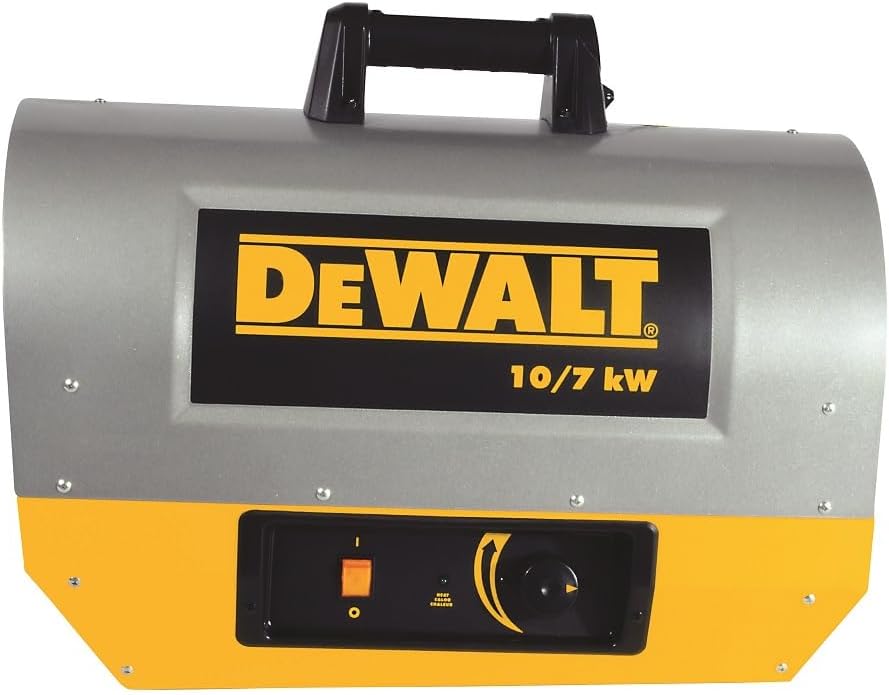
Image: Front view of the DeWalt DXH1000TS Forced Air Electric Heater, showcasing its robust design and control panel.

Image: The DeWalt DXH1000TS heater in a construction setting, demonstrating its intended use for warming work areas.
Important Safety Information
Always follow basic safety precautions when using electrical appliances to reduce the risk of fire, electric shock, and personal injury. This heater is designed for indoor use in well-ventilated areas. Do not use this heater in bathrooms, laundry areas, or similar indoor locations where water may be present.
- Read all instructions before using this heater.
- Do not use this heater with a damaged cord or plug, or after the heater malfunctions or has been dropped or damaged in any manner.
- Do not run cord under carpeting. Do not cover cord with throw rugs, runners, or similar coverings. Arrange cord away from traffic area and where it will not be tripped over.
- To disconnect heater, turn controls to off, then remove plug from outlet.
- Do not insert or allow foreign objects to enter any ventilation or exhaust opening as this may cause an electric shock or fire, or damage the heater.
- To prevent a possible fire, do not block air intakes or exhaust in any manner. Do not use on soft surfaces, like a bed, where openings may become blocked.
- This heater has hot parts inside. Do not use it in areas where gasoline, paint, or flammable liquids are used or stored.
- Use this heater only as described in this manual. Any other use not recommended by the manufacturer may cause fire, electric shock, or injury to persons.
- Always plug heaters directly into a wall outlet/receptacle. Never use with an extension cord or relocatable power tap (outlet/power strip).
Product Features
The DeWalt DXH1000TS is a robust electric forced air heater designed for demanding indoor heating applications. Key features include:
- Dual Output: Operates at either 10kW (50 amp) or 7kW (30 amp) for flexible heating needs.
- Thermal Protection: Equipped with safety features to prevent overheating.
- Proprietary Dual Coil Support System: Ensures efficient and consistent heat distribution.
- ETL Certified: Meets recognized safety standards.
- High Heat Output: Provides 22,861 BTU to 34,121 BTU of heat.

Image: Angled view of the DeWalt DXH1000TS heater, highlighting the protective grille over the fan and heating elements.
Setup and Installation
- Unpacking: Carefully remove the heater from its packaging. Inspect for any shipping damage.
- Placement: Position the heater on a firm, level surface. Ensure there is at least 3 feet (0.9 meters) of clearance from any combustible materials (e.g., furniture, curtains, walls). Do not block air intake or exhaust openings.
- Power Connection: This heater requires a 240 Volt electrical supply.
- For 10kW operation, a 50 amp circuit is required.
- For 7kW operation, a 30 amp circuit is required.
Important: The heater does not come with a power cord. A qualified electrician must install the appropriate power cord and plug for your specific electrical setup. Always plug the heater directly into a dedicated wall outlet. Do not use extension cords or power strips.
- Initial Inspection: Before first use, ensure all components are securely in place and there are no loose parts.
Operating Instructions
Familiarize yourself with the control panel before operation.
Image: Close-up of the control panel on the DeWalt DXH1000TS, showing the power switch and thermostat dial.
- Power On: Plug the heater into the appropriate 240V electrical outlet. Turn the main power switch (typically an orange rocker switch) to the "ON" position.
- Set Heat Output (if applicable): Some models may have a switch or setting to select between 7kW and 10kW output. Ensure this is set according to your electrical circuit capacity.
- Adjust Thermostat: Rotate the thermostat control dial clockwise to increase the desired temperature. The heater will cycle on and off to maintain the set temperature.
- Power Off: To turn off the heater, rotate the thermostat dial to its lowest setting, then turn the main power switch to the "OFF" position. Unplug the heater from the outlet when not in use for extended periods.
Note: The fan may continue to run for a short period after the heating elements turn off to dissipate residual heat, which is a normal function.
Maintenance
Regular maintenance ensures optimal performance and extends the life of your heater. Always unplug the heater before performing any maintenance.
- Cleaning:
- Wipe the exterior surfaces with a soft, damp cloth. Do not use abrasive cleaners or solvents.
- Use a vacuum cleaner with a brush attachment to remove dust and debris from the air intake and exhaust grilles.
- Ensure the heating elements are free from dust and obstructions.
- Storage: When not in use, store the heater in a cool, dry place, away from direct sunlight and moisture.
- Cord Inspection: Periodically inspect the power cord and plug for any signs of damage, fraying, or overheating. If damage is found, discontinue use and have it repaired by a qualified technician.
Troubleshooting
| Problem | Possible Cause | Solution |
|---|---|---|
| Heater does not turn on. |
|
|
| Heater produces no heat, but fan runs. |
|
|
| Reduced heat output. |
|
|
If the problem persists after attempting these solutions, contact a qualified service technician.
Specifications
| Brand | DEWALT |
| Model Number | DXH1000TS |
| Special Feature | Portable |
| Form Factor | Cabinet |
| Indoor/Outdoor Usage | Indoor |
| Product Dimensions | 25"D x 14.5"W x 18.5"H |
| Recommended Uses | Garage, Home Office, Bedroom, Study Room |
| Mounting Type | Floor Mount |
| Room Type | Garage |
| Burner Type | Radiant |
| Heat Output | 10 Kilowatts (34,121 BTU) or 7 Kilowatts (22,861 BTU) |
| Fuel Type | Electric |
| Number of Speeds | 2 |
| Voltage | 240 Volts |
| Amperage | 50 Amps (for 10kW) / 30 Amps (for 7kW) |
| Item Weight | 31.8 pounds |
| Manufacturer | DeWALT |
| UPC | 856795406455 |

Image: Diagram illustrating the dimensions of the DeWalt DXH1000TS heater: 25 inches deep, 14.5 inches wide, and 18.5 inches high.
Warranty Information
The DeWalt DXH1000TS Forced Air Electric Heater comes with a 1-year warranty from the date of purchase. This warranty covers defects in materials and workmanship under normal use. For specific terms and conditions, or to make a warranty claim, please refer to the official DeWalt warranty documentation or contact DeWalt customer support.
Support and Contact
For further assistance, technical support, or to inquire about replacement parts, please contact DeWalt customer service. You can also refer to the official user guide for more detailed information.
- Official User Guide (PDF): Download PDF
- DeWalt Official Website: Visit the DEWALT Store on Amazon for product information and support resources.


