
1. Introduction
Thank you for choosing the VONYX SMWBA18 Active PA Subwoofer. This powerful 18-inch bi-amplified subwoofer is designed to deliver deep, impactful bass, enhancing any sound system for professional DJ events, home audio, bars, or parties. With its robust construction and integrated amplifier, the SMWBA18 provides a comprehensive solution for low-frequency sound reinforcement.
This manual provides essential information for the safe and efficient operation of your subwoofer. Please read it thoroughly before use and retain it for future reference.

Figure 1.1: Front view of the VONYX SMWBA18 Active PA Subwoofer, showcasing its robust grille and side handle.
2. Safety Instructions
To reduce the risk of electric shock, do not remove the cover. No user-serviceable parts inside. Refer servicing to qualified service personnel.
- Power Source: Connect the unit only to a grounded mains socket with the correct voltage (220-240V AC, 50Hz).
- Moisture: Do not expose the unit to rain or moisture. Do not place objects filled with liquids, such as vases, on the unit.
- Ventilation: Ensure adequate ventilation. Do not block ventilation openings.
- Heat: Do not place the unit near heat sources such as radiators, heat registers, stoves, or other apparatus (including amplifiers) that produce heat.
- Cleaning: Clean only with a dry cloth.
- Cables: Protect the power cord from being walked on or pinched, particularly at plugs, convenience receptacles, and the point where they exit from the apparatus.
- Servicing: Refer all servicing to qualified service personnel. Servicing is required when the apparatus has been damaged in any way, such as power-supply cord or plug is damaged, liquid has been spilled or objects have fallen into the apparatus, the apparatus has been exposed to rain or moisture, does not operate normally, or has been dropped.
- Overload: Do not overload the unit. This can lead to damage and fire.
- Minimum Impedance: This device is only compatible with speakers of 8 ohms minimum. Connecting speakers with lower impedance can damage the amplifier.
3. Product Overview
3.1 Features
- Active Subwoofer with 500W RMS power.
- Two integrated 250W full-range amplifiers for satellite speakers.
- Line stereo inputs with Loop Thru function for daisy-chaining multiple units.
- Microphone input with adjustable Echo function.
- Durable protective metal grille and robust fabric coating.
- Ergonomic carrying handles for easy transport.
- 18-inch subwoofer for powerful bass reproduction.
3.2 Controls and Connections
The rear panel of the SMWBA18 features all the necessary controls and connection points for operation. Familiarize yourself with these before setup.
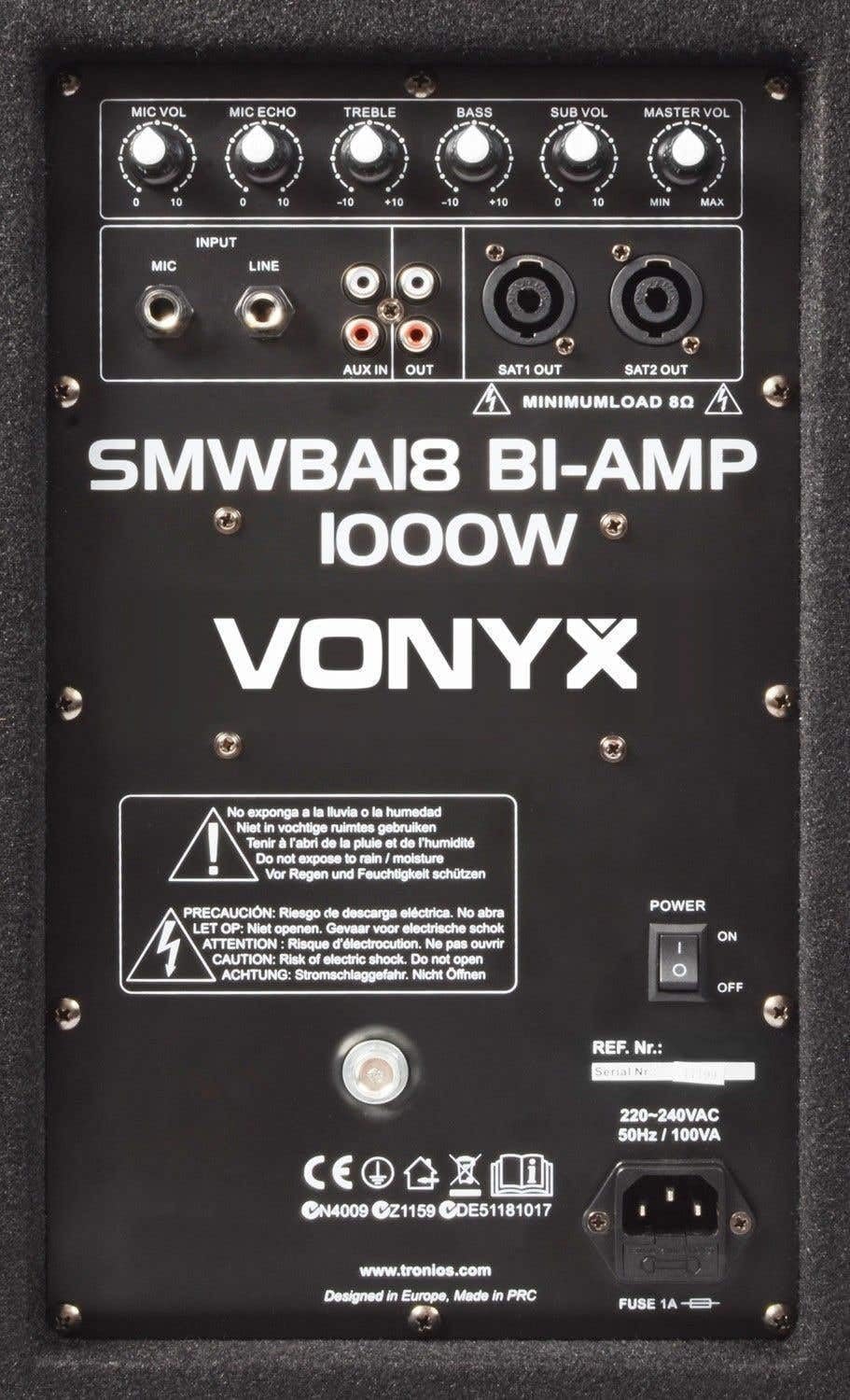
Figure 3.1: Rear panel of the VONYX SMWBA18, showing input/output connections and control knobs.
- MIC VOL: Adjusts the volume of the microphone input.
- MIC ECHO: Controls the echo effect applied to the microphone input.
- TREBLE: Adjusts the high frequencies of the main output.
- BASS: Adjusts the low frequencies of the main output.
- SUB VOL: Controls the volume level of the subwoofer.
- MASTER VOL: Overall master volume control for the entire system.
- MIC Input: 6.3mm jack for connecting a microphone.
- LINE Input (RCA): Stereo RCA inputs for connecting audio sources (e.g., mixer, CD player).
- AUX IN/OUT (RCA): Auxiliary RCA input and output for additional connections or daisy-chaining.
- SAT1 OUT / SAT2 OUT (Speakon): Speaker outputs for connecting passive satellite speakers (minimum 8 ohms impedance).
- POWER Switch: Turns the unit ON or OFF.
- FUSE: Fuse holder. Replace only with the specified fuse type (FUSE 1A).
- AC IN: Power input for the mains cable.
4. Setup
4.1 Placement
For optimal bass performance, place the subwoofer on a solid, flat surface. Avoid placing it directly against walls or in corners, as this can lead to exaggerated or muddy bass. Experiment with placement within your room to find the best sound balance.
4.2 Connections
- Power Connection: Ensure the POWER switch is in the OFF position. Connect the supplied power cable to the AC IN socket on the rear panel and then to a grounded mains outlet.
- Audio Input:
- Connect your audio source (e.g., mixer, DJ controller, CD player) to the LINE Input (RCA) using appropriate RCA cables.
- If using a microphone, connect it to the MIC Input (6.3mm jack).
- Satellite Speaker Connection (Optional): If you are using passive satellite speakers, connect them to the SAT1 OUT and SAT2 OUT (Speakon) terminals. Ensure your satellite speakers have a minimum impedance of 8 ohms.
- Daisy-Chaining (Optional): To connect multiple SMWBA18 subwoofers or send the audio signal to another amplifier, use the AUX OUT (RCA) connection.
5. Operating Instructions
5.1 Powering On/Off
- Before powering on, ensure all volume controls (MIC VOL, SUB VOL, MASTER VOL) are set to their minimum positions.
- Flip the POWER switch to the ON position. The power indicator light will illuminate.
- To power off, first reduce all volume controls to minimum, then flip the POWER switch to the OFF position.
5.2 Adjusting Volume and Tone
- MASTER VOL: Gradually increase the MASTER VOL knob to achieve the desired overall system volume.
- SUB VOL: Adjust the SUB VOL knob to balance the subwoofer's bass output with your satellite speakers.
- TREBLE / BASS: Use the TREBLE and BASS knobs to fine-tune the overall tonal characteristics of your sound.
5.3 Using the Microphone
- Connect your microphone to the MIC Input.
- Slowly increase the MIC VOL knob until the desired microphone volume is reached.
- Adjust the MIC ECHO knob to add an echo effect to your microphone signal, if desired.
6. Maintenance
- Cleaning: Disconnect the unit from the power supply before cleaning. Use a soft, dry cloth to wipe the exterior. Do not use abrasive cleaners, waxes, or solvents.
- Storage: When not in use for extended periods, store the subwoofer in a cool, dry place, away from direct sunlight and extreme temperatures.
- Ventilation: Regularly check that the ventilation openings are clear of dust and debris to prevent overheating.
7. Troubleshooting
| Problem | Possible Cause | Solution |
|---|---|---|
| No power | Power cable not connected; Power switch off; Blown fuse | Check power cable connection; Turn power switch ON; Replace fuse (FUSE 1A) |
| No sound from subwoofer | SUB VOL or MASTER VOL too low; Input cable not connected; Audio source issue | Increase SUB VOL and MASTER VOL; Check input cable connections; Verify audio source is playing |
| No sound from satellite speakers | Satellite speakers not connected; Satellite speaker impedance too low; MASTER VOL too low | Check Speakon connections; Ensure speakers are 8 ohms minimum; Increase MASTER VOL |
| Distorted sound | Input signal too high; Volume levels too high; Damaged speaker | Reduce input signal level; Lower volume controls; Contact service for speaker inspection |
| Microphone not working | MIC VOL too low; Microphone not connected properly; Microphone faulty | Increase MIC VOL; Check microphone connection; Test with another microphone |
8. Specifications

Figure 8.1: Dimensions of the VONYX SMWBA18 Active PA Subwoofer.
| Specification | Value |
|---|---|
| Model | SMWBA18 |
| Speaker Type | Active PA Subwoofer |
| Subwoofer Diameter | 18 Inches (46 cm) |
| Output Wattage (Max) | 1000 Watts |
| Subwoofer Amplifier Power | 500W |
| Satellite Amplifier Power | 2 x 250W (full range) |
| Frequency Response (Sub) | 20-200Hz |
| Impedance (Satellite Out) | 8 Ohm minimum |
| Power Source | Corded Electric |
| Voltage | 220-240 Volts AC, 50Hz |
| Product Dimensions (D x W x H) | 41D x 55W x 60H centimetres |
| Item Weight | 24.3 Kilograms |
| Material Type | Wood |
| Colour | Black |
9. Warranty and Support
For warranty information and technical support, please refer to the documentation provided with your purchase or contact your local VONYX dealer or distributor. Keep your proof of purchase for any warranty claims.
For further assistance, you may also visit the manufacturer's website or contact their customer service department.