
Introduction
This instruction manual provides essential information for the safe installation, operation, and maintenance of your PHILIPS 10.5W G24q LED Bulb. Please read this manual thoroughly before installation and retain it for future reference.
Safety Information
- Electrical Hazard: Always turn off power at the circuit breaker or fuse box before inspecting, installing, or removing the bulb. Failure to do so may result in electric shock or serious injury.
- Ballast Compatibility: This LED bulb is designed to operate with compatible electronic ballasts. It is not intended for use with magnetic ballasts or direct line voltage without ballast. Using an incompatible ballast may damage the bulb or the fixture.
- Indoor Use Only: This bulb is rated for indoor use in damp locations. Do not expose to direct water spray or immerse in water.
- Non-Dimmable: This LED bulb is not dimmable. Do not connect to dimmer switches, as this may cause malfunction or damage.
- Operating Temperature: Ensure the operating environment temperature is within the specified range for the bulb.
Setup and Installation
Pre-Installation Checks:
- Verify Power Off: Ensure the power supply to the fixture is completely disconnected before proceeding.
- Check Fixture Compatibility: Confirm your fixture uses a G24q (4-pin) base and an electronic ballast. This bulb is designed for vertical orientation.
- Inspect Bulb: Carefully remove the new LED bulb from its packaging and inspect it for any visible damage. Do not install a damaged bulb.
Installation Steps:
- Gently align the four pins of the LED bulb with the corresponding slots in the G24q lamp holder.
- Push the bulb firmly but carefully into the socket until it is fully seated. Do not force the bulb.
- Once the bulb is securely in place, restore power to the fixture at the circuit breaker.
- Turn on the light switch to verify proper operation.
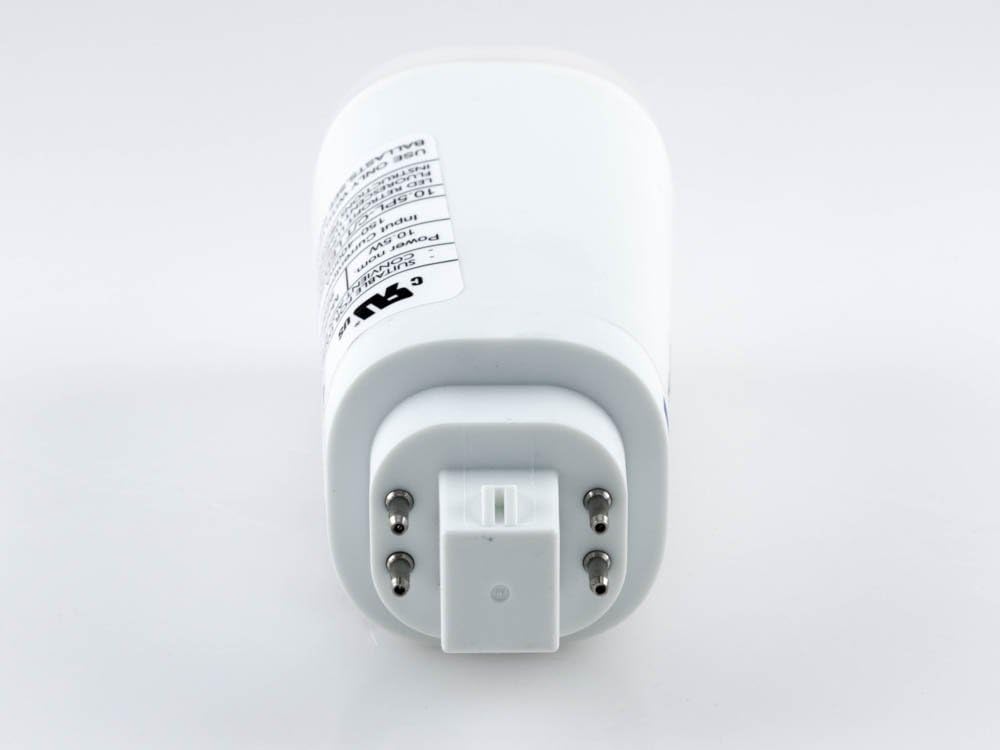
Image: The G24q 4-pin base of the PHILIPS LED bulb, showing the four electrical contacts for connection to the fixture's ballast.

Image: The PHILIPS G24q LED bulb in a vertical orientation, highlighting its form factor designed for specific fixtures.
Operating Instructions
The PHILIPS 10.5W G24q LED Bulb provides instant illumination upon activation. It emits a warm white light with a color temperature of 3000K and a brightness of 1200 lumens. This bulb is designed for consistent light output and is not compatible with dimming controls.

Image: The PHILIPS 10.5W G24q LED bulb, showcasing its overall design and branding.
Maintenance
- Cleaning: Ensure power is off before cleaning. Wipe the bulb with a soft, dry cloth. Do not use liquid cleaners or abrasive materials.
- Replacement: This LED bulb has an average life of 40,000 hours. Replacement is typically only necessary at the end of its operational lifespan.
Troubleshooting
| Problem | Possible Cause | Solution |
|---|---|---|
| Bulb does not light up. | No power to the fixture, incorrect installation, incompatible ballast, or faulty bulb. |
|
| Bulb flickers or blinks. | Incompatible ballast, loose connection, or electrical interference. |
|
| Light output is too low or inconsistent. | Incompatible ballast, incorrect voltage, or bulb nearing end of life. |
|
If troubleshooting steps do not resolve the issue, contact PHILIPS customer support.
Specifications
| Feature | Detail |
|---|---|
| Brand | PHILIPS |
| Model Number | 458406 |
| Light Type | LED |
| Wattage | 10.5 Watts |
| Bulb Shape Size | T (Tubular) |
| Base Type | G24q (4-Pin) |
| Light Color | Soft White, Warm White |
| Color Temperature | 3000 Kelvin |
| Brightness | 1200 Lumens |
| Voltage | 26 Volts (Ballast dependent, input 100-240V) |
| Dimmable | No |
| Average Life | 40,000 Hours (approx. 37 years based on 3 hrs/day) |
| Color Rendering Index (CRI) | 80 |
| Beam Angle | 120 Degrees |
| Indoor/Outdoor Usage | Indoor (Damp Location) |
| Product Dimensions | 5 x 2 x 2 inches |
| Item Weight | 4 ounces |
| Certifications | Energy Star, UL |
Warranty and Support
For warranty information or technical assistance, please refer to the official PHILIPS website or contact PHILIPS customer support directly. Keep your purchase receipt as proof of purchase.
PHILIPS Customer Support: www.philips.com/support


