
1. Product Overview
The SIGLENT SPD3303X is a programmable linear DC power supply designed for precision applications. It features three independently controlled and isolated outputs, providing flexibility for various testing and development needs. The unit is equipped with a 4.3-inch TFT-LCD display, offering clear and accurate readings of 5-digit voltage and 4-digit current.
Key features include:
- Programmable linear DC power supply with high stability.
- Three independently controlled and isolated outputs.
- High resolution: 1 mV for voltage and 1 mA for current.
- 4.3-inch TFT-LCD display with 5-digit voltage and 4-digit current readings.
- Channels 1 and 2 are adjustable (0-30V, 0-3.2A), while channel 3 has fixed selections (2.5V, 3.3V, 5V at 3.2A).
- Supports independent, series, and parallel output modes.
- Integrated timing output function for automated sequences.
- Ability to save and recall 5 groups of setting parameters.
- Output short-circuit and overload protection for enhanced safety.
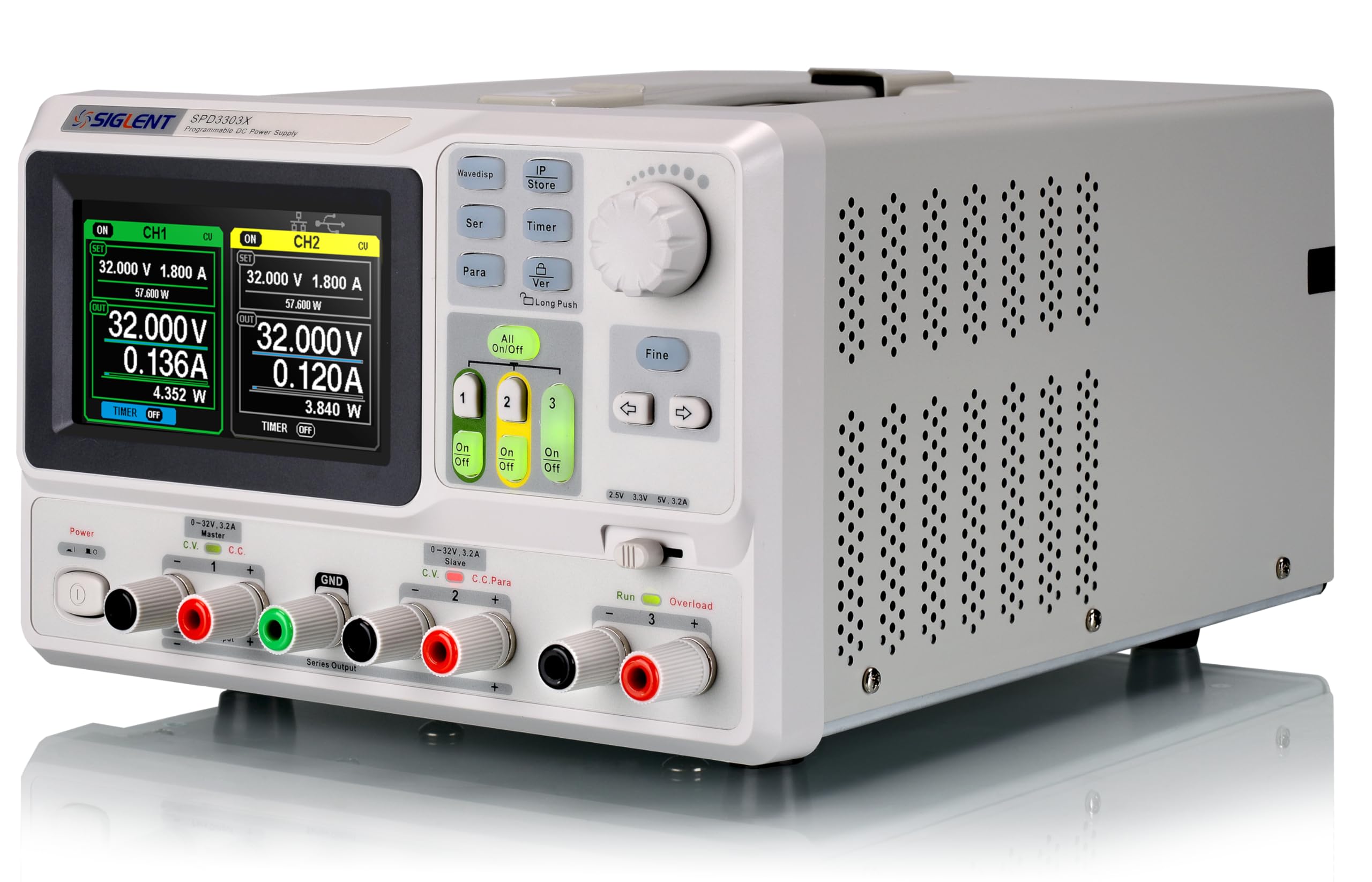
Figure 1.1: Front view of the SIGLENT SPD3303X DC Power Supply, showing the display, control knobs, and output terminals.
2. Safety Information
To ensure safe operation and prevent damage to the instrument or injury to personnel, please observe the following safety precautions:
- Read the Manual: Always read and understand this instruction manual before operating the device.
- Power Source: Connect the instrument only to a power source with the specified voltage and frequency. Ensure the power cord is properly grounded.
- Environment: Operate the power supply in a dry, well-ventilated area. Avoid operating in environments with excessive dust, humidity, or corrosive gases.
- Ventilation: Do not block the ventilation openings on the instrument. Adequate airflow is essential to prevent overheating.
- Connections: Always disconnect the power cord before making or changing any connections to the output terminals.
- Overload Protection: Do not exceed the maximum voltage and current ratings of the power supply or the connected load.
- Servicing: Do not attempt to open the instrument casing or perform any internal adjustments. Refer all servicing to qualified service personnel.
- Accessories: Use only accessories and attachments specified by the manufacturer.
3. Product Components
3.1 Front Panel Overview
The front panel provides the main interface for controlling and monitoring the power supply. It includes the TFT-LCD display, control knobs, function buttons, and output terminals for channels 1, 2, and 3.

Figure 3.1: Close-up view of the SPD3303X display, showing voltage, current, and power readings for Channel 1 and Channel 2.
3.2 Rear Panel Overview
The rear panel houses the AC power input, cooling fan, and additional terminals for specific configurations or remote control interfaces.
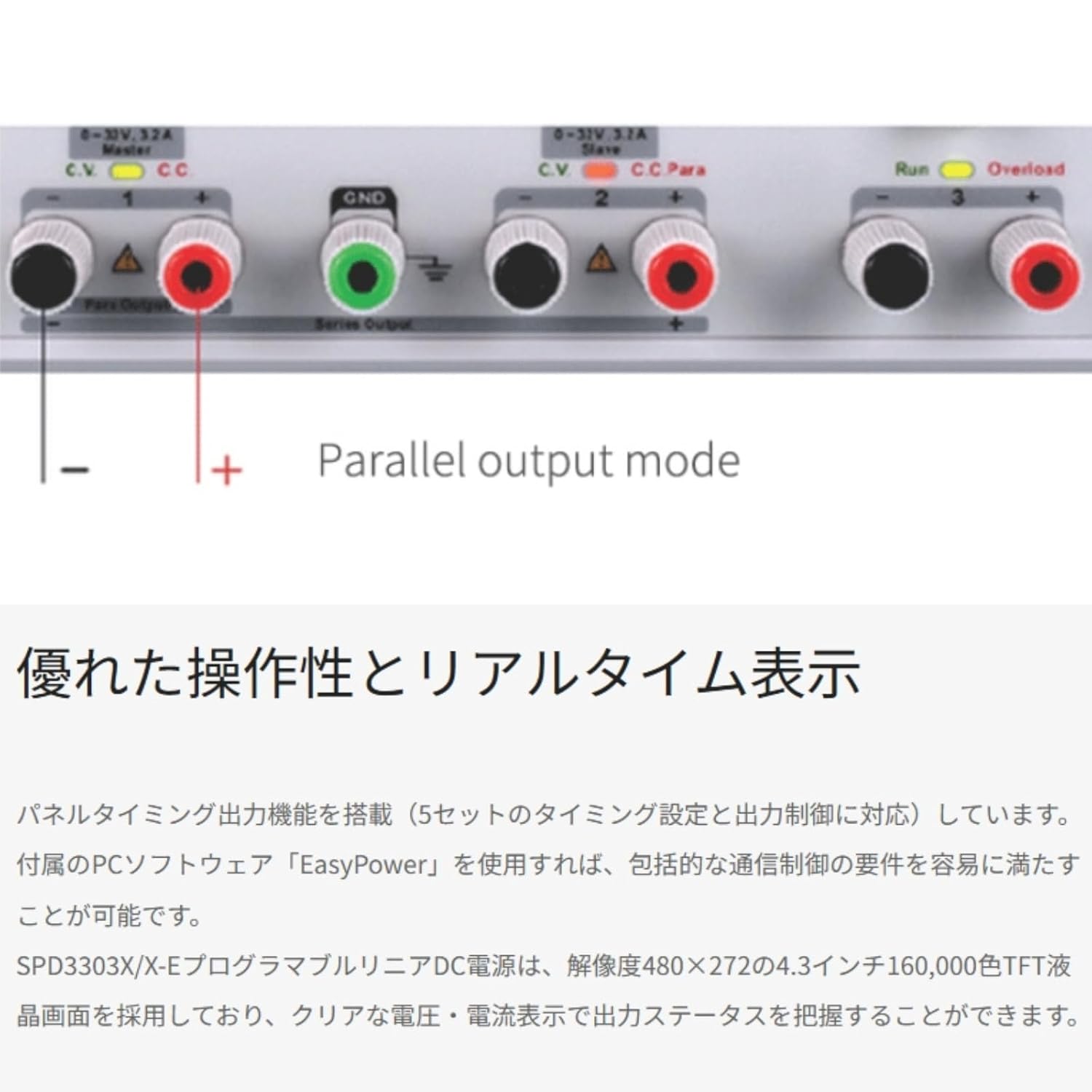
Figure 3.2: Rear panel of the SPD3303X, illustrating the AC power input, cooling fan, and various communication ports.
4. Setup
4.1 Unpacking and Initial Inspection
Upon receiving your SPD3303X, carefully unpack the instrument and inspect it for any signs of damage that may have occurred during transit. If any damage is found, contact your supplier immediately.
Verify that all standard accessories are included:
- Power Cord
- USB Cable
- Test Leads
- Quick Start Guide / User Manual
4.2 Placement and Ventilation
Place the power supply on a stable, level surface. Ensure there is sufficient space around the instrument (at least 10 cm on all sides) for proper ventilation. Do not place the unit near heat sources or in direct sunlight.
4.3 Power Connection
- Ensure the power switch on the front panel is in the OFF position.
- Connect the provided AC power cord to the power input socket on the rear panel of the instrument.
- Plug the other end of the power cord into a grounded AC power outlet.
4.4 Connecting a Load
Before connecting any load, ensure the power supply is turned off. Connect your load to the appropriate output terminals (CH1, CH2, or CH3) using suitable test leads. Observe correct polarity (red for positive, black for negative).
5. Operating Instructions
5.1 Basic Operation
- Power On: Press the main power switch on the front panel to turn on the instrument. The display will illuminate.
- Channel Selection: Use the CH1, CH2, or CH3 buttons to select the desired output channel for adjustment.
- Setting Voltage and Current: Rotate the voltage and current adjustment knobs to set the desired output values. The 1mV/1mA resolution allows for fine adjustments. Press the 'Fine' button for more precise control.
- Output Enable/Disable: Press the 'ON/OFF' button for the selected channel to enable or disable its output. The 'All ON/OFF' button controls all channels simultaneously.
5.2 Output Modes
The SPD3303X supports three primary output modes:
- Independent Mode: Each channel operates as a separate power supply with its own voltage and current settings.
- Series Mode: Channels 1 and 2 can be connected in series to provide a higher output voltage (up to 60V). This mode is useful for applications requiring higher voltage than a single channel can provide.
- Parallel Mode: Channels 1 and 2 can be connected in parallel to provide a higher output current (up to 6.4A). This mode is suitable for loads requiring more current.
Figure 5.1: Illustration of parallel output mode, showing how Channel 1 and Channel 2 can be combined for increased current output.
5.3 Advanced Functions
- Timing Output Function: The SPD3303X allows users to program up to 5 groups of timing settings for automated output control. This enables the power supply to execute sequences of voltage and current changes over specified durations.

Figure 5.2: The timing output interface on the SPD3303X display, showing programmable steps for voltage, current, and duration.
- Saving and Recalling Settings: The instrument can store up to 5 groups of user-defined settings in its internal memory. These settings can be quickly recalled for repetitive tasks.
- Remote Programming: The SPD3303X supports remote control via USB or LAN interfaces. Siglent's EasyPower PC software can be used to program and monitor the power supply from a computer, offering comprehensive control features.
6. Maintenance
6.1 Cleaning
To maintain the appearance and performance of your power supply, clean the exterior regularly. Use a soft, dry cloth. For stubborn dirt, a cloth lightly dampened with water or a mild detergent can be used. Ensure no liquid enters the instrument. Do not use abrasive cleaners, solvents, or strong chemicals.
6.2 Storage
When not in use for extended periods, store the SPD3303X in a dry, dust-free environment, away from direct sunlight and extreme temperatures. It is recommended to keep the original packaging for safe storage and transport.
7. Troubleshooting
This section provides solutions to common issues you might encounter with the SPD3303X DC Power Supply.
- No Power:
- Check if the power cord is securely connected to both the instrument and the AC outlet.
- Verify that the AC outlet is functional.
- Check the fuse on the rear panel (if accessible and user-replaceable).
- No Output Voltage/Current:
- Ensure the individual channel's 'ON/OFF' button is pressed and the output is enabled.
- Check if the 'All ON/OFF' button is enabled.
- Verify that the voltage and current limits are set above zero.
- Check for any overload or short-circuit conditions on the load. The overload protection may have activated.
- Incorrect Readings:
- Ensure test leads are properly connected and not damaged.
- Verify the load is connected correctly.
- If persistent, the unit may require calibration. Contact customer support.
- Fan Noise is Excessive:
- Ensure adequate ventilation around the unit. Blocked vents can cause the fan to work harder.
- High ambient temperatures or heavy loads can increase fan speed.
For issues not covered here, please refer to the official Siglent support resources.
8. Specifications
The following table lists the key technical specifications for the SIGLENT SPD3303X DC Power Supply:
| Specification | Value |
|---|---|
| Model Number | SPD3303X |
| Brand | Siglent |
| Output Channels | 3 (CH1, CH2 adjustable 0-30V/0-3.2A; CH3 fixed 2.5V/3.3V/5V at 3.2A) |
| Output Wattage | 220 Watts (Total) |
| Resolution | 1 mV, 1 mA |
| Display | 4.3-inch TFT-LCD |
| Product Dimensions (L x W x H) | 16 x 14 x 11 inches |
| Item Weight | 0.01 ounces (Note: This value appears unusually low and may be a data entry error. Refer to manufacturer's official specifications for accurate weight.) |
| Cooling Method | Air |
| Compatible Devices | Personal Computer (for remote control) |
| Manufacturer | Siglent Technologies NA Inc. |
9. Warranty and Support
9.1 Warranty Information
For detailed warranty terms and conditions, please refer to the official documentation provided with your SIGLENT SPD3303X DC Power Supply or visit the official Siglent Technologies website. Warranty periods and coverage may vary by region and product.
9.2 Customer Support
If you require technical assistance, have questions about the operation of your device, or need to arrange for service, please contact Siglent Technologies customer support. Contact information can typically be found on the manufacturer's website or in the included documentation.


