
1. Introduction
This manual provides essential information for the safe and efficient operation, maintenance, and troubleshooting of your Bunn G9WD-RH Weight-Driven Coffee Grinder. This precision grinder is designed to deliver consistent coffee grinds with unparalleled accuracy, featuring a 6 lb. front-loading hopper and three batch size settings for optimal brewing.
2. Important Safety Instructions
To reduce the risk of fire, electric shock, or injury, always follow basic safety precautions when using electrical appliances. Read all instructions before using this appliance.
- Electrical Safety: Ensure the grinder is connected to a properly grounded electrical outlet of the correct voltage as specified on the product label. Do not immerse the appliance, cord, or plug in water or other liquids.
- Moving Parts: Avoid contact with moving parts. Keep hands, hair, clothing, and utensils away from the grinding mechanism during operation to prevent injury.
- Hot Surfaces: The grinder may become warm during extended operation. Allow it to cool before cleaning or handling.
- Supervision: Close supervision is necessary when any appliance is used by or near children.
- Maintenance: Do not operate any appliance with a damaged cord or plug, or after the appliance malfunctions or has been damaged in any manner. Refer all servicing to qualified service personnel.
- Intended Use: Use this appliance only for its intended purpose as described in this manual.
3. Setup
Before initial use, ensure the grinder is placed on a stable, level surface. Unpack all components and remove any packaging materials.
- Placement: Position the grinder in a well-ventilated area, away from heat sources and direct sunlight.
- Power Connection: Plug the grinder into a suitable grounded electrical outlet.
- Hopper Filling: The grinder features a 6 lb. front-loading hopper. Open the hopper lid and carefully pour whole coffee beans into the hopper. Ensure the hopper is full for optimal performance.
- Initial Cleaning: Before first use, it is recommended to wipe down the exterior with a damp cloth and ensure the hopper and grinding chute are free of any debris.
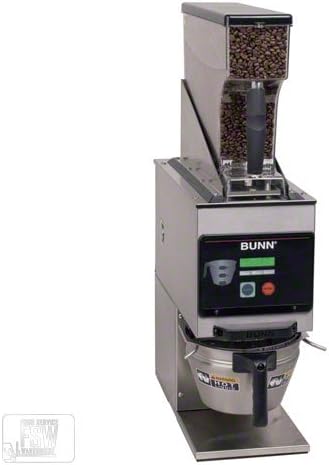
Figure 1: Bunn G9WD-RH Weight-Driven Coffee Grinder. This image shows the complete grinder unit, including the clear top hopper filled with coffee beans, the main body with the Bunn logo and control panel, and the lower section where the ground coffee is dispensed. The design emphasizes its robust, commercial-grade appearance.
4. Operating Instructions
The Bunn G9WD-RH grinder is designed for simple and precise operation.
- Select Batch Size: The grinder offers three batch size settings. Use the control panel to select your desired grind quantity. Refer to the markings on the control panel for specific batch indicators.
- Position Container: Place your coffee container or brew basket directly under the grinding chute.
- Start Grinding: Press the designated start button on the control panel. The grinder will automatically dispense the selected weight of coffee.
- Monitor Hopper: Ensure the front-loaded hopper remains adequately filled with whole coffee beans for continuous operation and consistent grind quality.
Note: For optimal results, use fresh, high-quality whole coffee beans. The Smart Funnel (sold separately) can integrate with BrewWISE intelligence for automated coffee management.
5. Maintenance and Cleaning
Regular cleaning and maintenance will ensure the longevity and optimal performance of your Bunn grinder.
- Daily Cleaning:
- Wipe down the exterior surfaces with a clean, damp cloth.
- Empty and clean the front-loaded hopper. The hopper is designed for easy removal, cleaning, and refilling.
- Brush away any residual coffee grounds from the grinding chute and surrounding areas.
- Deep Cleaning (Periodically):
- Unplug the grinder from the power outlet before performing any deep cleaning.
- Consult a qualified service technician for detailed cleaning of internal components or burrs.
- Storage: When not in use for extended periods, store the grinder in a clean, dry place.
6. Troubleshooting
If you encounter issues with your Bunn G9WD-RH grinder, refer to the following common problems and solutions:
| Problem | Possible Cause | Solution |
|---|---|---|
| Grinder does not turn on. | Not plugged in; power outage; circuit breaker tripped. | Ensure power cord is securely plugged in. Check power supply and circuit breaker. |
| Inconsistent grind. | Low coffee bean level in hopper; burrs are worn or dirty. | Refill hopper with fresh beans. Clean burrs (refer to maintenance section or contact service). |
| Grinder makes unusual noise. | Foreign object in grinding chamber; motor issue. | Unplug and inspect grinding chamber for obstructions. If noise persists, contact service. |
| Coffee not dispensing. | Chute clogged; hopper empty. | Clear any blockages from the dispensing chute. Refill hopper. |
If the problem persists after attempting these solutions, please contact Bunn customer support or a qualified service technician.
7. Specifications
- Model: CCG-Bunn 40700.0001 (G9WD-RH)
- Brand: Bunn
- Hopper Capacity: 6 lbs (approx. 2.72 kg)
- Dimensions (H x W x D): 75.7 cm x 20.7 cm x 49 cm (29.8 in x 8.15 in x 19.3 in)
- Grind Precision: Weight-driven for unparalleled accuracy
- Batch Settings: Three selectable batch sizes
- Hopper Type: Front-loading, easy to remove and clean
- Burr Material: Precision Carbides
8. Warranty and Support
Bunn stands behind the quality of its products. The precision carbides in this grinder are guaranteed for three years from the date of purchase, ensuring satisfaction and consistent performance.
For technical support, warranty claims, or to purchase replacement parts, please contact Bunn customer service through their official website or the contact information provided with your purchase documentation. Always provide your model number (CCG-Bunn 40700.0001) when seeking support.

