
Cree Lighting BA19-08027OMF-12CE26-1C100
Cree Lighting Connected LED Smart Bulb User Manual
Model: BA19-08027OMF-12CE26-1C100 | Brand: Cree Lighting
Introduction
The Cree Connected LED bulb is designed to provide an easy-to-use and cost-effective solution for customizing lighting in your home. This smart bulb can be controlled from anywhere, offering convenience and flexibility. It integrates with compatible home automation systems, allowing you to manage your lighting settings via an app on your iOS or Android device.

The Cree Connected LED bulb offers convenient control from anywhere, enhancing your home lighting experience.
Safety Information
Please read and understand all safety instructions before installing or using this product. Failure to follow these instructions may result in electric shock, fire, or other hazards.
- Indoor Use Only: This bulb is designed for indoor use in dry locations. Do not use in wet or damp environments.
- Not for Enclosed Fixtures: Do not use this bulb in fully enclosed luminaires or fixtures, as this can trap heat and shorten the bulb's lifespan.
- Dimmable LED: This bulb is dimmable, but it is not recommended for use with traditional wall dimmers. Control dimming via a compatible smart hub and app.
- Power Off Before Installation: Always turn off the power to the fixture at the circuit breaker before installing or removing the bulb.
- Voltage Compatibility: Ensure the fixture's voltage (120 Volts) matches the bulb's requirements.
- Handle with Care: Avoid dropping the bulb or subjecting it to excessive force.
Package Contents
The package for your Cree Connected LED Smart Bulb typically includes:
- 1 x Cree Connected LED Smart Bulb

The product packaging for the Cree Connected LED Smart Bulb.
Setup
To set up your Cree Connected LED Smart Bulb, you will need a compatible ZigBee certified hub (e.g., Wink, SmartThings, WeMo, or Alexa devices with built-in ZigBee hub like Echo Plus, Echo Studio, Echo Show 2nd Gen).
- Install the Bulb: Screw the Cree Connected LED bulb into a standard E26 light socket. Ensure the power to the fixture is off before installation.
- Prepare Your Hub: Place your compatible ZigBee hub into device discovery mode. Refer to your hub's specific instructions for this step. It is often recommended to initiate discovery mode on the hub before turning on the bulb.
- Power On the Bulb: Turn on the power to the light fixture. The bulb should light up. Your hub should detect and pair with the bulb automatically. A successful pairing is often indicated by the bulb blinking twice.
- Download and Launch App: Download the applicable app for your chosen hub (e.g., Wink app, SmartThings app, Alexa app) on your iOS or Android device. Launch the app and follow the on-screen instructions to add and configure your new bulb.
- Name Your Bulb: Once paired, you can name your bulb within the app for easy identification and control (e.g., "Living Room Lamp," "Kitchen Light").
Resetting the Bulb to Factory Defaults
If you experience difficulty pairing the bulb or need to reset it, follow this sequence:
- 1. Turn the bulb OFF for 2 seconds.
- 2. Turn the bulb ON for 1 second.
- 3. Turn the bulb OFF for 2 seconds.
- 4. Turn the bulb ON for 1 second.
- 5. Turn the bulb OFF for 2 seconds.
- 6. Turn the bulb ON for 1 second.
- 7. Turn the bulb OFF for 2 seconds.
- 8. Turn the bulb ON.
After the fourth ON cycle, the light will blink twice, indicating a successful reset. You can then attempt to pair the bulb again.

Cree Lighting offers a variety of smart lighting solutions.
Operating Instructions
Once your Cree Connected LED Smart Bulb is successfully paired with your hub, you can control it using the associated mobile application or voice commands through compatible smart assistants.
- On/Off Control: Use the app to turn the bulb on or off instantly.
- Dimming: Adjust the brightness of the bulb to your desired level using the dimming controls within the app. The bulb offers a full range of dimming.
- Scheduling: Set schedules for your lights to turn on or off automatically at specific times, or to simulate occupancy when you are away from home.
- Grouping: Group multiple Cree Connected bulbs together to control them simultaneously as a single unit.
- Voice Control: If connected to a voice assistant (e.g., Alexa), use voice commands to control your lights (e.g., "Alexa, turn on Living Room Light," "Alexa, dim Kitchen to 50%").
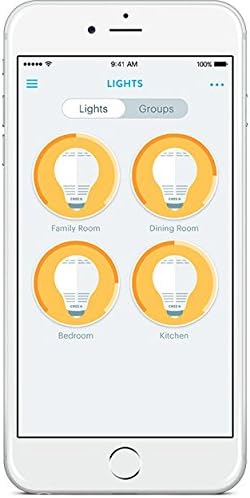
Control your smart bulbs easily through the mobile application.

Control your lights remotely for convenience and security.
Maintenance
The Cree Connected LED Smart Bulb requires minimal maintenance. Follow these guidelines to ensure optimal performance and longevity:
- Cleaning: Ensure the bulb is cool and the power is off before cleaning. Wipe the bulb with a soft, dry cloth. Do not use liquid or abrasive cleaners.
- Storage: If storing the bulb for an extended period, keep it in its original packaging or a protective container in a cool, dry place.
- Avoid Overheating: Do not install the bulb in enclosed fixtures or areas with poor ventilation, as this can lead to overheating and reduce its lifespan.
Troubleshooting
If you encounter issues with your Cree Connected LED Smart Bulb, refer to the following common problems and solutions:
| Problem | Possible Cause / Solution |
|---|---|
| Bulb does not light up. |
|
| Bulb does not pair with the hub. |
|
| Bulb does not turn off completely (faint glow). |
|
| Bulb comes on at full brightness after being manually switched off and on. |
|
| Bulb loses connection or is unresponsive. |
|
Specifications

Dimensions of the Cree Connected LED Smart Bulb.
| Feature | Detail |
|---|---|
| Brand | Cree Lighting |
| Model Name | Cree Connected LED |
| Part Number | BA19-08027OMF-12CE26-1C100 |
| UPC | 849665009542 |
| Light Type | LED |
| Wattage | 11 watts |
| Incandescent Equivalent Wattage | 60 Watts |
| Brightness | 815 Lumens |
| Light Color | Soft White |
| Color Temperature | 2700 Kelvin |
| Bulb Shape Size | A19 |
| Bulb Base | E26 |
| Voltage | 120 Volts |
| Connectivity Technology | ZigBee |
| Connectivity Protocol | Zigbee |
| Indoor/Outdoor Usage | Indoor use only |
| Average Life | 22 Years (25,000 hours rated life) |
| Product Dimensions | 2.4"W x 4.4"H |
| Material | Glass |
| Color Rendering Index | 80 |
Warranty and Support
Warranty: The Cree Connected LED Smart Bulb comes with a 3-year limited warranty. Please refer to the product packaging for complete details regarding warranty coverage and terms.
Support: For additional support, frequently asked questions, or to access the latest user guides and installation manuals, please visit the official Cree Lighting website. You may also find helpful resources in the PDF documents provided by the manufacturer:
Related documentsBA19-08027OMF-12CE26-1C100


Ask a question about this manual
Ask about setup, troubleshooting, compatibility, parts, safety, or missing instructions. Manuals+ will review the question and use this page’s manual context to help answer it.