
1. Introduction
The Vivanco PAU 1501 is a versatile universal power supply designed for operating and charging a wide range of electronic devices, including both USB and non-USB compatible equipment. This manual provides essential information for the safe and efficient use of your power supply.
2. Safety Instructions
Please read these safety instructions carefully before using the device. Failure to follow these instructions may result in electric shock, fire, or damage to the product.
- Do not expose the power supply to rain, moisture, or extreme temperatures.
- Ensure the power supply is disconnected from the mains before cleaning or if it will not be used for an extended period.
- Do not open the casing of the power supply. There are no user-serviceable parts inside.
- Use only the provided or approved connectors.
- Verify the voltage and polarity requirements of your device before connecting it to the power supply. Incorrect settings can damage your device.
- Keep out of reach of children.
3. Package Contents
The Vivanco PAU 1501 package typically includes:
- 1x Vivanco PAU 1501 Universal Power Supply Unit
- 8x Non-USB Output Connectors (various sizes)
- 3x USB Output Connectors (USB A, Mini USB, Micro USB)
- 1x Instruction Manual
4. Product Overview
The Vivanco PAU 1501 features a compact design with a selectable voltage switch and multiple interchangeable output connectors to ensure compatibility with a wide range of devices.
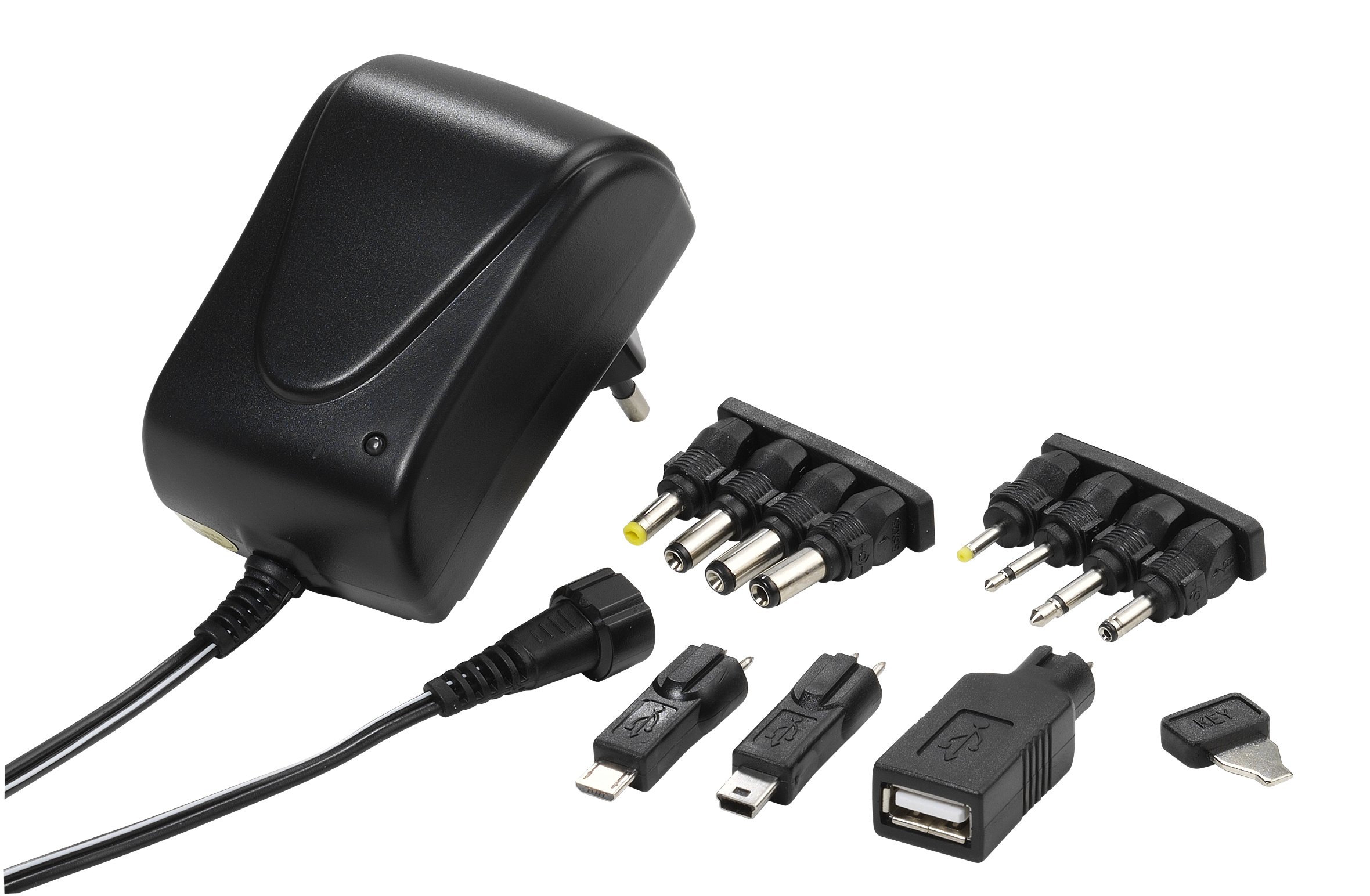
Image 1: The Vivanco PAU 1501 universal power supply unit shown with a selection of its interchangeable output connectors. The main unit features a voltage selector switch and an input for the AC power cable.
Key Components:
- Main Unit: Contains the transformer, voltage selector, and output port.
- Voltage Selector Switch: Allows selection of output voltages (3.0V, 4.5V, 5.0V, 6.0V, 7.5V, 9.0V, 12V DC).
- Output Cable: Connects to the interchangeable tips.
- Interchangeable Connectors: A variety of tips for different devices, including USB A, Mini USB, Micro USB, and 8 non-USB tips (2.5mm, 3.5mm, 5.5x2.1mm, 5.5x2.5mm, 3.5x1.35mm, 4.0x1.7mm, 5.5x1.5mm, 2.35x0.75mm).
- Power Plug: Type C/EF – 2 pins (European/hybrid FR-DE plug) for mains connection.
5. Setup
Before connecting the power supply to your device, follow these steps:
- Identify Device Requirements: Check your device's manual or specifications for its required input voltage (V) and current (mA or A). Also, determine the correct connector type and polarity (usually indicated by a diagram).
- Select Correct Voltage: Locate the voltage selector switch on the Vivanco PAU 1501. Using a small tool (e.g., a coin or screwdriver), carefully rotate the switch to match your device's required voltage (e.g., 5.0V, 9.0V, 12V).
- Choose Correct Connector: Select the appropriate output connector tip that fits your device's power input port. For USB devices, choose USB A, Mini USB, or Micro USB. For non-USB devices, select one of the 8 barrel or jack connectors.
- Attach Connector: Firmly attach the chosen connector tip to the output cable of the power supply. Ensure it is securely seated.
6. Operating Instructions
Once setup is complete, you can begin using your universal power supply:
- Connect to Device: Plug the selected connector tip into your electronic device's power input port.
- Connect to Mains: Insert the power supply's main plug into a suitable wall socket (100-240V AC, 50/60Hz).
- Power On: Your device should now receive power or begin charging. Some devices may have an indicator light.
- Disconnect: To disconnect, first unplug the power supply from the wall socket, then remove the connector from your device.
Important: Always ensure the correct voltage and connector are selected before plugging into your device to prevent damage.
7. Maintenance
To ensure the longevity and proper functioning of your Vivanco PAU 1501 power supply, follow these maintenance guidelines:
- Cleaning: Disconnect the power supply from the mains before cleaning. Use a soft, dry cloth to wipe the exterior. Do not use liquid cleaners or solvents.
- Storage: Store the power supply and its connectors in a cool, dry place away from direct sunlight and moisture when not in use.
- Cable Care: Avoid bending or kinking the power cable excessively. Do not place heavy objects on the cable.
- Inspection: Periodically inspect the power supply and cables for any signs of damage, such as frayed wires or cracked casings. If damage is found, discontinue use immediately.
8. Troubleshooting
If you encounter issues with your Vivanco PAU 1501, refer to the following common problems and solutions:
| Problem | Possible Cause | Solution |
|---|---|---|
| Device not powering on/charging. | Incorrect voltage selected. Incorrect connector tip. Loose connection. Wall socket not active. Device fault. |
Verify the voltage setting matches your device's requirements. Ensure the correct connector tip is used and securely attached. Check all connections are firm. Test the wall socket with another appliance. Test the device with its original power supply, if available. |
| Power supply feels hot. | Normal operation under load. Overload. Poor ventilation. |
A slight warmth is normal. If it's excessively hot, disconnect immediately. Ensure the device's current draw does not exceed 1500mA (1.5A). Ensure the power supply is in a well-ventilated area. |
| Sparking when plugging into wall socket. | Normal inrush current. Faulty socket or plug. |
Minor sparking is common. If it's excessive or persistent, discontinue use. Check the wall socket and power supply plug for damage. Consult a qualified electrician if necessary. |
If the problem persists after trying these solutions, please contact Vivanco customer support.
9. Specifications
| Feature | Detail |
|---|---|
| Model Number | PAU 1501 |
| Input Voltage | 100-240 V AC ~ 50/60 Hz, 0.35 A max. |
| Output Voltages (DC) | 3.0V, 4.5V, 5.0V, 6.0V, 7.5V, 9.0V, 12V (selectable) |
| Maximum Output Current | 1500 mA (1.5 A) max. |
| Maximum Output Power | 18 W |
| No-Load Power Consumption | < 0.3 W |
| Efficiency | Max. 83% |
| Output Connectors | 8 non-USB tips (2.5mm, 3.5mm, 5.5x2.1mm, 5.5x2.5mm, 3.5x1.35mm, 4.0x1.7mm, 5.5x1.5mm, 2.35x0.75mm), 3 USB tips (USB A, Mini USB, Micro USB) |
| Plug Type | Type C/EF – 2 pins (European/hybrid FR-DE) |
| Color | Black |
| Special Feature | Portable, Travel-friendly |
10. Warranty and Support
Specific warranty information for the Vivanco PAU 1501 is not provided in the product details. Please refer to the warranty card included with your purchase or contact your retailer for details regarding warranty terms and conditions.
For technical support or further inquiries, please visit the official Vivanco website or contact their customer service department.
Manufacturer: Vivanco