
Showlite LB-4390 LED
Showlite LB-4390 LED Light System
Instruction Manual
Model: LB-4390 LED | Brand: Showlite
1. Introduction
The Showlite LB-4390 LED Light System is a comprehensive lighting solution designed for various applications, from small stages and events to clubs. This versatile system features four Tri-LED PAR spots and four white strobe spots, offering a wide range of lighting effects and full RGB color mixing. With multiple control options including DMX512, a wireless footswitch, and built-in automatic and sound-activated programs, the LB-4390 provides flexible operation for both professional users and solo entertainers. This manual provides detailed instructions for setup, operation, maintenance, and troubleshooting to ensure optimal performance and longevity of your device.

Figure 1.1: Showlite LB-4390 LED Light System
2. Safety Instructions
2.1 General Safety
- Read all instructions carefully before operating the device.
- Keep the device away from water, moisture, and high humidity.
- Do not open the housing; there are no user-serviceable parts inside. Refer all servicing to qualified personnel.
- Use only the specified power supply (100-240V, 50/60Hz).
- Ensure adequate ventilation around the unit to prevent overheating.
- Avoid direct eye exposure to the light source, as it can cause eye damage.
- Securely mount the unit to prevent accidental falls.
- Disconnect the device from the power supply before cleaning or performing any maintenance.
3. Package Contents
3.1 What's Included
Please check the package contents upon receipt to ensure all items are present and undamaged:
- Showlite LB-4390 LED Light System (T-Bar with integrated PAR spots and strobe spots)
- Wireless Footswitch
- Adjustable Lighting Stand
- Power Cable
- Mounting Material for fixed installation (brackets, screws)
- 2 Transport Bags (one for the T-Bar, one for the stand)
- Instruction Manual


Figure 3.1: Included components and accessories
4. Setup
4.1 Assembly
- Carefully unpack all components from their packaging.
- Extend the tripod stand legs to a stable position and adjust the height to your desired level, ensuring the stand is firmly planted.
- Mount the T-Bar with the integrated lights onto the top pole of the stand. Secure it tightly using the provided locking knob.
- Adjust the angle of the individual PAR spots and strobe spots on the T-Bar as needed for optimal light coverage.
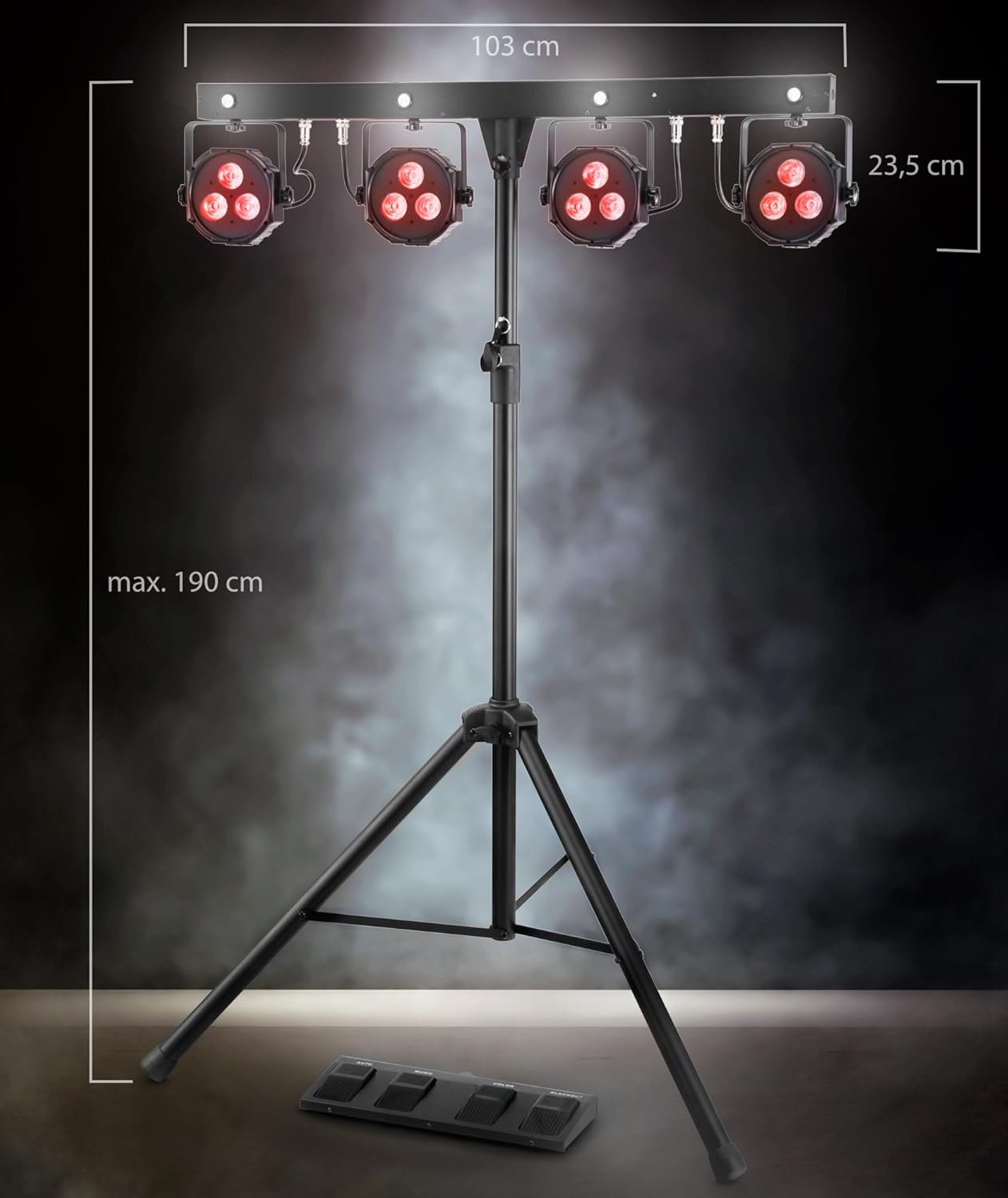
Figure 4.1: Product dimensions and assembly overview
4.2 Connections
- Connect the provided power cable to the power input on the rear of the T-Bar unit. Then, plug the other end into a suitable power outlet (100-240V, 50/60Hz).
- For DMX control, connect a DMX cable from your DMX controller to the 'DMX IN' port on the unit. If chaining multiple DMX devices, connect from 'DMX OUT' to the next device's 'DMX IN'.

Figure 4.2: Rear panel connections
5. Operating Modes
5.1 Control Panel Overview
The main control panel is located on the rear of the T-Bar unit and features an LCD display, navigation buttons (MENU, UP, DOWN, ENTER), a built-in microphone, DMX input/output, and a USB port.

Figure 5.1: Control Panel
5.2 DMX Control
The LB-4390 can be controlled via DMX512 protocol. Set the DMX address using the control panel's LCD display and navigation buttons. The unit supports various DMX channel modes: 03CH, 05CH, 12CH, 12CF (with Flash LED), and 24CH. Refer to the detailed DMX parameter lists in the full manual for specific channel functions.
5.3 Wireless Footswitch Operation
The included wireless footswitch provides convenient remote control over the light system. Ensure the footswitch is powered on and properly paired with the main unit. The footswitch features four buttons:
- AUTO: Activates the built-in automatic programs, cycling through various light sequences.
- MUSIC: Engages the sound-activated mode, where the lights react to ambient sound picked up by the unit's built-in microphone.
- COLOR: Cycles through a selection of static color presets.
- BLACKOUT: Turns off all lights instantly.

Figure 5.2: Wireless Footswitch (Top View)

Figure 5.3: Wireless Footswitch (Side View)
5.4 Manual Mode
Use the MENU, UP, DOWN, and ENTER buttons on the control panel to manually select specific colors, programs, or adjust settings without a DMX controller or footswitch.
5.5 Sound-Activated Mode
In this mode, the light system reacts to sound via its built-in microphone. You can adjust the microphone sensitivity via the control panel to fine-tune the response to music or ambient sounds.
5.6 Color Mode
This mode allows you to select and mix colors manually, creating custom static color scenes.
6. Maintenance
6.1 Cleaning
To maintain the performance and appearance of your light system:
- Always disconnect the unit from the power supply before cleaning.
- Use a soft, dry, lint-free cloth to wipe down the exterior surfaces.
- Do not use abrasive cleaners, solvents, or harsh chemicals, as these can damage the finish and internal components.
- Periodically check the lenses for dust or smudges and gently clean them to ensure optimal light output.
6.2 Storage
When not in use, store the light system in a cool, dry place, away from direct sunlight and extreme temperatures. Utilize the provided transport bags to protect the T-Bar and stand from dust and physical damage during storage and transport.
7. Troubleshooting
7.1 Common Issues
| Problem | Possible Cause | Solution |
|---|---|---|
| No power to the unit. | Power cable disconnected, faulty outlet, blown fuse. | Check power cable connection. Test outlet with another device. Check and replace fuse (T1, 6A) if necessary. |
| Lights not responding to DMX. | Incorrect DMX address, faulty DMX cable, DMX controller issue. | Verify DMX address on the unit matches controller. Check DMX cable for damage. Ensure DMX controller is functioning correctly. |
| Wireless footswitch not working. | Footswitch not powered on, out of range, interference. | Ensure footswitch is switched on. Move closer to the main unit. Reduce potential sources of wireless interference. |
| Sound-activated mode not reacting. | Microphone sensitivity too low, no sound input. | Increase microphone sensitivity via the control panel. Ensure there is sufficient sound for the unit to detect. |
8. Specifications
8.1 Technical Data
| Parameter | Value |
|---|---|
| Model Number | LB-4390 LED |
| LEDs | 4 x Tri-LED PAR-Spots (3x 9W 3-in-1 LEDs), 4 x white Strobe-Spots (1W LEDs) |
| Beam Angle | 15° |
| Control Options | DMX512, Wireless Footswitch, Manual, Sound-Activated, Color Mode |
| DMX Channels | 03CH, 05CH, 12CH, 12CF (with Flash LED), 24CH |
| Display | LCD |
| Microphone | Built-in with sensitivity control |
| Power Consumption | 84 Watt |
| Input Voltage | 100-240 V, 50/60 Hz |
| Fuse | T1, 6A (250V) |
| Dimensions (H x W x D) | 235 x 1032 x 71 mm |
| Unit Weight | 10.2 kg |
| Packaged Weight | 11.8 kg |
| Stand | Extendable |
9. Warranty and Support
9.1 Warranty Information
This Showlite product comes with a standard manufacturer's warranty. Please refer to your purchase documentation or contact your retailer for specific terms, conditions, and duration of the warranty applicable to your region.
9.2 Customer Support
For technical assistance, spare parts, or service inquiries regarding your Showlite LB-4390 LED Light System, please contact Showlite customer support or your authorized dealer. Have your model number and purchase information ready when contacting support.
Related documentsLB-4390 LED

Ask a question about this manual
Ask about setup, troubleshooting, compatibility, parts, safety, or missing instructions. Manuals+ will review the question and use this page’s manual context to help answer it.