
DENON D-MG33-S
DENON D-MG33-S CD/MD Component System User Manual
Model: D-MG33-S
Brand: DENON
1. Product Overview
The DENON D-MG33-S is a versatile mini component system designed to deliver high-quality audio performance. It integrates a CD player, MD recorder, and AM/FM tuner into a compact and stylish unit, complemented by a pair of stereo speakers. This system allows for various audio playback and recording options, including high-speed CD-to-MD recording and digital input recording.
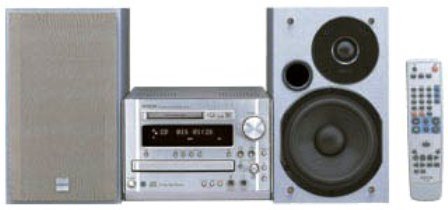
This image displays the complete DENON D-MG33-S audio system. On the left is one speaker with a light gray grille. In the center is the main unit, which is silver, featuring a display screen, CD tray, and MD slot. To the right of the main unit is the second speaker, also silver, with visible woofer and tweeter cones. Further to the right is the silver remote control for the system.
2. Features
- Premium Design: Features a high-quality aluminum front panel, volume knob, and power button with aluminum caps for a robust and elegant appearance.
- High-Speed CD-to-MD Recording: Enables fast recording from CD to MD, with 2x and 4x speed editing functions.
- Background Playback: Allows simultaneous playback of audio from TV, VCR, etc., via tuner or external input, while recording from CD to MD.
- CD-R/RW Playback: Compatible with CD, CD-R, and CD-RW discs.
- MD Recording from Copy-Protected Discs: MD recording is possible even for SCMS copy-protected CD-R/RWs (results in analog recording).
- Digital Audio Output: CD audio can be digitally recorded to external devices like CD recorders.
- Optical Digital Input: Equipped with a sampling rate converter, allowing connection of external digital devices (e.g., BS/CS tuners) for high-quality playback and digital recording to MD.
- MDLP Mode Support: Supports 2x and 4x long-time stereo recording using conventional MD discs.
- Synchronized Recording (SRS): Includes 'ALL TRACK SRS' for sequential recording of all tracks and '1 TRACK SRS' for recording a single selected track.
- Super Dynamic Bass (S.D.B) Circuit: Ensures rich deep bass reproduction even at low listening volumes and in a compact size.
- Super Woofer Pre-Out: Connect an optional super woofer for enhanced deep bass.
3. Setup
3.1 Unpacking
Carefully remove all components from the packaging. Ensure all items listed in the packing list are present: Main Unit (CMR-MG33), two Speaker Units (SC-MG33), remote control, power cord, and antenna cables.
3.2 Speaker Connection
- Locate the speaker terminals on the rear of the Main Unit and on each Speaker Unit.
- Connect the speaker wires from the Main Unit to the corresponding terminals on the Speaker Units. Ensure correct polarity (positive to positive, negative to negative) for optimal sound quality.
- Position the speakers for best stereo imaging, typically equidistant from the listening position.
3.3 Antenna Connection
- Connect the supplied FM antenna to the FM antenna terminal on the Main Unit. Extend the antenna for better reception.
- Connect the supplied AM loop antenna to the AM antenna terminals. Position the loop antenna away from the main unit and other electronic devices to minimize interference.
3.4 External Device Connection (Optional)
- Analog Devices: Use RCA audio cables to connect external devices (e.g., cassette deck, TV) to the TAPE (IN) or AUX (IN) terminals on the Main Unit.
- Digital Devices: Use an optical digital cable to connect digital audio sources (e.g., BS/CS tuner, DVD player) to the OPTICAL DIGITAL IN terminal.
- Super Woofer: If using an optional super woofer, connect it to the PRE OUT (Super Woofer) terminal.
3.5 Power Connection
Once all connections are made, plug the power cord into the AC inlet on the Main Unit, then plug the other end into a standard AC wall outlet (AC100V, 50/60Hz).
4. Operating
4.1 Power On/Off
Press the POWER button on the front panel or remote control to turn the unit on or off.
4.2 CD Playback
- Press the CD button to select the CD function.
- Press the OPEN/CLOSE button to open the CD tray.
- Place a CD (or CD-R/RW) disc on the tray with the label side up.
- Press OPEN/CLOSE again to close the tray.
- Press the PLAY button to start playback.
- Use the SKIP buttons to navigate tracks and the STOP or PAUSE buttons for control.
4.3 MD Recording and Playback
4.3.1 MD Playback
- Press the MD button to select the MD function.
- Insert an MD disc into the MD slot.
- Press the PLAY button to start playback.
4.3.2 CD-to-MD Recording (High-Speed)
- Insert a CD into the CD tray and a blank MD into the MD slot.
- Press the CD button, then the MD button.
- Select the desired recording speed (2x or 4x) using the appropriate button (refer to your remote control or front panel).
- Press the REC button to start recording. The system will automatically synchronize and record the CD tracks to the MD.
4.3.3 Synchronized Recording (SRS)
- ALL TRACK SRS: Records all tracks from the source sequentially to the MD.
- 1 TRACK SRS: Records only the currently playing track from the source to the MD.
- Refer to the display and control buttons for selecting the SRS mode.
4.4 Tuner Operation
- Press the TUNER button to select the FM or AM band.
- Use the TUNING buttons to manually tune to a station or use the PRESET buttons to recall stored stations.
- To store a station, tune to the desired frequency, then press and hold a PRESET button until the display confirms storage.
4.5 Volume Control
Rotate the VOLUME knob on the front panel or use the VOLUME +/- buttons on the remote control to adjust the sound level.
4.6 Super Dynamic Bass (S.D.B)
Press the S.D.B button to activate or deactivate the Super Dynamic Bass circuit, which enhances bass response, especially at lower listening volumes.
5. Maintenance
5.1 Cleaning the Unit
- Before cleaning, disconnect the power cord from the wall outlet.
- Wipe the exterior surfaces of the main unit and speakers with a soft, dry cloth.
- For stubborn dirt, lightly dampen the cloth with water or a mild, non-abrasive cleaner. Do not use strong solvents or abrasive pads.
- Avoid spraying liquids directly onto the unit.
5.2 Disc Care
- Handle CDs and MDs by their edges to avoid fingerprints or scratches on the recording surface.
- Keep discs clean. Wipe them gently from the center outwards with a soft, lint-free cloth if necessary.
- Store discs in their cases when not in use to protect them from dust and damage.
5.3 General Precautions
- Do not block ventilation openings on the unit.
- Avoid exposing the unit to direct sunlight, extreme temperatures, humidity, or dust.
- Do not attempt to disassemble or repair the unit yourself. Refer to qualified service personnel.
6. Troubleshooting
If you experience issues with your DENON D-MG33-S, please refer to the following common problems and solutions before contacting service.
| Problem | Possible Cause | Solution |
|---|---|---|
| No power | Power cord not connected securely. | Check if the power cord is firmly plugged into the unit and the wall outlet. |
| No sound | Volume is too low or muted. Speakers not connected properly. Incorrect input source selected. | Increase volume. Check speaker connections. Select the correct input source (CD, MD, Tuner, AUX). |
| Disc not playing | Disc is dirty or scratched. Disc inserted incorrectly. Incompatible disc type. | Clean the disc. Insert the disc with the label side up. Ensure it's a compatible CD, CD-R, CD-RW, or MD. |
| MD recording issues | MD is full or protected. Incorrect recording settings. | Use a blank or erasable MD. Check MD's write-protect tab. Verify recording source and settings. |
| Poor radio reception | Antenna not connected or positioned correctly. Interference from other electronics. | Connect and adjust the antenna. Move the unit or antenna away from other electronic devices. |
7. Specifications
7.1 Center Unit (CMR-MG33)
| Category | Item | Specification |
|---|---|---|
| Amplifier Section | Practical Max Output | Speakers: 20W+20W (6Ω, EIAJ) |
| Audio Input Terminals | TAPE (IN), AUX (IN) | |
| Audio Output Terminals | TAPE (OUT), AUX (OUT), PRE OUT (Super Woofer), Headphones, Speakers | |
| Digital Input Terminals | Optical x1 system | |
| Digital Output Terminals | Optical x1 system | |
| Tuner Section | Receiving Frequency | FM: 76.0-108.0MHz, AM: 522-1629kHz |
| CD Player Section | Playback Method | Non-contact optical (semiconductor laser) |
| Audio Frequency Characteristics | 20Hz-20kHz | |
| Sampling Frequency | 44.1kHz | |
| Playable Discs | CD, CD-R, CD-RW | |
| MD Section | Recording Method | Magnetic field modulation overwrite method |
| Playback Method | Non-contact optical (semiconductor laser) | |
| Audio Compression Method | ATRAC/ATRAC3 24bit calculation method | |
| Frequency Characteristics | 20Hz-20kHz | |
| Power Supply & Others | Power Supply | AC100V・50/60Hz |
| Power Consumption | 55W (approx. 1W or less in standby) | |
| Max External Dimensions (W×H×D) | 210×145×333mm | |
| Weight | 6.4kg |
7.2 Speaker Unit (SC-MG33) (Per Unit)
| Category | Item | Specification |
|---|---|---|
| Speaker Configuration | Type | 2-way, 2-speaker bass-reflex type, magnetically shielded design |
| Woofer | 14cm cone type x1 | |
| Tweeter | 2.5cm dome type x1 | |
| Electrical | Input Impedance | 6Ω |
| Maximum Input | 50W | |
| Physical | Max External Dimensions (W×H×D) | 160mm × 270mm × 231mm |
| Weight | Approx. 2.9kg |
Ask a question about this manual
Ask about setup, troubleshooting, compatibility, parts, safety, or missing instructions. Manuals+ will review the question and use this page’s manual context to help answer it.