
Nemco 8018-220
Nemco 8018-220 Hot Dog Roller Grill - 18 Hot Dog Capacity (220V)
User Instruction Manual
1. Product Overview
The Nemco 8018-220 Hot Dog Roller Grill is a commercial-grade appliance designed for efficiently cooking and warming hot dogs, sausages, and similar cylindrical food items. Featuring 18 hot dog capacity and operating on 220V, this unit is ideal for concession stands, convenience stores, and other food service establishments. Its durable aluminum construction ensures longevity and consistent performance.
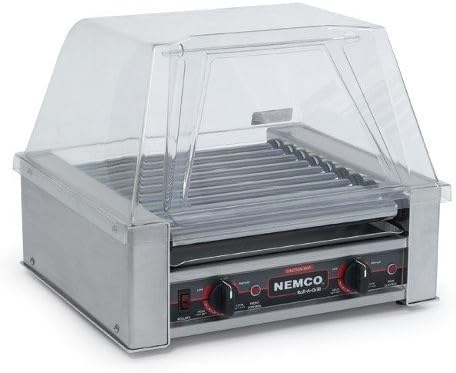
Figure 1: The Nemco 8018-220 Hot Dog Roller Grill. This image shows the complete unit, including the stainless steel base, the heated rollers, and the clear protective cover. The control panel with temperature knobs and power switches is visible at the front.
2. Important Safety Instructions
WARNING: To reduce the risk of fire, electric shock, or injury, read and understand all instructions before using this appliance.
- Ensure the unit is connected to a properly grounded 220V electrical outlet with appropriate amperage.
- Do not immerse the appliance, cord, or plug in water or other liquids.
- Always unplug the unit from the outlet when not in use and before cleaning.
- Do not operate any appliance with a damaged cord or plug, or after the appliance malfunctions or has been damaged in any manner.
- Keep hands and utensils away from hot rollers during operation to prevent burns.
- Use caution when handling hot food items.
- This appliance is intended for commercial use only.
- Ensure adequate ventilation around the unit during operation.
3. Setup and Installation
- Unpacking: Carefully remove the roller grill and all accessories from the packaging. Retain packaging for future storage or shipping.
- Placement: Place the unit on a stable, level, heat-resistant surface. Ensure there is sufficient clearance around the unit for ventilation.
- Drip Tray: Slide the removable drip tray into its designated slot beneath the rollers. This tray collects grease and food debris.
- Protective Cover (Optional): If your model includes a clear protective cover, place it securely over the rollers. This helps maintain temperature and hygiene.
- Power Connection: Plug the power cord into a dedicated 220V grounded electrical outlet. Verify that the power supply matches the unit's requirements.
4. Operating Instructions
The Nemco 8018-220 features two independent heating zones for precise temperature control.
- Preheating:
- Ensure the unit is plugged in.
- Turn the power switch (usually labeled "POWER" or "ON/OFF") to the "ON" position.
- Set the temperature control knobs for both the front and rear rollers to the desired cooking temperature (e.g., "HIGH" or a specific temperature setting).
- Allow the grill to preheat for approximately 15-20 minutes, or until the rollers reach the set temperature.
- Loading Hot Dogs:
- Carefully place hot dogs or sausages onto the heated rollers. Distribute them evenly to ensure consistent cooking.
- Avoid overcrowding the rollers, as this can affect cooking performance. The unit has an 18 hot dog capacity.
- Cooking:
- The rollers will continuously rotate, ensuring even cooking and browning of the hot dogs.
- Monitor the hot dogs and adjust temperature settings as needed. For holding cooked hot dogs, reduce the temperature to a lower setting (e.g., "HOLD" or "LOW").
- Serving:
- Use tongs to remove cooked hot dogs from the rollers.
- Shutting Down:
- When finished, turn the temperature control knobs to the "OFF" or minimum setting.
- Turn the main power switch to the "OFF" position.
- Unplug the unit from the electrical outlet.
- Allow the unit to cool completely before cleaning.
5. Cleaning and Maintenance
CAUTION: Always unplug the unit and allow it to cool completely before cleaning.
- Drip Tray: Remove the drip tray and empty any accumulated grease and debris. Wash the drip tray with warm, soapy water, rinse, and dry thoroughly.
- Rollers: Using a damp cloth or sponge with mild detergent, carefully wipe down each roller. For stubborn residue, a non-abrasive brush can be used. Avoid using abrasive cleaners or scouring pads that could damage the roller surface.
- Exterior: Wipe the exterior surfaces of the unit with a damp cloth. Do not use harsh chemicals or immerse the unit in water.
- Protective Cover: If applicable, wash the clear protective cover with warm, soapy water. Rinse and dry thoroughly.
- Reassembly: Once all parts are clean and dry, reassemble the unit.
- Regular Inspection: Periodically inspect the power cord for any signs of damage. If damage is found, discontinue use and contact qualified service personnel.
6. Troubleshooting
| Problem | Possible Cause | Solution |
|---|---|---|
| Unit does not power on. | Not plugged in; power switch off; circuit breaker tripped; faulty outlet. | Ensure plug is fully inserted; turn power switch on; check circuit breaker; try a different outlet. |
| Rollers not heating. | Temperature knobs set too low; heating element malfunction. | Increase temperature settings; if problem persists, contact service. |
| Rollers not rotating. | Motor malfunction; obstruction. | Check for obstructions; if clear, contact service. |
| Hot dogs cooking unevenly. | Overcrowding; uneven temperature setting between zones. | Reduce number of hot dogs; adjust temperature knobs for front and rear zones to match. |
| Excessive smoke or odor. | Grease buildup; food debris on heating elements. | Clean drip tray and rollers thoroughly; ensure proper ventilation. If smoke persists, unplug immediately. |
7. Specifications
| Model | 8018-220 |
| Brand | Nemco |
| Capacity | 18 Hot Dogs |
| Voltage | 220V |
| Material | Aluminum |
| ASIN | B016SIJCDS |
| UPC | 749628423746 |
8. Warranty and Support
This Nemco product is designed for durability and performance. For specific warranty information, please refer to the warranty card included with your purchase or visit the official Nemco website. For technical support, parts, or service inquiries, please contact Nemco customer service.
Please retain your proof of purchase for warranty claims.
Related documents8018-220


Ask a question about this manual
Ask about setup, troubleshooting, compatibility, parts, safety, or missing instructions. Manuals+ will review the question and use this page’s manual context to help answer it.