
1. Introduction
Thank you for choosing the CubicFun LED U.S. Capitol 3D Puzzle. This model kit allows you to construct a detailed replica of the iconic U.S. Capitol building, complete with integrated LED lighting. Designed for enthusiasts aged 10 and up, this puzzle provides an engaging assembly experience without the need for glue or additional tools.
Key features of this product include:
- Number of Pieces: 150
- Recommended Age: 10+ years
- Approximate Assembly Time: 4+ hours
- Special Feature: Integrated LED Lighting

Image: The fully assembled CubicFun LED U.S. Capitol 3D Puzzle, illuminated by its internal LED lights.

Image: A family engaged in assembling the U.S. Capitol 3D puzzle, highlighting the collaborative aspect of the activity.
2. Safety Information
Please read and adhere to the following safety guidelines before beginning assembly:
- Small Parts Warning: This product contains small parts and is not suitable for children under 3 years old due to choking hazards.
- Adult Supervision: Adult supervision is recommended for younger users (under 10 years) during assembly.
- Battery Safety: If the LED lighting kit requires batteries (not included), ensure they are inserted correctly according to polarity (+/-). Do not mix old and new batteries, or different types of batteries. Remove exhausted batteries promptly.
- Handling: Handle puzzle pieces with care to avoid bending or tearing.
3. Package Contents
Verify that all components are present in your package before starting assembly:
- 150 x Green Paper Foam Board Puzzle Pieces
- 1 x Detailed Instruction Manual
- 1 x LED Lighting Kit (includes wires and battery box)
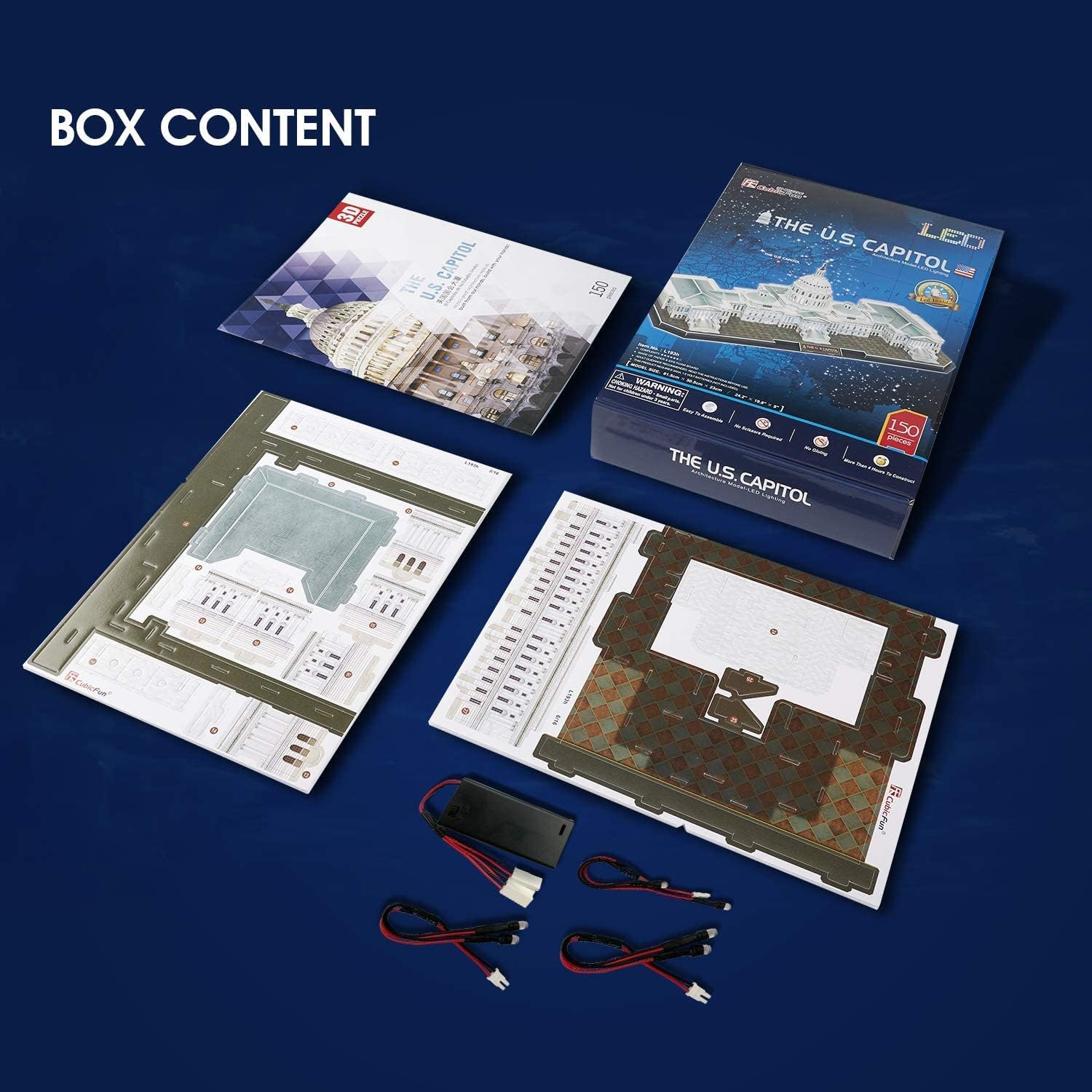
Image: The complete box contents, showing the puzzle sheets, instruction booklet, and LED light components.
4. Assembly Instructions
4.1 General Assembly
- Unpack: Carefully remove all puzzle sheets and the instruction manual from the box.
- Identify Pieces: The instruction manual provides detailed, illustrated steps. Identify pieces by their numbers and shapes as indicated in the manual.
- Punch Out: Gently punch out the puzzle pieces from the foam boards. Do not force them to avoid damage.
- Assemble: Follow the step-by-step diagrams in the instruction manual. Pieces are designed to interlock without glue or tools. Patience and carefulness are essential for a precise fit.
- Check Fit: Ensure each piece is securely connected before proceeding to the next step.

Image: A close-up of the assembly process, demonstrating how pieces fit together.
4.2 LED Light Installation
The LED lighting kit is integrated during the assembly process. Follow these specific steps for proper installation:
- Refer to Manual: The instruction manual will indicate specific points where LED lights need to be installed.
- Insert LEDs: Carefully push the LED bulbs fully into their designated 'socket holes' on the puzzle pieces.
- Bend Connections: If necessary, gently bend the LED light connections. To do this, hold the light behind the bulb socket and bend from that point to avoid damaging the bulb or wire.
- Route Wires: Route the wires along the designated channels or paths within the puzzle structure as shown in the manual.
- Secure Wires: Use strong tape (not included, but recommended) to fasten the lighting wires securely to prevent them from becoming loose or interfering with other pieces.
- Connect to Battery Box: Connect the LED wires to the battery box as instructed. Ensure correct polarity.

Image: An example of the easy-to-follow instructions with numbered pieces and illustrated steps.
5. Operating Instructions
5.1 Activating LED Lights
Once the assembly is complete and the LED lighting kit is connected to the battery box (batteries not included), you can activate the lights:
- Insert Batteries: Open the battery compartment on the LED battery box and insert the required batteries (e.g., AA or AAA, check manual for specifics) according to the polarity markings.
- Power On: Locate the power switch on the battery box. Flip the switch to the 'ON' position to illuminate your U.S. Capitol model.
- Power Off: To conserve battery life, flip the switch to the 'OFF' position when not in use.
Video: A demonstration of the LED white lights illuminating the U.S. Capitol model, showcasing its enhanced appearance.

Image: A visual comparison of the U.S. Capitol model with its LED lights off and on, highlighting the illumination effect.

Image: Detailed views of the model's facades and the subtle light effects from the integrated LEDs.
6. Maintenance
- Cleaning: To clean the model, gently dust it with a soft, dry cloth or a soft brush. Avoid using water or cleaning solutions, as they may damage the paper foam material.
- Storage: Store the assembled model in a dry environment, away from direct sunlight and extreme temperatures, to prevent warping or fading.
- Battery Replacement: If the LED lights dim or stop working, replace the batteries in the battery box.
7. Troubleshooting
- LED Lights Not Working:
- Ensure batteries are correctly inserted and not depleted.
- Check all wire connections to the battery box and individual LEDs for secure contact.
- Verify the power switch on the battery box is in the 'ON' position.
- Pieces Not Fitting Correctly:
- Double-check the instruction manual to ensure you are using the correct pieces for the current step.
- Verify the orientation of the pieces. Some pieces may only fit in one specific direction.
- Apply gentle, even pressure. Do not force pieces, as this can cause damage.
8. Specifications
| Attribute | Detail |
|---|---|
| Brand | CubicFun |
| Model Number | L193H |
| Number of Pieces | 150 |
| Product Dimensions (L x W x H) | 24.2 x 19.8 x 9.1 inches (61.5 x 30 x 23 cm) |
| Item Weight | 1 pound |
| Recommended Age | 10 years and up |
| Theme | Building (U.S. Capitol) |
| Special Feature | LED Lighting |

Image: A visual representation of the assembled model with its dimensions labeled.
9. Warranty and Support
CubicFun stands behind the quality of its products. All CubicFun products come with a worry-free 12-month warranty.
If you encounter any problems or have questions regarding your CubicFun LED U.S. Capitol 3D Puzzle, please contact the CubicFun Customer Service Team. Our friendly customer service professionals are always available to assist you.
For support, please visit the official CubicFun website or refer to the contact information provided in your product packaging.
