
Spider M-BTSP-L802
Spider Waterproof Bluetooth Speaker
Model: M-BTSP-L802
Introduction
Thank you for choosing the Spider Waterproof Bluetooth Speaker. This manual provides detailed instructions for the proper use, maintenance, and troubleshooting of your new speaker. Please read this manual thoroughly before operating the device to ensure optimal performance and longevity.
Safety Information
- Do not expose the speaker to extreme temperatures or direct sunlight for extended periods.
- Avoid dropping or subjecting the speaker to strong impacts.
- Do not attempt to disassemble or modify the speaker. This will void the warranty.
- Keep the speaker away from medical devices.
- Ensure all ports are securely closed when using the speaker near water to maintain its waterproof rating.
Package Contents
Please check the package for the following items:
- Spider Waterproof Bluetooth Speaker (M-BTSP-L802)
- USB Charging Cable (USB-A to 3.5mm/USB-B)
- Carabiner Clip
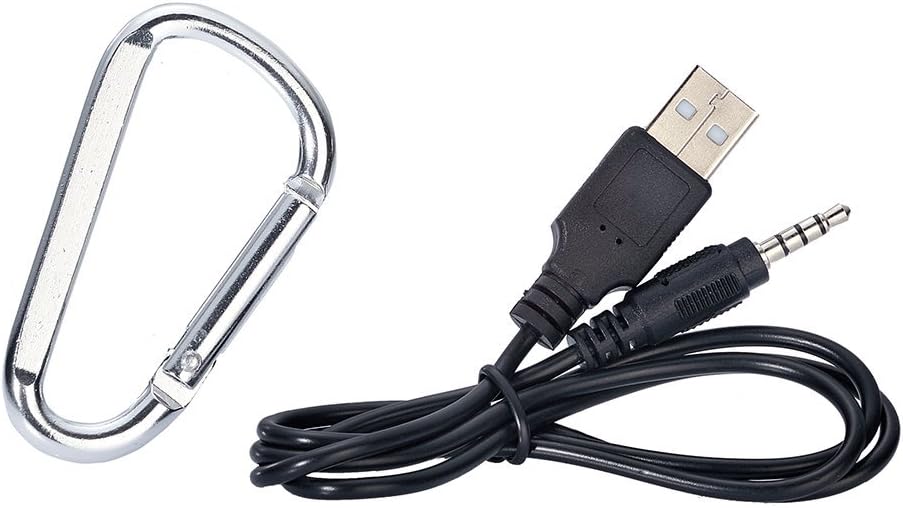
Image: Included USB charging cable and carabiner clip.
Product Overview
Familiarize yourself with the various parts and controls of your speaker.
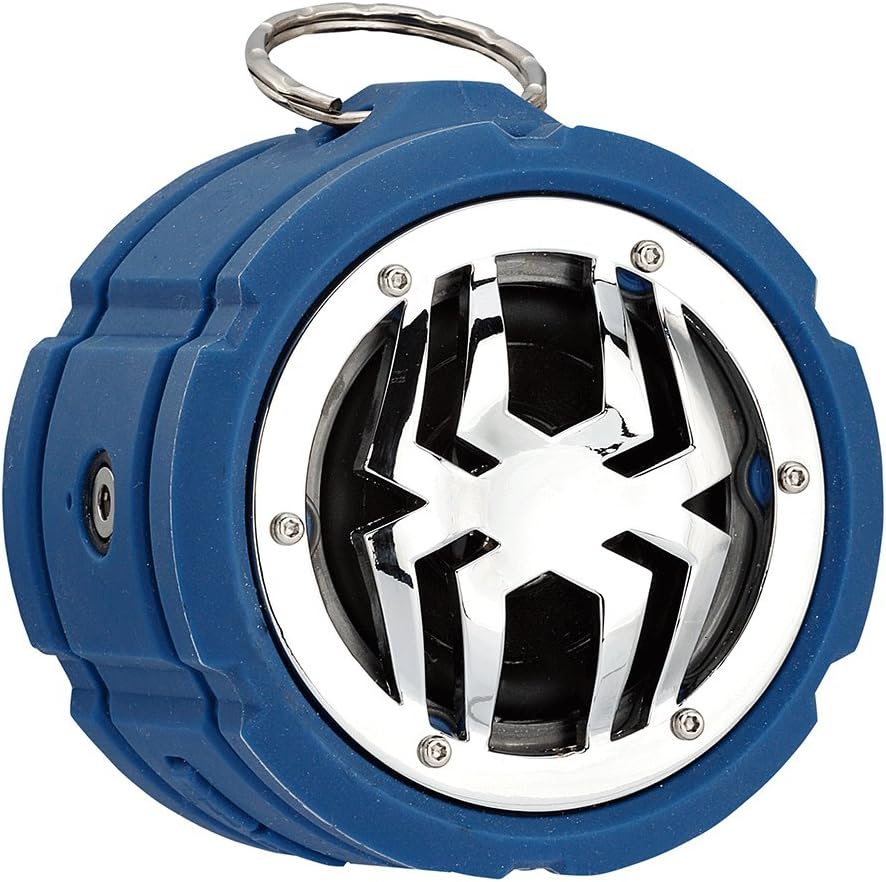
Image: Front view of the Spider Waterproof Bluetooth Speaker, showing the speaker grille with spider design and the top ring for the carabiner.
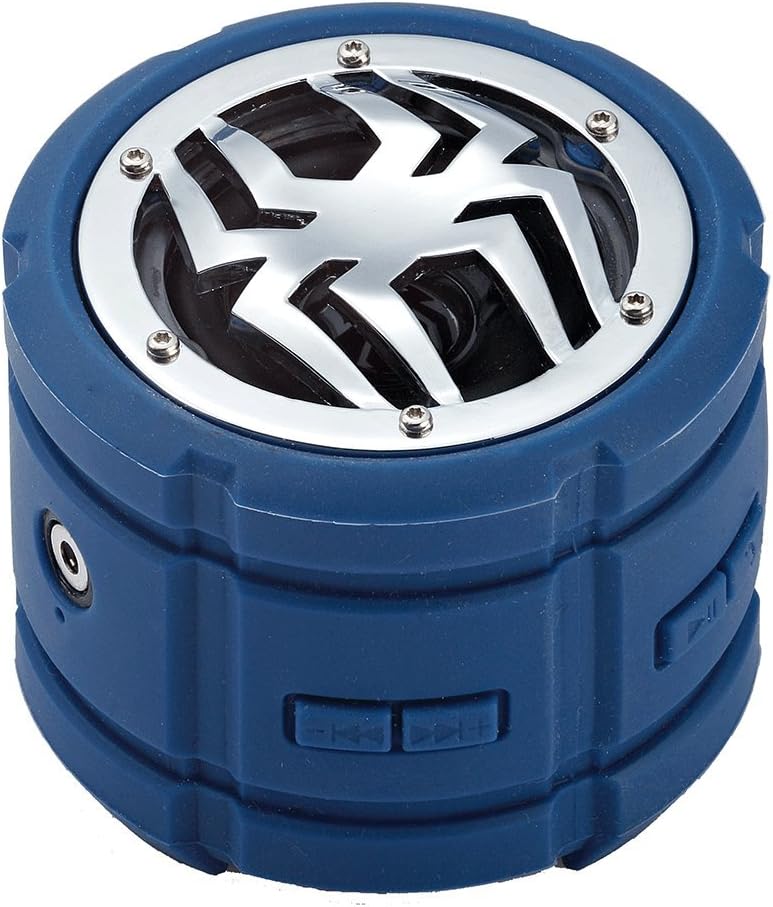
Image: Side view of the speaker, highlighting the control buttons for power, volume, and track navigation.

Image: Rear view of the speaker, showing the covered charging port and audio input jack.
Setup
1. Charging the Speaker
Before first use, fully charge the speaker. Connect the small end of the USB charging cable to the speaker's charging port (located under the protective flap) and the USB-A end to a USB power adapter (not included) or a computer's USB port. The charging indicator light will illuminate during charging and turn off when fully charged.
2. Powering On/Off
- To Power On: Press and hold the Power button (usually indicated by a power symbol) for approximately 3 seconds until you hear an audible prompt or see an indicator light.
- To Power Off: Press and hold the Power button again for approximately 3 seconds until you hear an audible prompt or the indicator light turns off.
3. Bluetooth Pairing
- Ensure the speaker is powered on and in Bluetooth pairing mode (indicated by a flashing LED light). If not, briefly press the Bluetooth button (if available) or power cycle the device.
- On your mobile device (smartphone, tablet, laptop), enable Bluetooth and search for available devices.
- Select "Spider BT802" or similar name from the list of found devices.
- Once paired, the speaker will provide an audible confirmation, and the LED indicator will stop flashing and remain solid.
4. Connecting via Audio Jack (AUX)
For devices without Bluetooth, you can use the 3.5mm audio jack. Connect one end of a 3.5mm audio cable (not included) to the speaker's AUX-in port and the other end to your audio source's headphone jack. The speaker will automatically switch to AUX mode.
Operating
Music Playback
- Play/Pause: Press the Play/Pause button (usually a triangle or two vertical bars).
- Next Track: Press the 'Next Track' button (usually a double arrow pointing right).
- Previous Track: Press the 'Previous Track' button (usually a double arrow pointing left).
- Volume Up: Press the 'Volume Up' button (usually '+').
- Volume Down: Press the 'Volume Down' button (usually '-').
Call Functions (Built-in Microphone)
The speaker features a built-in microphone, allowing you to answer calls hands-free when connected via Bluetooth.
- Answer Call: Press the Play/Pause button once when a call comes in.
- End Call: Press the Play/Pause button once during a call.
- Reject Call: Press and hold the Play/Pause button for 2 seconds when a call comes in.
Maintenance
- Cleaning: Use a soft, dry cloth to clean the speaker. For stubborn dirt, a slightly damp cloth can be used. Do not use harsh chemicals or abrasive cleaners.
- Storage: Store the speaker in a cool, dry place away from direct sunlight and extreme temperatures when not in use for extended periods.
- Battery Care: To prolong battery life, avoid fully discharging the speaker frequently. Charge it regularly, even if not in use.
Troubleshooting
| Problem | Possible Cause | Solution |
|---|---|---|
| Speaker does not power on. | Low battery. | Charge the speaker fully. |
| Cannot pair via Bluetooth. | Speaker not in pairing mode; Device Bluetooth off; Too far from device. | Ensure speaker is in pairing mode; Turn on Bluetooth on your device; Move speaker closer to device (within 10 meters). |
| No sound. | Volume too low; Incorrect input mode; Device not playing. | Increase speaker and device volume; Ensure correct mode (Bluetooth/AUX); Check if audio is playing on your device. |
| Poor sound quality. | Interference; Low battery. | Move away from other electronic devices; Charge the speaker. |
Specifications
| Feature | Detail |
|---|---|
| Model Number | M-BTSP-L802 |
| Connectivity Technology | Bluetooth, 3.5mm Audio Jack |
| Special Features | Waterproof, Built-in Microphone, Multi-room Audio (if supported by source) |
| Audio Output Mode | Stereo |
| Maximum Speaker Power Output | 80 Watts |
| Standby Time | 120 hours |
| Dimensions (approx.) | 11.68 x 9.4 x 7.62 cm |
| Weight (approx.) | 362.87 g |
| Color | Blue |
Warranty and Support
This Spider Waterproof Bluetooth Speaker (Model M-BTSP-L802) comes with a 1-Year Manufacturer Warranty from the date of purchase. This warranty covers defects in materials and workmanship under normal use.
The warranty does not cover:
- Damage caused by accident, abuse, misuse, flood, fire, earthquake, or other external causes.
- Damage caused by operating the product outside the permitted or intended uses described by Spider.
- Damage caused by service performed by anyone who is not a representative of Spider or an authorized Spider Service Provider.
For warranty claims or technical support, please contact your retailer or the manufacturer directly. Please retain your proof of purchase for warranty validation.
Ask a question about this manual
Ask about setup, troubleshooting, compatibility, parts, safety, or missing instructions. Manuals+ will review the question and use this page’s manual context to help answer it.