
1. Introduction
Thank you for choosing the ADAM Audio Sub8 Active Subwoofer. This manual provides essential information for the safe and efficient operation of your device. Please read it thoroughly before initial use and retain it for future reference.
2. Important Safety Instructions
- Read these instructions carefully.
- Keep these instructions for future reference.
- Heed all warnings.
- Follow all instructions.
- Do not use this apparatus near water.
- Clean only with a dry cloth.
- Do not block any ventilation openings. Install in accordance with the manufacturer's instructions.
- Do not install near any heat sources such as radiators, heat registers, stoves, or other apparatus (including amplifiers) that produce heat.
- Do not defeat the safety purpose of the polarized or grounding-type plug. A polarized plug has two blades with one wider than the other. A grounding-type plug has two blades and a third grounding prong. The wide blade or the third prong are provided for your safety. If the provided plug does not fit into your outlet, consult an electrician for replacement of the obsolete outlet.
- Protect the power cord from being walked on or pinched, particularly at plugs, convenience receptacles, and the point where they exit from the apparatus.
- Only use attachments/accessories specified by the manufacturer.
- Use only with the cart, stand, tripod, bracket, or table specified by the manufacturer, or sold with the apparatus. When a cart is used, use caution when moving the cart/apparatus combination to avoid injury from tip-over.
- Unplug this apparatus during lightning storms or when unused for long periods of time.
- Refer all servicing to qualified service personnel. Servicing is required when the apparatus has been damaged in any way, such as power-supply cord or plug is damaged, liquid has been spilled or objects have fallen into the apparatus, the apparatus has been exposed to rain or moisture, does not operate normally, or has been dropped.
3. Package Contents
Please check that all items are present and in good condition:
- ADAM Audio Sub8 Active Subwoofer
- Power Cable
- User Manual (this document)
4. Product Overview
The ADAM Audio Sub8 is a powerful and precise active subwoofer designed to extend the low-frequency response of your audio system. It features an 8.5-inch woofer and a 160W amplifier, providing deep and accurate bass reproduction.

Figure 4.1: Front View of Sub8 Subwoofer. This image displays the front of the ADAM Audio Sub8 subwoofer, featuring the 8.5-inch woofer with a protective grille and the control panel located at the top center. The control panel includes knobs for adjusting settings.

Figure 4.2: Rear View of Sub8 Subwoofer. This image shows the rear panel of the ADAM Audio Sub8, highlighting the various input and output connections. These include XLR and RCA inputs and outputs, along with the power inlet and main power switch. Warning labels are also visible.
5. Setup
5.1 Placement
Optimal placement of the Sub8 is crucial for achieving the best sound performance. Consider the following:
- Room Acoustics: Room size and shape significantly affect bass response. Experiment with different positions.
- Corner Placement: Placing the subwoofer in a corner can increase bass output, but may also lead to boomy or uneven bass.
- Wall Proximity: Placing the subwoofer closer to a wall (but not in a corner) can also enhance bass.
- Listening Position: The subwoofer should ideally be placed in a position that provides balanced bass at your primary listening position.
- Vibration: Ensure the subwoofer is placed on a stable, level surface to minimize unwanted vibrations.
5.2 Connections
The Sub8 offers both balanced XLR and unbalanced RCA input/output options. Always ensure your audio system is powered off before making any connections.
- XLR Connections: For professional setups, connect your audio source (e.g., audio interface, monitor controller) to the XLR inputs on the Sub8. Use XLR outputs to connect to your main studio monitors.
- RCA Connections: For consumer-grade equipment, connect your audio source to the RCA inputs. Use RCA outputs to connect to other audio devices if needed.
- Power Connection: Connect the supplied power cable to the power inlet on the rear panel of the Sub8 and then to a suitable AC power outlet.
6. Operating the Subwoofer
6.1 Controls
The Sub8 features several controls on its front panel for fine-tuning its performance:
- Volume Control: Adjusts the overall output level of the subwoofer. Start with a low setting and gradually increase.
- Phase Switch: Allows you to invert the phase of the subwoofer's output (0° or 180°). This helps to ensure proper integration with your main speakers. Experiment with both settings to find the one that provides the most coherent bass response.
- Crossover Frequency Control: Sets the upper frequency limit for the subwoofer. Frequencies above this point will be handled by your main speakers. Adjust this to seamlessly blend the subwoofer with your main speakers. A common starting point is around 80 Hz.
6.2 Power On/Off
To power on the Sub8, ensure all connections are secure, then flip the main power switch located on the rear panel to the 'ON' position. To power off, flip the switch to 'OFF'. It is recommended to power on your subwoofer after your main speakers and power it off before your main speakers to avoid any transient noises.
7. Maintenance
To ensure the longevity and optimal performance of your Sub8 subwoofer, follow these maintenance guidelines:
- Cleaning: Use a soft, dry cloth to clean the exterior surfaces of the subwoofer. Do not use liquid cleaners, aerosols, or abrasive materials, as these can damage the finish or internal components.
- Ventilation: Ensure that the ventilation openings are not blocked. Adequate airflow is essential to prevent overheating.
- Environment: Avoid exposing the subwoofer to extreme temperatures, high humidity, direct sunlight, or excessive dust.
- Power Cord: Regularly inspect the power cord for any signs of damage. If damaged, replace it with an approved cord.
8. Troubleshooting
If you encounter issues with your Sub8, refer to the table below for common problems and their solutions.
| Problem | Possible Cause | Solution |
|---|---|---|
| No sound from subwoofer |
|
|
| Distorted or unclear bass |
|
|
| Humming or buzzing noise |
|
|
9. Specifications
Detailed technical specifications for the ADAM Audio Sub8 Active Subwoofer:
| Feature | Detail |
|---|---|
| Model Name | Sub8 |
| Item Model Number | 397262 |
| Brand | ADAM Audio |
| Speaker Maximum Output Power | 160 Watts |
| Connectivity Technology | RCA, XLR |
| Mounting Type | Floor Standing |
| Woofer Size | 8.5 inches |
| Manufacturer | Adam Audio |
| Date First Available | April 9, 2014 |
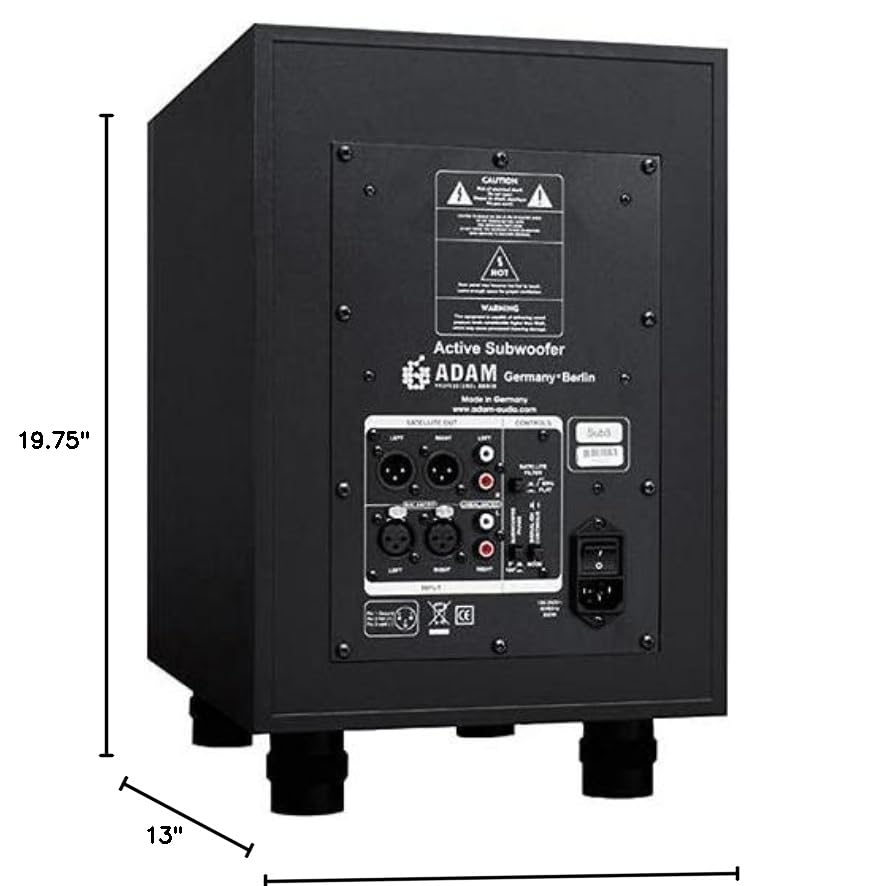
Figure 9.1: Sub8 Dimensions. This image illustrates the physical dimensions of the ADAM Audio Sub8 subwoofer, showing a height of 19.75 inches and a depth of 13 inches. The width is not explicitly labeled but can be inferred from the overall shape.
10. Warranty and Support
ADAM Audio products are designed for reliability and performance. For specific warranty terms and conditions, please refer to the warranty card included with your product or visit the official ADAM Audio website. For technical support, service, or further inquiries, please contact your authorized ADAM Audio dealer or distributor.
ADAM Audio Official Website: www.adam-audio.com


