
1. Introduction
This manual provides essential information for the safe and efficient operation of your Luminous Zelio+ 1700 Pure Sine Wave Inverter. Please read these instructions carefully before installation and use, and retain this manual for future reference. The Luminous Zelio+ 1700 is designed to provide reliable power backup for homes, offices, and shops, featuring pure sine wave output for sensitive electronics.
2. Safety Instructions
Adhering to these safety guidelines is crucial for preventing electric shock, fire, and damage to the inverter or connected appliances.
- Professional Installation: Installation should only be performed by a qualified electrician or service technician.
- Ventilation: Ensure the inverter is installed in a well-ventilated area to prevent overheating. Do not block ventilation openings.
- Moisture: Keep the inverter away from water, rain, and excessive humidity.
- Flammable Materials: Do not operate the inverter near flammable liquids or gases.
- Battery Safety: Batteries contain corrosive acid. Wear protective gear when handling batteries. Ensure proper battery connections (positive to positive, negative to negative).
- Grounding: The inverter must be properly grounded to prevent electrical hazards.
- Overload: Do not overload the inverter beyond its specified capacity. This can cause damage to the unit and connected appliances.
3. Product Overview
The Luminous Zelio+ 1700 is a Pure Sine Wave Inverter designed for efficient and reliable power conversion. Key features include:
- Pure Sine Wave Output: Provides clean power suitable for all types of appliances, including sensitive electronics.
- LED Display: An intuitive display shows power back-up/battery charging time in hours and minutes, along with other operational statuses.
- Noiseless Operation: Designed for low harmonic distortion, ensuring quiet performance.
- High Charge Acceptance: Optimized for efficient battery charging and low maintenance.
- Bypass Switch: Allows direct connection to mains power, bypassing the inverter if needed.

Figure 3.1: Front view of the Luminous Zelio+ 1700 Inverter. This image shows the compact design and the integrated LED display on the front panel.

Figure 3.2: Detailed view of the inverter's front panel, highlighting the LCD screen and the On/Off switch. The LCD provides real-time status updates.

Figure 3.3: Side view of the Luminous Zelio+ 1700 Inverter, illustrating its design for noiseless operation and efficient heat dissipation.
4. Setup
Proper setup is essential for the inverter's performance and safety. It is highly recommended to have the installation performed by a certified technician.
4.1 Battery Connection
- The Zelio+ 1700 operates on a 24V system and requires two 12V batteries.
- Connect the batteries in series to achieve the required 24V.
- Ensure correct polarity: connect the positive (+) terminal of the inverter to the positive terminal of the battery bank, and the negative (-) terminal of the inverter to the negative terminal of the battery bank.
- The inverter is compatible with various battery types, including Flat Plate, Tubular, and SMF batteries, with capacities ranging from 80 Ah to 220 Ah.
- Upon initial connection, the inverter may take approximately one minute to recognize the battery level and capacity.
4.2 Power Connection
- Connect the inverter's input power cord to a properly grounded mains power outlet.
- Connect your home or office electrical load to the inverter's output terminals.
- Ensure all connections are secure and insulated.
5. Operating Instructions
Once installed, operating the Luminous Zelio+ 1700 is straightforward.
5.1 Turning On/Off
- To turn on the inverter, press the On/Off switch located on the front panel.
- To turn off the inverter, press the On/Off switch again.
5.2 LED Display Functions
The LED display provides real-time information about the inverter's status:
- Power Icon: Indicates when mains power is connected and available.
- Eco Mode: Displays 'ECO' logo if the inverter is set to Eco mode. In this mode, the inverter switches to battery power only when the mains voltage goes significantly out of range, saving battery life.
- UPS Mode: No specific logo for UPS mode. In this mode, the inverter provides continuous power with minimal switching time, ideal for sensitive electronics.
- Battery Type: Shows the selected battery type (e.g., Tubular, Flat Plate). This setting is typically configured during installation.
- Battery Backup Time: When operating on battery power, the display shows the approximate remaining battery life in hours and minutes.
- Charging Time: When the battery is charging, the display shows the estimated time remaining for a full charge in hours and minutes.
6. Load Capacity and Battery Compatibility
Understanding the inverter's load capacity and battery requirements is crucial for optimal performance and backup time.
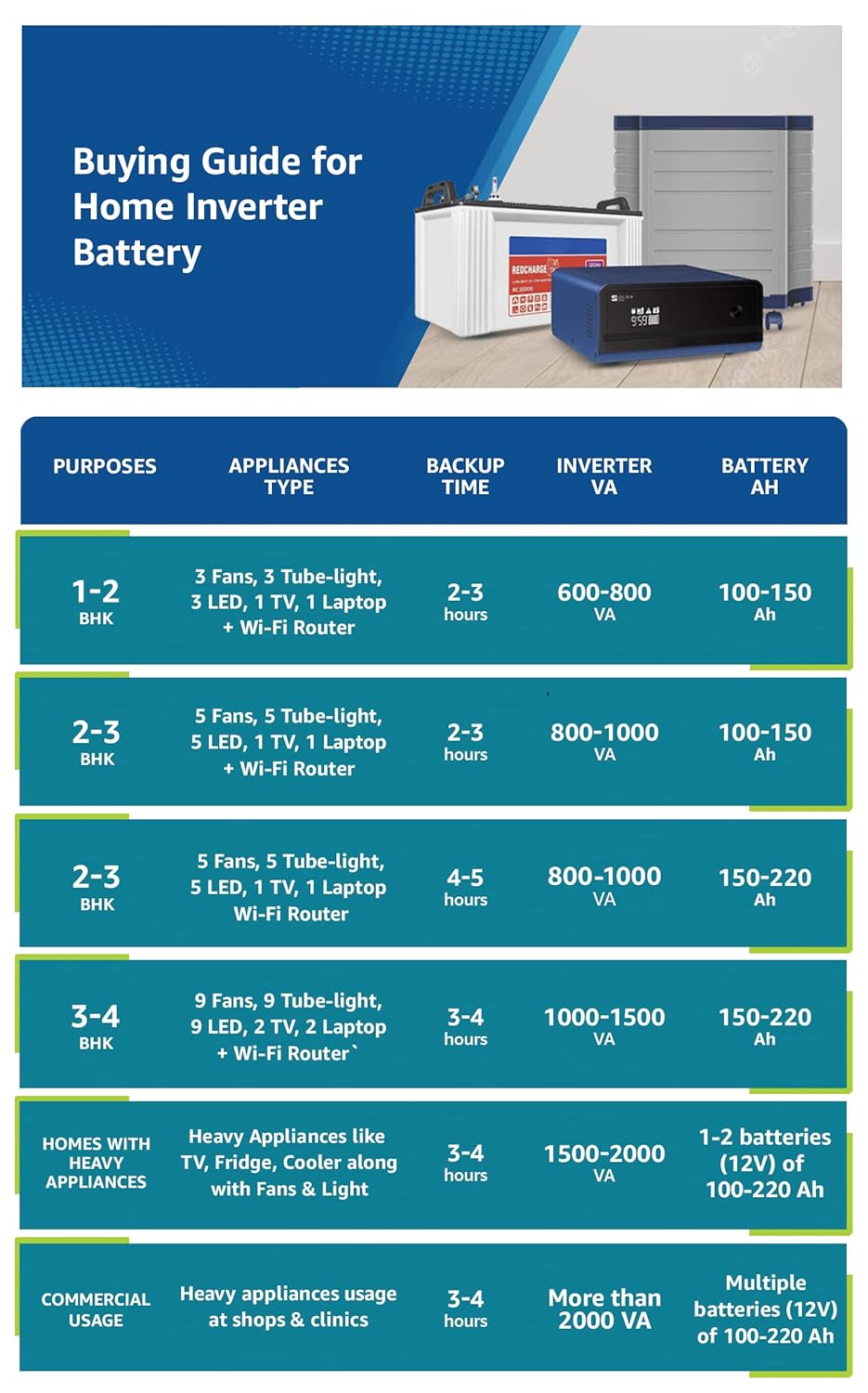
Figure 6.1: General buying guide for home inverter batteries, illustrating recommended inverter VA and battery Ah based on home size and appliance usage.

Figure 6.2: Load chart for the Zelio+ 1700, detailing the number of common appliances that can be supported under different scenarios and estimated backup times with 120Ah and 150Ah batteries at 75% load.

Figure 6.3: Examples of common appliances and their typical wattage, demonstrating the inverter's capacity to run essential household items. Recommended running load should be at 75% of peak load.
The Zelio+ 1700 has a VA Rating of 1500VA/24V and a Peak Load capacity of 1260W. It is designed to support 2 x 12V batteries with capacities between 80 Ah and 220 Ah. Refer to the load charts for guidance on appliance compatibility and estimated backup times.
7. Maintenance
Regular maintenance ensures the longevity and optimal performance of your inverter.
- Keep Clean: Regularly clean the inverter's exterior with a dry cloth. Ensure ventilation openings are free from dust and obstructions.
- Ventilation: Always ensure adequate airflow around the inverter to prevent overheating.
- Battery Water Levels: For lead-acid batteries, periodically check and maintain the distilled water levels. Use a hydrometer to check specific gravity if necessary.
- Connections: Periodically inspect battery terminals and other connections for corrosion or looseness. Clean and tighten as required.
- Avoid Overload: Do not consistently operate the inverter at its maximum load capacity. This can reduce its lifespan.
8. Troubleshooting
This section addresses common issues you might encounter with your Luminous Zelio+ 1700 Inverter.
| Problem | Possible Cause | Solution |
|---|---|---|
| Inverter not turning on | No mains power, loose battery connections, discharged battery, tripped internal breaker. | Check mains power supply. Ensure battery terminals are securely connected. Allow battery to charge. Check and reset the inverter's MCB (Miniature Circuit Breaker) if tripped. |
| No power output from inverter | Overload, short circuit, inverter fault. | Reduce connected load. Check for short circuits in wiring. If problem persists, contact customer support. |
| Inverter running on battery despite mains being present | Mains input breaker tripped, mains voltage out of range (in UPS mode). | Check and reset the main electrical breaker. Ensure the inverter's internal breaker is not tripped. If in UPS mode, slight voltage variations can cause switching; consider Eco mode if frequent switching is undesirable. |
| Fan noise or overheating | Heavy load, insufficient ventilation, internal component issue. | Ensure adequate ventilation around the inverter. Reduce the connected load. If noise or overheating is excessive, contact customer support. |
| Error codes on display | Indicates specific internal fault or operational issue. | Refer to the full product manual for a list of error codes and their meanings, or contact Luminous customer support with the specific code displayed. |
If you encounter issues not listed here or if the suggested solutions do not resolve the problem, please contact Luminous customer support.
9. Specifications
| Feature | Specification |
|---|---|
| Model Name | Zelio+ 1700 |
| Inverter Type | Pure Sine Wave |
| VA Rating | 1500VA/24V |
| Peak Load | 1260 Watts |
| Battery Compatibility | 2 x 12V batteries (80 Ah - 220 Ah), Flat Plate, Tubular, SMF |
| Power Source | Electric |
| Item Dimensions (LxWxH) | 31 x 29 x 13.5 CM |
| Item Weight | 15.2 Kg |
| Included Components | 1 Inverter |
| Recommended Uses | Home, Office, Shop |
| Manufacturer | Luminous Power TECHNOLOGIES Pvt. Ltd. |
| Item Model Number | F04217016501 |
10. Warranty and Support
The Luminous Zelio+ 1700 Inverter comes with a 36-month warranty from the date of purchase. Please retain your purchase receipt for warranty claims.
For technical assistance, service requests, or any inquiries, please contact Luminous customer support:
- Customer Service Number: 18001033039
When contacting support, please have your product model number (Zelio+ 1700) and serial number ready.


