
Introduction
This manual provides detailed instructions for the safe and efficient operation, maintenance, and care of your Zojirushi CD-LFC30 Micom Water Boiler and Warmer. Please read all instructions carefully before use and retain this manual for future reference. This appliance is designed to boil water and maintain it at a selected hot temperature, ideal for various beverages and instant foods.
Safety Precautions
WARNING: Failure to follow these safety instructions may result in fire, electric shock, serious injury, or property damage.
- Always connect the appliance to a grounded electrical outlet with the specified voltage (120V).
- Do not immerse the main unit, power cord, or plug in water or other liquids.
- Keep the appliance out of reach of children. Hot water and steam can cause severe burns.
- Do not operate the appliance if the power cord or plug is damaged, or if the appliance malfunctions or has been damaged in any manner.
- Place the appliance on a stable, heat-resistant, and level surface away from edges.
- Do not cover the steam vent during operation.
- Use only water in the appliance. Do not add milk, coffee, tea, or other liquids.
- Always unplug the appliance when not in use and before cleaning.
- Avoid touching hot surfaces. Use handles or knobs.
- Do not attempt to repair or modify the appliance yourself. Contact qualified service personnel.
Product Overview
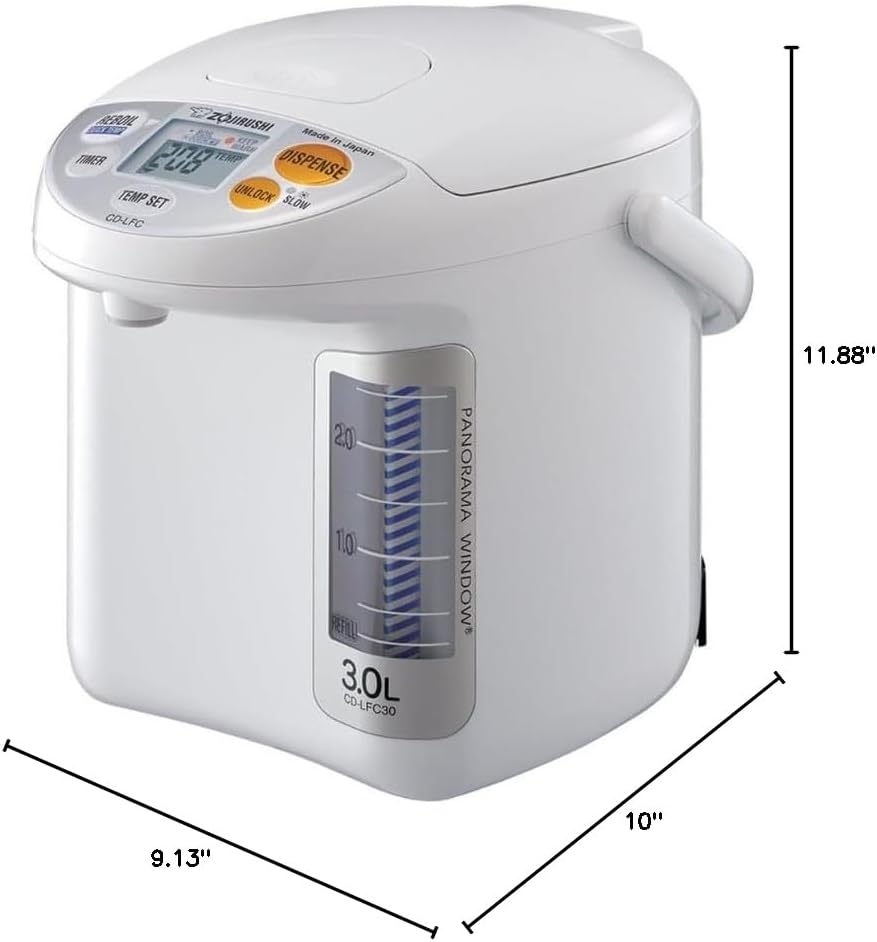
The Zojirushi CD-LFC30 features a micro computerized temperature control system and an easy-to-read Panorama Window water level gauge. Key components include the main body, lid, control panel, dispense button, and a detachable magnetic power cord.

Setup
- Unpacking: Carefully remove the water boiler and all accessories from the packaging. Retain packaging for future transport or storage.
- Initial Cleaning: Before first use, wash the interior of the pot and the lid thoroughly with warm water and a mild dish soap. Rinse well and wipe dry.
- Placement: Place the water boiler on a flat, stable, and heat-resistant surface. Ensure there is adequate space around the unit for ventilation and away from walls or cabinets to prevent steam damage.
- Power Connection: Connect the detachable magnetic power cord to the appliance, then plug it into a standard 120V grounded electrical outlet.
Operating Instructions
1. Filling the Water Boiler
- Open the lid and fill the inner pot with water up to the 'FULL' line indicated on the Panorama Window water level gauge. Do not overfill or underfill.
- Close the lid securely.
2. Selecting Keep Warm Temperature
The unit offers four keep warm temperature settings:
- 208°F (98°C): Ideal for black tea, instant coffee, and instant noodles.
- 195°F (90°C): Suitable for Oolong tea and some herbal teas.
- 175°F (80°C): Perfect for green tea and delicate herbal infusions.
- 160°F (70°C): Recommended for warming milk or preparing baby formula.
Press the TEMP SET button repeatedly until your desired temperature is displayed.
3. Boiling and Keeping Warm
- Once filled and plugged in, the unit will automatically begin boiling the water.
- After boiling, it will automatically switch to the selected keep warm temperature.
- The display will show the current water temperature.
4. Quick Temp Mode
The Optional Quick Temp Mode allows the unit to reach 160°F, 175°F, or 195°F directly without reaching a full boil. This saves energy and time. To activate, select one of these three temperatures using the TEMP SET button. The unit will then heat directly to that temperature.
5. Dispensing Water
- To dispense water, press the UNLOCK button, then press and hold the DISPENSE button.
- Release the DISPENSE button when you have the desired amount of hot water.
6. Cafe Drip Dispensing Mode
For slower dispensing, ideal for pour-over coffee, press the SLOW button after unlocking. This will reduce the water flow rate.
7. Energy-Saving Timer Function
The timer function allows you to set the unit to delay boiling for 6-10 hours. This is useful for having hot water ready at a specific time, such as in the morning. Press the TIMER button and select the desired delay time.
8. Reboil Function
If the water temperature has dropped significantly or you wish to reboil the water, press the REBOIL button. The unit will boil the water again before returning to the selected keep warm temperature.
Maintenance
1. Daily Cleaning
- Always unplug the unit and allow it to cool completely before cleaning.
- Wipe the exterior with a soft, damp cloth. Do not use abrasive cleaners or solvents.
- The non-stick interior is easy to clean. Use a soft sponge and mild dish soap to clean the inside of the pot. Rinse thoroughly.
- Ensure the lid and all removable parts are clean and dry before reassembling.
- Product care instructions specify hand washing for components.
2. Descaling
Over time, mineral deposits (scale) may accumulate inside the pot, especially in areas with hard water. The Zojirushi CD-LFC30 features a Descaling mode to facilitate cleaning.
- Use Zojirushi's citric acid cleaner (sold separately) for descaling. Follow the instructions provided with the cleaner.
- Typically, you will fill the pot with water, add the citric acid cleaner, and activate the Descaling mode (refer to the control panel or specific instructions for your model's descaling procedure).
- After the descaling cycle, rinse the pot thoroughly several times to remove any residue.
Troubleshooting
| Problem | Possible Cause | Solution |
|---|---|---|
| Water not heating/boiling | Unit not plugged in; power outage; unit malfunction. | Check power connection; ensure outlet is functional; contact customer support if problem persists. |
| Water not dispensing | Unlock button not pressed; low water level; dispenser clogged. | Press UNLOCK before DISPENSE; refill water; clean dispenser spout. |
| Unusual odor/taste | New unit odor; mineral deposits; improper cleaning. | Perform initial cleaning; descale the unit; ensure thorough rinsing after cleaning. |
| Steam leakage from lid | Lid not properly closed; lid gasket worn or dirty. | Ensure lid is securely closed; clean or inspect lid gasket for damage. |
Specifications
| Feature | Specification |
|---|---|
| Brand | Zojirushi |
| Model | CD-LFC30 |
| Capacity | 3.0 Liters (101 oz / 3.2 Quarts) |
| Color | White |
| Dimensions (L x W x H) | 11.88" x 9.13" x 10" |
| Item Weight | 5 Pounds |
| Power Source | Corded Electric |
| Voltage | 120 Volts |
| Special Features | Boil Dry Protection, Digital Control, Low Water Sensor, Non-Stick Interior, Panorama Window Water Level Gauge, Quick Temp Mode, Energy-Saving Timer, Cafe Drip Dispensing Mode |
| Included Components | Water Boiler, detachable magnetic cord |
| Product Care Instructions | Hand Wash |
Warranty and Support
Warranty Information
This Zojirushi CD-LFC30 Micom Water Boiler and Warmer is covered by the Zojirushi Limited Warranty for Electrical Products. Please refer to the warranty card included with your product or visit the official Zojirushi website for complete details regarding warranty terms, conditions, and duration.
Customer Support
For technical assistance, troubleshooting beyond this manual, or to inquire about replacement parts, please contact Zojirushi customer support. You can typically find contact information, including phone numbers and email addresses, on the official Zojirushi website or within your product packaging.
Online Resources: For additional information, FAQs, and product registration, please visit the official Zojirushi website.


