
Introduction
This manual provides instructions for the installation, operation, and maintenance of your StarTech.com ST1030USBM 10-Port USB 3.0 Industrial Hub. This robust hub is designed for demanding environments, offering ten independent USB 3.0 (5Gbps) ports with advanced ESD and surge protection.
The ST1030USBM is built with a durable metal casing and offers versatile mounting options, including DIN rail, wall, or desk mounting, making it suitable for server rooms and industrial applications.
What's in the Box
- 1 - 10-port industrial USB 3.0 hub
- 1 - USB 3.0 host cable
- 1 - DIN rail mounting kit
- 1 - terminal block (2 wire)
- 1 - instruction manual
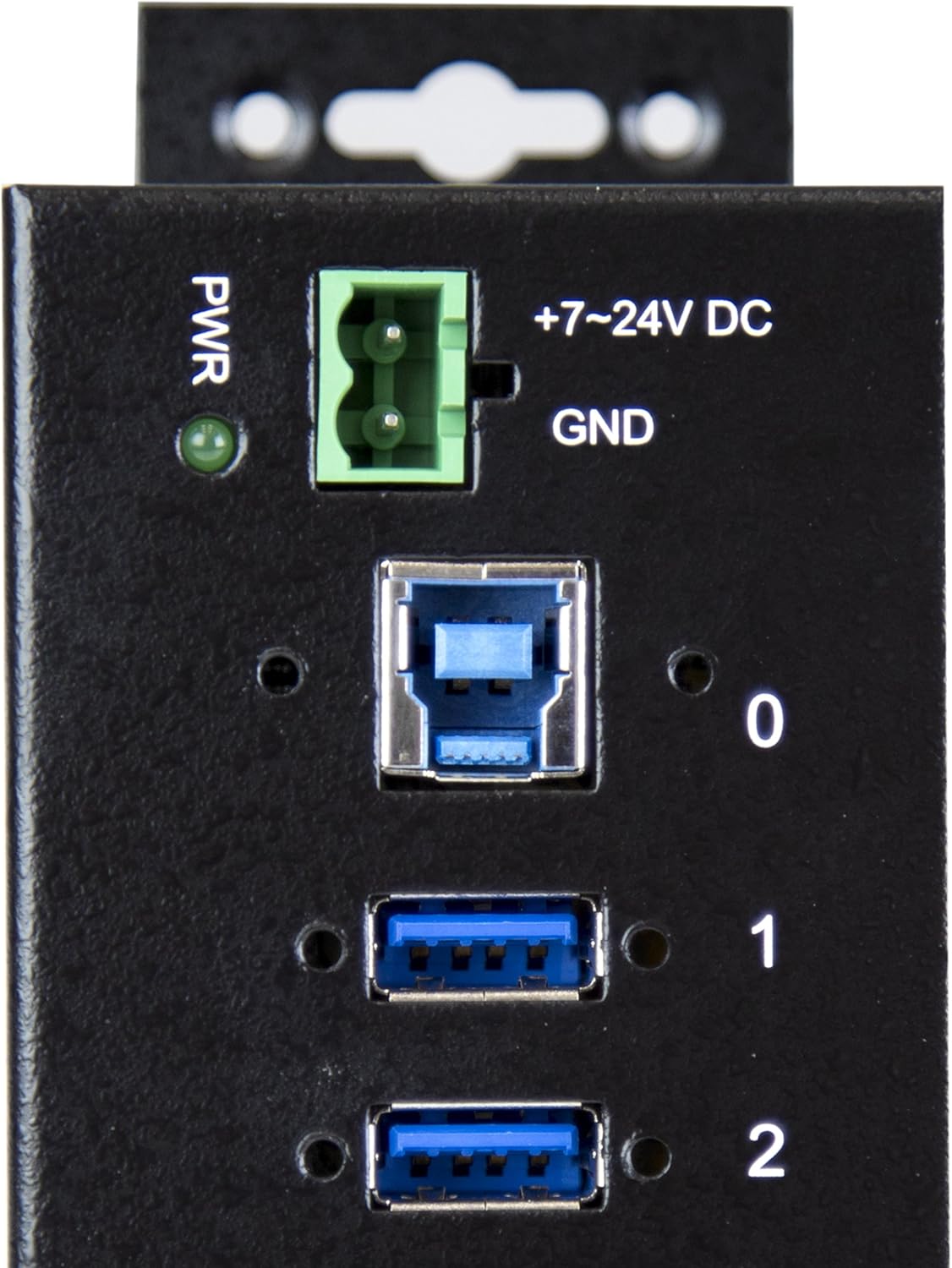
Image: Contents of the ST1030USBM package, including the hub, USB cable, DIN rail mounting kit, terminal block, and instruction manual.
Setup
Power Connection
The ST1030USBM hub requires external power. It operates with a 7-24V DC input via the included terminal block. An optional 65W external power adapter (not included) can also be used. Ensure the power source meets the specified voltage range.
- If using the terminal block connector, ensure it is already inserted into the hub.
- Loosen the two screws on the terminal block connector using a small flat-head screwdriver.
- Connect the positive and ground wires from your DC power source to the proper terminal block connections and fasten the screws. Ensure correct polarity for proper function.

Image: Detail of the power input terminal block (+7-24V DC, GND) and the upstream USB 3.0 port (Port 0) on the hub.
Host Connection
Connect the included USB 3.0 host cable from the upstream port (Port 0) on the hub to an available USB 3.0 port on your host computer.
Mounting Options
The hub can be mounted in various ways using the built-in mounting brackets or the included DIN rail mounting kit.
- Wall/Desk Mounting: Use the integrated mounting flanges on the sides of the hub to secure it to a flat surface with appropriate screws (not included).
- DIN Rail Mounting: Attach the provided DIN rail clips to the hub using the included screws, then clip the hub onto a standard DIN rail.

Image: The ST1030USBM hub shown mounted on a DIN rail, illustrating a typical installation scenario in an industrial or server environment.
Operating the Hub
Once the hub is powered and connected to your host computer, it is ready for use. The hub is plug-and-play, requiring no additional drivers for most operating systems (Windows, macOS, Linux).
- Connect your USB devices to any of the ten available USB 3.0 ports (Ports 1-10).
- The hub supports USB 3.0 (5Gbps) data transfer rates, as well as backward compatibility with USB 2.0 and USB 1.1 devices.
- The hub provides 15kV Air and 8kV contact ESD protection, along with 350W surge protection on both downstream and upstream USB ports, safeguarding your connected devices.
- The power LED indicator will illuminate when the hub is receiving power.

Image: Front view of the ST1030USBM hub, showing the power input, upstream USB port (0), and ten downstream USB 3.0 ports (1-10).
Maintenance
To ensure optimal performance and longevity of your USB hub, follow these general maintenance guidelines:
- Keep the device clean and free from dust. Use a soft, dry cloth for cleaning.
- Avoid exposing the hub to extreme temperatures, humidity, or direct sunlight.
- Ensure proper ventilation around the hub, especially if it is installed in an enclosed space.
- Regularly check all cable connections to ensure they are secure.
Troubleshooting
If you encounter issues with your StarTech.com ST1030USBM hub, refer to the following common troubleshooting steps:
- No Power:
- Verify that the power source is connected correctly to the terminal block and provides 7-24V DC.
- Check the polarity of the power connection if using the terminal block.
- Ensure the power source itself is functional.
- Devices Not Recognized:
- Ensure the hub is properly powered and the power LED is illuminated.
- Verify the USB 3.0 host cable is securely connected between the hub and the computer.
- Try connecting the USB device directly to the computer to confirm it is functional.
- Test the device on a different port on the hub.
- Restart your computer.
- Slow Data Transfer:
- Ensure both the host computer's USB port and the connected device support USB 3.0 (5Gbps) for optimal speeds.
- Check the USB cable quality; using a high-quality USB 3.0 cable is recommended.
- Avoid connecting too many high-bandwidth devices simultaneously if experiencing performance issues.
Specifications
| Feature | Detail |
|---|---|
| Model Number | ST1030USBM |
| USB Standard | USB 3.0 (USB 3.2 Gen 1) |
| Data Transfer Rate | 5 Gbps |
| Number of Ports | 10 (USB-A Downstream) + 1 (USB-A Upstream) |
| ESD Protection | 15kV Air, 8kV Contact |
| Surge Protection | 350W (Downstream & Upstream) |
| Power Source | Terminal Block (7-24V DC) |
| Material | Metal Casing |
| Mounting Options | DIN Rail, Wall, Desk |
| Operating System Compatibility | Linux, macOS, Windows |
| Dimensions (LxWxH) | 7.8 x 2.2 x 1.2 inches (19.8 x 5.6 x 3.0 cm) |
| Item Weight | 12.6 ounces (357.2 grams) |
Warranty Information
The StarTech.com ST1030USBM 10-Port USB 3.0 Industrial Hub is backed by a 2-Year Warranty. This warranty covers defects in materials and workmanship under normal use. For specific terms and conditions, please refer to the official StarTech.com website.
Technical Support
StarTech.com offers free lifetime 24/5 multi-lingual technical assistance. For support, visit the official StarTech.com website or contact their customer service directly.
Online Resources: StarTech.com Product Page (ST1030USBM)


