
1. Introduction
The Beurer MP 100 Professional Manicure/Pedicure Station is designed for comprehensive nail and foot care at home. This device offers professional-grade results for both natural and artificial nails, featuring continuously adjustable speed and reversible rotation for comfortable and precise use.
This manual provides essential information for the safe and effective operation, maintenance, and troubleshooting of your Beurer MP 100 device. Please read it thoroughly before first use and keep it for future reference.
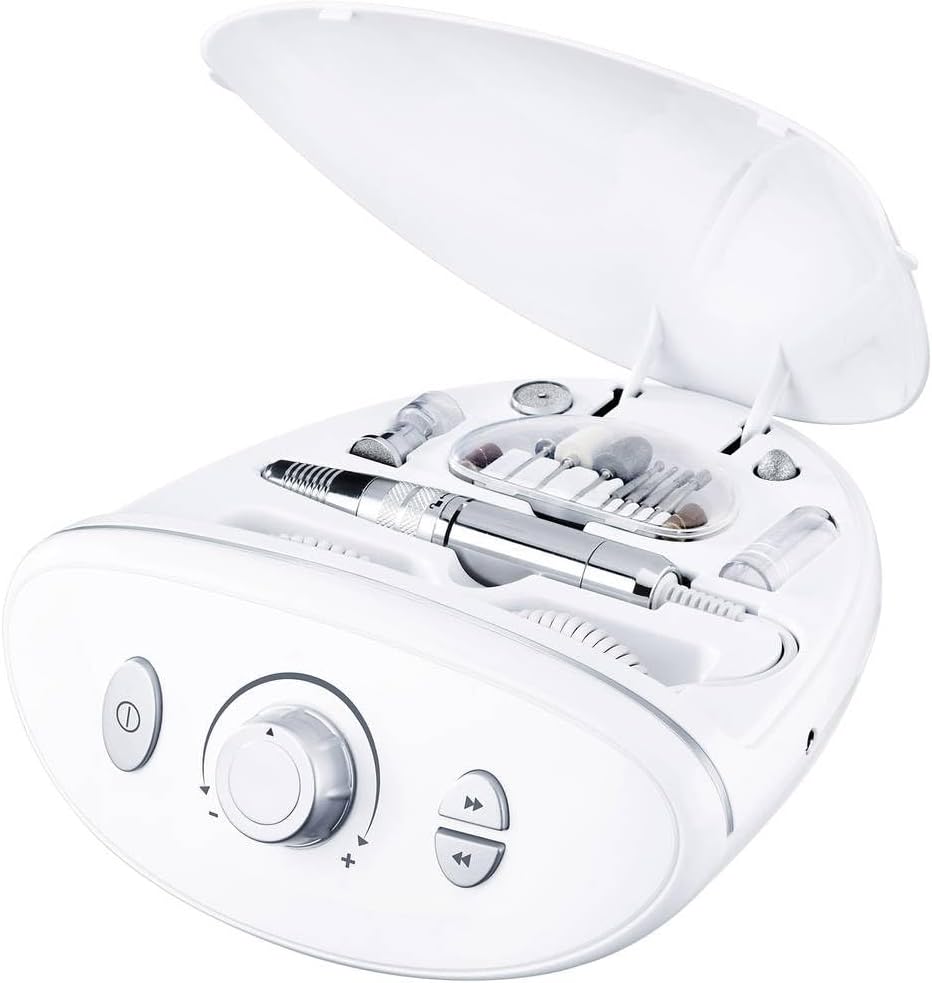
Image 1.1: The Beurer MP 100 Manicure/Pedicure Station with its protective lid open, revealing the main unit, handpiece, and a selection of sapphire and felt attachments stored within.
2. Safety Warnings
Failure to observe the following safety instructions may result in personal injury or damage to the device.
- Always use the device in a well-ventilated area to prevent the inhalation of nail debris or dust.
- Protective eyewear is strongly recommended during operation to shield eyes from flying particles.
- Do not touch the rotating attachment or the motor during operation to avoid burns or injury.
- Keep the device and all its components out of reach of children.
- Ensure the device is disconnected from the power supply before cleaning or changing attachments.
- Do not use the device if it is damaged or malfunctioning. Contact customer support for assistance.
- Avoid using the device on inflamed, injured, or infected skin. Consult a medical professional if you have any concerns.
3. Package Contents
Your Beurer MP 100 Professional Manicure/Pedicure Station includes the following items:
- Beurer MP 100 Main Unit
- Handpiece with coiled cable
- Power Adapter
- Protective Dust Cap
- 10 High-Quality Attachments (9 reusable sapphire/felt attachments + 30 disposable sandpaper attachments):
- Sapphire Disc, Coarse: For rapid filing of thick nails.
- Sapphire Disc, Fine: For precise filing and shaping of nails.
- Sapphire Cone, Coarse: For removing dry skin, calluses, and hard skin.
- Sapphire Cone, Fine: For detailed removal of dry skin and calluses.
- Cylindrical Cutter: For smoothing hardened toenail surfaces.
- Felt Cone: For polishing nail edges and surfaces.
- Round Sapphire Cutter: For gentle removal of corns.
- Needle Cutter: For addressing ingrown nails and dead nail pieces.
- Disposable Sandpaper Attachments (30 pieces): For hygienic removal of dry skin, calluses, and hard skin.
4. Setup
- Unpack the Device: Carefully remove all components from the packaging.
- Position the Unit: Place the main unit on a stable, flat, and well-lit surface.
- Connect Power: Plug the power adapter into the main unit's power input, then connect the adapter to a suitable electrical outlet.
- Attach Handpiece: Ensure the handpiece is securely connected to the main unit.
- Select Attachment: Choose the appropriate attachment for your desired treatment. Insert the attachment firmly into the opening at the tip of the handpiece until it clicks into place. To remove, gently pull the attachment out.

Image 4.1: The Beurer MP 100 unit displaying its controls and the handpiece with various attachments, illustrating its readiness for setup and operation.
5. Operating Instructions
The Beurer MP 100 offers precise control for various manicure and pedicure tasks.
- Power On/Off: Press the power button (ⓘ) to turn the device on or off. The indicator light will illuminate when the device is active.
- Adjust Speed: Use the rotary dial to continuously adjust the rotation speed. Turn clockwise to increase speed and counter-clockwise to decrease it. The device offers speeds up to 20,000 RPM.
- Change Rotation Direction: Use the direction buttons (◀◀ / ▶▶) to switch between clockwise and counter-clockwise rotation. This feature is useful for different nail types and for working on both hands/feet.
- Performing Treatment:
- Hold the handpiece firmly but gently.
- Apply the chosen attachment to the nail or skin area with light pressure. Avoid excessive pressure, which can cause heat buildup or injury.
- Move the attachment smoothly and evenly across the surface.
- For filing nails, work from the outer edge towards the center.
- For removing calluses or dry skin, use the appropriate sapphire cone or sandpaper attachment, moving in small circular motions.
- Utilize the protective dust cap to minimize dust dispersion during treatment.
- After Use: Turn off the device, disconnect it from the power supply, and remove the attachment. Clean the attachments and the device as described in the Maintenance section.

Image 5.1: Demonstrating the use of the Beurer MP 100 for manicure, showing the handpiece in action on fingernails.

Image 5.2: Demonstrating the use of the Beurer MP 100 for pedicure, showing the handpiece in action on a foot.
6. Maintenance and Cleaning
Regular cleaning and maintenance ensure the longevity and hygienic operation of your device.
- Disconnect Power: Always unplug the device from the power outlet before cleaning.
- Clean Attachments:
- Remove all attachments from the handpiece.
- Reusable sapphire and felt attachments can be cleaned with a brush and disinfected with an alcohol-based solution. Ensure they are completely dry before storage.
- Disposable sandpaper attachments should be discarded after each use for hygiene.
- Clean Handpiece and Main Unit: Wipe the handpiece and the main unit with a soft, slightly damp cloth. Do not use abrasive cleaners or immerse the device in water.
- Storage: Store the device and its attachments in a clean, dry place, preferably in its original case, away from direct sunlight and extreme temperatures.
7. Troubleshooting
If you encounter issues with your Beurer MP 100, refer to the following common problems and solutions:
| Problem | Possible Cause | Solution |
|---|---|---|
| Device does not turn on. | Not plugged in; power outlet malfunction; device fault. | Check power connection; try a different outlet; contact customer support. |
| Attachment does not rotate or rotates slowly. | Attachment not properly inserted; speed setting too low; motor obstruction. | Ensure attachment is fully inserted; increase speed with rotary dial; check for debris in handpiece. |
| Device becomes hot during use. | Excessive pressure applied; prolonged continuous use. | Reduce pressure; take breaks during extended use; ensure proper ventilation. |
| Unusual noise during operation. | Loose attachment; internal component issue. | Re-insert attachment securely; if noise persists, discontinue use and contact support. |
If the problem persists after attempting these solutions, please contact Beurer customer support.
8. Specifications
- Model: MP 100
- Power Source: Corded Electric
- Input Power: 15 Watt
- Voltage: 15 Volts
- Maximum Rotation Speed: Up to 20,000 RPM
- Dimensions (L x W x H): 22 x 23.5 x 11 cm (8.66 x 9.25 x 4.33 inches)
- Item Weight: 1.25 Kilograms (2.76 lbs)
- Material: Plastic
- Country of Origin: China
9. Warranty and Support
The Beurer MP 100 Professional Manicure/Pedicure Station typically comes with a manufacturer's warranty. Please refer to your purchase documentation or the official Beurer website for specific warranty terms and conditions, which may vary by region.
For technical support, spare parts, or warranty claims, please contact Beurer customer service. Contact information can usually be found on the official Beurer website or in the packaging materials.
Beurer Official Website: www.beurer.com