
Makita BL1840B
Makita BL1840B 18V LXT Lithium-Ion 4.0Ah Battery User Manual
Model: BL1840B
Brand: Makita
1. Product Overview
The Makita 18V LXT Lithium-Ion battery is engineered for superior performance and productivity with your cordless tools. It offers extended run time and a rapid charge time, ensuring your tools are ready when you are. This battery is designed for compatibility with Star Protection tools, providing advanced protection against overloading, over-discharging, and overheating.

Figure 1: Front view of the Makita BL1840B 18V LXT Lithium-Ion 4.0Ah Battery.
Key Features:
- Integrated L.E.D. battery charge level indicator allows user to monitor battery charge.
- Provides up to 35% more run time per charge compared to BL1830.
- Reaches full charge in 40 minutes or less.
- Compatible only with Star Protection tools, indicated by the Star Symbol and/or Yellow Battery Receiver under the tool.
- Battery delivers consistent power and run time in extreme temperatures, even in winter (-4°F/-20°C).
2. Setup and Installation
The Makita BL1840B battery is designed for easy installation and removal from compatible Makita 18V LXT tools and chargers.
Installing the Battery:
- Align the battery with the battery receiver on your Makita 18V LXT tool or charger. Ensure the battery's grooves match the tool's rails.
- Slide the battery firmly into the tool or charger until it clicks into place. A click indicates that the battery is securely locked.
- Gently pull on the battery to confirm it is securely attached and will not accidentally detach during use.
Removing the Battery:
- Locate the battery release button(s) on the tool or charger.
- Press and hold the release button(s) while sliding the battery out of the receiver.
- Store the battery in a safe, dry place away from direct sunlight and extreme temperatures.

Figure 2: Bottom view of the battery, highlighting the connection terminals for tool and charger interface.
3. Operating Instructions
Checking Battery Charge Level:
The Makita BL1840B battery features an integrated L.E.D. charge level indicator to help you monitor the remaining battery life.
- Locate the button next to the L.E.D. indicators on the battery.
- Press the button once. The L.E.D. lights will illuminate to show the current charge level:
- 4 lights: 75% - 100% charge
- 3 lights: 50% - 75% charge
- 2 lights: 25% - 50% charge
- 1 light: 0% - 25% charge (recharge soon)
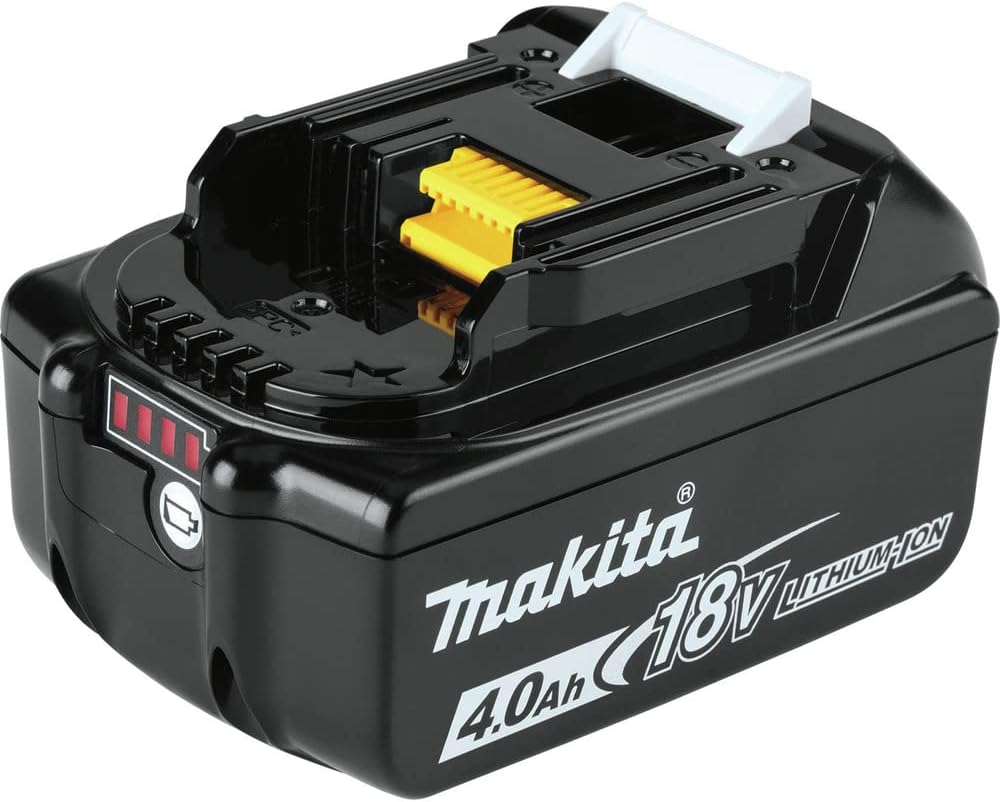
Figure 3: Top view of the battery with the L.E.D. charge indicator visible.
Charging the Battery:
For optimal performance and battery life, use a Makita Rapid Optimum Charger (sold separately). The battery reaches full charge in 40 minutes or less with a compatible charger.
- Insert the battery into the Makita Rapid Optimum Charger.
- The charger will communicate with the battery to monitor current, voltage, and temperature, optimizing the charging process.
- The charger's indicator lights will show the charging status. Refer to your charger's manual for specific indicator meanings.
4. Maintenance and Storage
General Care:
- Keep the battery clean and free of dust and debris. Use a dry cloth to wipe down the battery terminals.
- Avoid exposing the battery to water or rain. Do not destroy the battery by fire.
- Do not short-circuit the battery terminals.
Storage:
- Store the battery in a cool, dry place, away from direct sunlight and extreme temperatures. The battery delivers consistent power and run time in extreme temperatures, even in winter (-4°F/-20°C), but prolonged storage in such conditions is not recommended.
- For long-term storage, it is recommended to store the battery with a partial charge (around 50%) rather than fully charged or completely depleted.
- Makita 18V Lithium-Ion batteries resist self-discharge, so they are ready for use even after long periods of storage.
5. Troubleshooting
The Makita BL1840B battery is equipped with STAR Protection Computer Controls, an advanced communication technology that allows the tool and battery to exchange data in real time. This system monitors conditions during use to protect against common issues.
Common Protections Provided by STAR Protection:
- Overloading: Prevents damage to the battery and tool from excessive current draw.
- Over-discharging: Protects the battery from being completely drained, which can shorten its lifespan.
- Overheating: Monitors battery temperature to prevent damage from excessive heat.
If your tool stops operating or the battery indicator lights behave unusually, it may be due to one of these protection mechanisms activating. Allow the battery and tool to cool down if overheating is suspected, or recharge the battery if it is depleted. If issues persist, consult a Makita service center.
6. Specifications
| Feature | Detail |
|---|---|
| Manufacturer | Makita |
| Part Number | BL1840 |
| Item Weight | 1.32 pounds |
| Product Dimensions | 3 x 6.75 x 6.5 inches |
| Item Model Number | BL1840B |
| Batteries Required | 1 Lithium Ion batteries required. (included) |
| Size | 4.0Ah |
| Color | Black |
| Material | Plastic |
| Voltage | 18 Volts |
| Wattage | 72 watts |
| Battery Cell Type | Lithium Ion |
| Battery Capacity | 4 Amp Hours |
| Recommended Uses | Power Tool |
7. Warranty and Support
Makita provides a warranty for its products. For specific details regarding the warranty for your BL1840B battery, please refer to the official Makita warranty documentation included with your purchase or visit the official Makita website.
For technical support, service, or any inquiries regarding your Makita BL1840B battery, please contact Makita customer support directly. You can find contact information on the official Makita website or through your product's packaging.
Manufacturer: Makita
For more information, visit the Makita Store on Amazon.
Related documentsBL1840B


Ask a question about this manual
Ask about setup, troubleshooting, compatibility, parts, safety, or missing instructions. Manuals+ will review the question and use this page’s manual context to help answer it.