
Introduction
This manual provides essential instructions for the proper setup, operation, maintenance, and troubleshooting of your Myron L TP1 TECHPRO II Digital Meter. This device is designed for accurate measurement of conductivity, total dissolved solids (TDS), and temperature in various aqueous solutions. Please read this manual thoroughly before using the meter to ensure optimal performance and longevity.
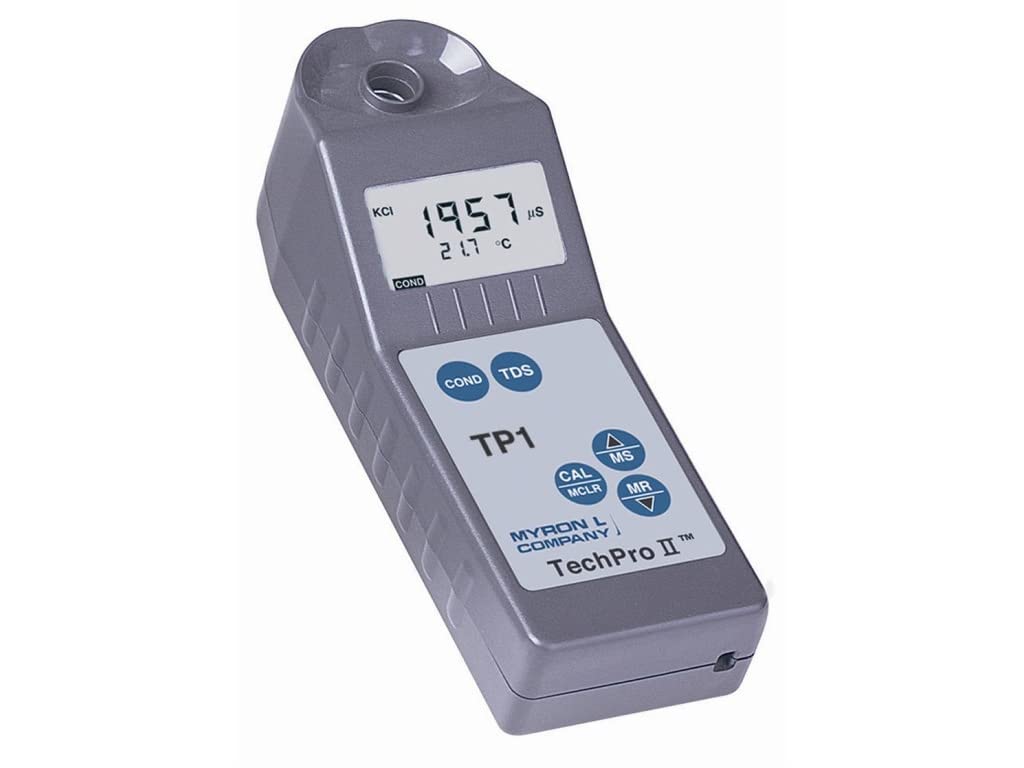
This image shows the Myron L TP1 TECHPRO II digital meter. The device is gray with a digital LCD screen displaying '1957 µS' for conductivity and '21.7 °C' for temperature. Below the screen are buttons labeled 'COND', 'TDS', 'CAL MCLR', 'MS', 'MR', and up/down arrows. The brand 'MYRON L COMPANY' and 'TechPro II™' are printed on the device.
Setup
Battery Installation
The Myron L TP1 meter is powered by batteries. To install or replace batteries, locate the battery compartment cover, typically on the rear or side of the device. Open the cover, insert the batteries according to the polarity indicators, and securely close the compartment. Ensure the compartment is sealed to prevent moisture ingress.
Initial Calibration
For accurate measurements, it is recommended to perform an initial calibration upon first use and periodically thereafter. Refer to the 'Calibration' section within the operating instructions for detailed steps on how to calibrate your meter using appropriate calibration solutions.
Operating Instructions
Power On/Off
To power on the meter, press either the 'COND' or 'TDS' button. The meter will perform a brief self-test and then display readiness for measurement. The meter typically powers off automatically after a period of inactivity to conserve battery life.
Taking Measurements
- Prepare the Sample: Ensure the sensor well at the top of the meter is clean and free of debris.
- Submerge Sensor: Fill the sensor well with the sample solution, ensuring the electrodes are fully submerged. Avoid air bubbles around the electrodes.
- Select Measurement Mode:
- Press the 'COND' button to measure conductivity. The display will show the reading in microsiemens (µS).
- Press the 'TDS' button to measure Total Dissolved Solids. The display will show the reading in parts per million (ppm).
- Read Display: The LCD screen will display the primary measurement (conductivity or TDS) along with the temperature in degrees Celsius (°C). Allow the reading to stabilize before recording.
Button Functions
- COND: Initiates conductivity measurement.
- TDS: Initiates Total Dissolved Solids measurement.
- CAL / MCLR: Used for meter calibration. Also functions to clear stored memory.
- MS (Memory Store): Saves the current measurement reading to the meter's internal memory.
- MR (Memory Recall): Recalls previously stored measurement readings from memory.
- Up / Down Arrows (▲ / ▼): Used for navigation within menus or adjusting values during calibration.
Understanding the Display
The LCD screen provides critical information:
- Primary Measurement: Displays the conductivity (e.g., 1957 µS) or TDS value.
- Temperature: Shows the sample temperature in °C (e.g., 21.7 °C).
- KCI Indicator: Indicates the potassium chloride (KCl) standard used for calibration, if applicable.
- Units: Displays the units for the measurement (e.g., µS, ppm, °C).
Maintenance
Cleaning
After each use, rinse the sensor well thoroughly with distilled or deionized water to prevent residue buildup. Gently shake off excess water. Wipe the exterior of the meter with a soft, damp cloth. Do not use abrasive cleaners, solvents, or harsh chemicals, as these can damage the meter's casing or sensor.
Storage
Store the Myron L TP1 meter in a clean, dry place away from direct sunlight, extreme temperatures, and corrosive environments. Ensure the sensor well is completely dry before storing. If storing for an extended period, remove the batteries to prevent leakage.
Electrode Care
Periodically inspect the electrodes located within the sensor well for any visible buildup, scratches, or damage. Avoid touching the electrodes directly. If buildup is present, gently clean with a soft brush and distilled water. Damaged electrodes may require replacement or professional servicing to maintain accuracy.
Troubleshooting
- No Display / Meter Not Powering On:
Check battery installation. Ensure batteries are inserted with correct polarity. Replace old or depleted batteries with fresh ones.
- Inaccurate or Unstable Readings:
Ensure the sensor well is clean and free of air bubbles. Perform a calibration using fresh, certified calibration solutions. Verify that the sample temperature is within the meter's specified operating range. Check for any damage to the electrodes.
- 'Err' Message on Display:
An 'Err' message typically indicates a measurement error or a condition outside the meter's operational limits. Consult a more detailed Myron L manual for specific error codes, if available. Common causes include sensor issues, out-of-range measurements, or calibration errors. Try cleaning the sensor and recalibrating. If the error persists, contact customer support.
- Slow Response Time:
Ensure the sensor is clean. Allow sufficient time for the meter to equilibrate with the sample temperature. Very cold or hot samples may require more time to stabilize.
Specifications
| Feature | Specification |
|---|---|
| Model | TP1 |
| Brand | Myron L |
| Display Type | Digital |
| Power Source | Battery Powered |
| Product Dimensions | 1 x 1 x 1 inches (2.54 x 2.54 x 2.54 cm) |
| Item Weight | 15.52 ounces (440 grams) |
| Outer Material | Polypropylene |
| Product Care | Wipe Clean |
| Reusability | Reusable |
| Date First Available | January 29, 2014 |
Warranty and Support
For detailed warranty information, technical assistance, or service inquiries regarding your Myron L TP1 TECHPRO II Digital Meter, please contact Myron L Company directly. You can find their official contact information, including customer service numbers and website, by visiting the Myron L Company's official website. Please retain your purchase receipt as proof of purchase for any warranty claims.


