
Introduction
This manual provides detailed instructions for the Keeley 30ms Double Tracker Pedal. This stereo effect pedal is designed to create a variety of studio-style double tracking effects, making instruments sound thicker and fuller. It can be used with guitar, bass, keyboards, and even vocals, offering versatile sound enhancement for musicians.
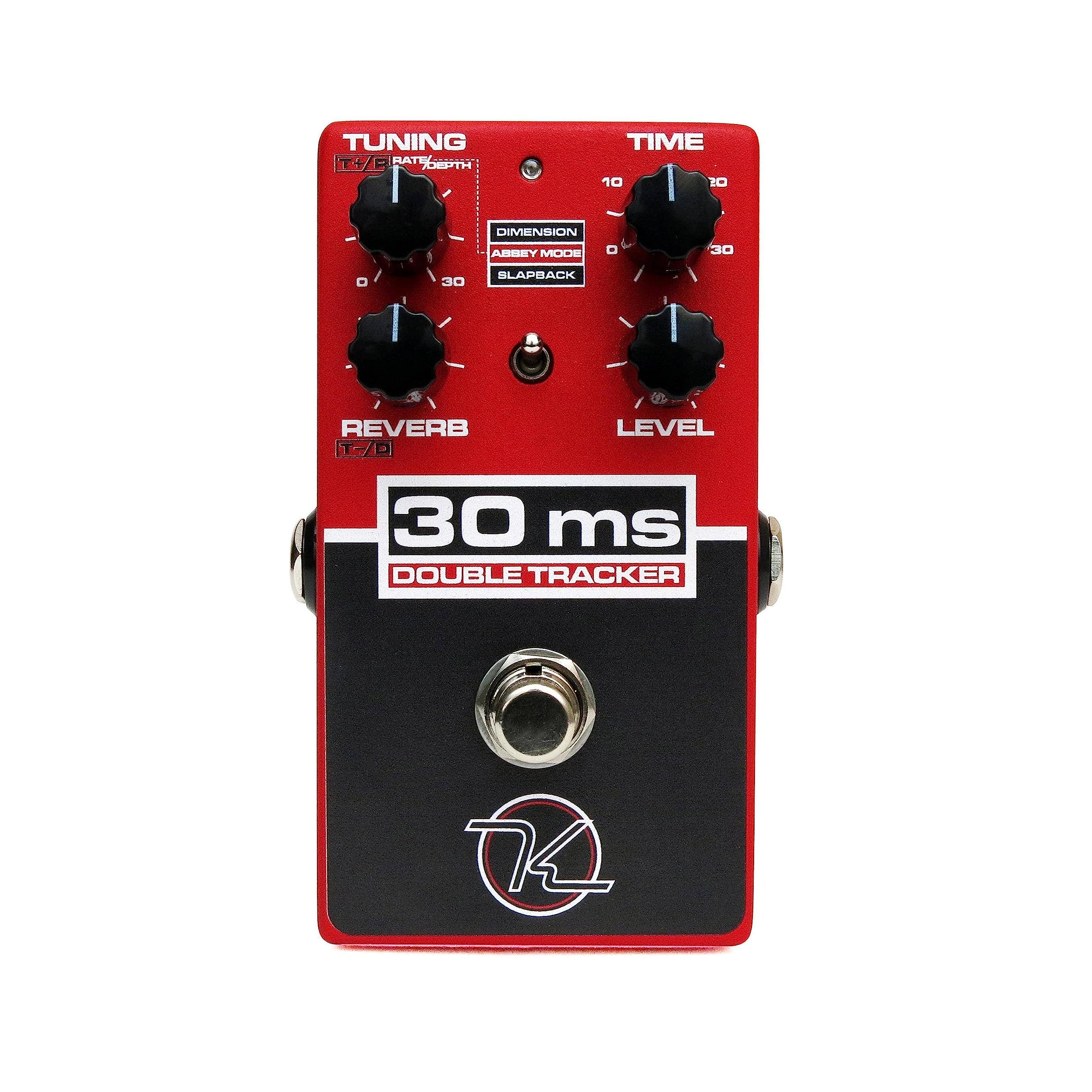
Figure 1: Keeley 30ms Double Tracker Pedal.
Key Features
- Stereo effect pedal offering various studio-style double tracking effects for thicker, fuller instrument sounds.
- Includes a reverb effect simulating the famous chamber in Studio Two.
- Designed for use with guitar, bass, keyboards, and vocals.
- Allows musicians to utilize double tracking techniques on the road with a wide range of tools for unique double tracking schemes.
- Can be used in mono with an integrated "Abbey Verb" reverb control or in stereo as the Double Tracker Pro.
Controls and Functions
The Keeley 30ms Double Tracker pedal features several controls to shape your sound. Familiarize yourself with each knob and switch for optimal performance.

Figure 2: Control layout of the 30ms Double Tracker Pedal.
- TUNING (T+R / Rate/Depth): Controls the tuning of double-tracked voices up to +/- 30 cents. In Abbey Mode, this knob controls the modulation rate and depth.
- TIME: Controls the delay time from 0-30ms. In Slapback Mode, this knob controls delay from 30-120ms.
- REVERB (T-D): Controls the amount of vintage studio echo chamber style reverb, featuring roll-offs at 600Hz and 10kHz.
- LEVEL: Controls the overall output level of the effect.
- MODE SELECT: A toggle switch used to select between three distinct modes: Dimension (Up position), Abbey Mode (Middle position), and Slapback (Down position).
- FOOTSWITCH: Engages or bypasses the effect. The LED indicates whether the effect is active.
Setup
Power Connection
The Keeley 30ms Double Tracker requires a 9V DC power supply with a center-negative polarity. The current draw is approximately 65mA. Ensure your power supply meets these specifications to prevent damage and ensure proper operation. Do not use an unregulated power supply or one with incorrect polarity.
Audio Connections
The pedal features standard 1/4-inch audio input and output jacks.
- Mono Operation: Connect your instrument (e.g., guitar) to the input jack and your amplifier or the next pedal in your signal chain to the output jack using standard mono instrument cables.
- Stereo Operation (Double Track Pro): For stereo output, use a TRS (Tip-Ring-Sleeve) cable for the output. In this configuration, the Tip carries the effected signal, and the Ring carries the original signal. Refer to the "Internal Switches" section for configuring stereo modes.
Operating Modes
The 30ms Double Tracker offers three distinct operating modes, each providing a unique sonic character. Select your desired mode using the Mode Select toggle switch.
Dimension Mode
This mode produces two voices, both slightly detuned from the original signal. Use the TUNING knob to control the pitch of these voices and the TIME knob to introduce a subtle delay, up to 30ms, creating a lush, wide sound.
Abbey Mode
Inspired by legendary British studio sessions of the 1960s, this mode provides a single delayed voice with a modulation effect, reminiscent of a classic tape machine. The TUNING knob controls the modulation rate and depth, allowing for subtle warble or more pronounced movement.
Slapback Mode
This mode produces a classic slapback delay ranging from 30ms to 120ms. It also includes two adjustable doubled voices, adding depth and character to the traditional slapback effect.
Internal Switches
The Keeley 30ms Double Tracker features internal DIP switches for advanced configuration, particularly for stereo operation and blending options. To access these switches, you will need to carefully open the pedal enclosure.

Figure 3: Internal switch settings and example configurations.
Mono Cable Operation
| SW1 | SW2 | MODE |
|---|---|---|
| LEFT | LEFT | MONO+REVERB (Factory Default) |
| LEFT | RIGHT | BLEND |
| RIGHT | LEFT | FX |
| RIGHT | RIGHT | DOUBLE TRACK PRO |
TRS Stereo Cable Operation
| SW1 | SW2 | BLEND | OUTPUT | TIP | RING | MODE |
|---|---|---|---|---|---|---|
| LEFT | LEFT | DRY | FX W/ REVERB | (STOCK) | ||
| LEFT | RIGHT | FX | DRY | DOUBLE TRACK PRO | ||
| RIGHT | LEFT | FX | DRY | FX W/ REVERB (STOCK) | ||
| RIGHT | RIGHT | FX | DRY | DOUBLE TRACK PRO |
To enable Double Tracking Pro mode, switch internal switch #2 to the RIGHT position. This allows the control layout on the face of the pedal to control the original signal. Use a TRS cable for an incredible stereo sound with double-tracked voices, one on the Tip and the original on the Ring.
Example Settings
Here are some suggested settings to help you get started with different modes and explore the pedal's capabilities.
Dimension Mode Example
- TUNE: Sharp 20 cents
- TIME: Flat 10 cents
- LEVEL: Adjust to taste
Abbey Mode Example
- RATE: 2Hz (Range: 0-4Hz)
- DEPTH: 1.75ms (Range: +/- 3.5ms)
- TIME: 15ms
- LEVEL: Adjust to taste
Slapback Mode Example
- TUNE: Sharp 15 cents
- TIME: Flat 15 cents
- LEVEL: Adjust to taste
Specifications
| Feature | Detail |
|---|---|
| Brand | Keeley |
| Model | K30ms |
| Effect Type | Double Tracker, Short Time Delay, Static Chorus, Reverb |
| Power Requirement | 9V DC, Center Negative, 65mA minimum |
| Audio Input | 1/4 inch instrument input (Mono) |
| Audio Output | 1/4 inch instrument output (Mono or Stereo TRS) |
| Signal Format | Analog |
| Dimensions | 11.2 x 6.8 x 5.1 cm |
| Included Components | "Abbey Verb" reverb control |
| UPC | 854295005383 |
Maintenance
Cleaning
Wipe the pedal with a soft, dry cloth. Avoid using abrasive cleaners, solvents, or excessive moisture, which can damage the finish, labels, and internal electronic components.
Storage
Store the pedal in a cool, dry place away from direct sunlight, extreme temperatures, and high humidity. Disconnect the power supply when the pedal is not in use for extended periods to prolong its lifespan.
Battery Replacement
This pedal is designed for external power supply only and does not utilize batteries.
Troubleshooting
No Sound
- Ensure the power supply is correctly connected and providing 9V DC center-negative power.
- Check all audio cables for proper connection and functionality. Try swapping cables to rule out a faulty cable.
- Verify that the pedal is engaged (the footswitch LED should be illuminated).
- Adjust the LEVEL knob to ensure the output is not set to minimum.
Unexpected Sound/Effect
- Check the MODE SELECT switch to ensure the desired mode (Dimension, Abbey, Slapback) is selected.
- Review the TUNING, TIME, and REVERB knob settings. Small adjustments can significantly alter the sound.
- If using stereo output, ensure internal switches are set correctly for your desired configuration (refer to the "Internal Switches" section).
Noise/Hum
- Ensure you are using a high-quality, isolated power supply. Daisy-chaining power with other pedals can sometimes introduce noise.
- Check for ground loops in your signal chain. Try isolating the pedal's power or using a different outlet.
- Try different audio cables to rule out faulty or unshielded connections.
Warranty and Support
Keeley Electronics products are known for their quality and reliability. For detailed warranty information, product registration, and technical support, please refer to the official Keeley Electronics website or contact their customer service directly.
Please retain your proof of purchase for any warranty claims. Unauthorized modifications or repairs may void your warranty.
For further assistance, visit: www.robertkeeley.com


