
PRORECK PARTY 15
PRORECK Party 15 Portable PA Speaker System
User Manual
Model: PARTY 15
Introduction
Thank you for purchasing the PRORECK Party 15 Portable PA Speaker System. This system is designed to deliver powerful and clear audio for various applications, including parties, DJ events, home studios, and social gatherings. Featuring Bluetooth connectivity, USB/SD card playback, FM radio, and integrated LED lights, the Party 15 offers versatile audio solutions. Please read this manual thoroughly before operating the system to ensure proper use and to maximize its performance and longevity.
Important Safety Information
Always follow basic safety precautions when using this product to reduce the risk of fire, electric shock, and injury.
- Do not expose this equipment to rain or moisture.
- Do not open the speaker enclosure. There are no user-serviceable parts inside. Refer all servicing to qualified service personnel.
- Ensure the power supply voltage matches the voltage specified on the unit.
- Protect the power cord from being walked on or pinched, particularly at plugs, convenience receptacles, and the point where they exit from the apparatus.
- Unplug this apparatus during lightning storms or when unused for long periods of time.
- Do not block any ventilation openings. Install in accordance with the manufacturer's instructions.
- Use only with the cart, stand, tripod, bracket, or table specified by the manufacturer, or sold with the apparatus.
What's in the Box
Carefully unpack your PRORECK Party 15 system and ensure all items listed below are present and in good condition. If any items are missing or damaged, please contact your retailer immediately.

Image: Complete PRORECK Party 15 system with all included accessories.
- 1 x Active Speaker
- 1 x Passive Speaker
- 2 x Speaker Stands
- 1 x Wired Microphone
- 1 x Speakon Cable (for connecting active to passive speaker)
- 1 x Power Cable
- 1 x Remote Control

Image: Detailed view of the wired microphone, remote control, and various cables.
Setup
Follow these steps to set up your PRORECK Party 15 speaker system.
1. Speaker Stand Assembly
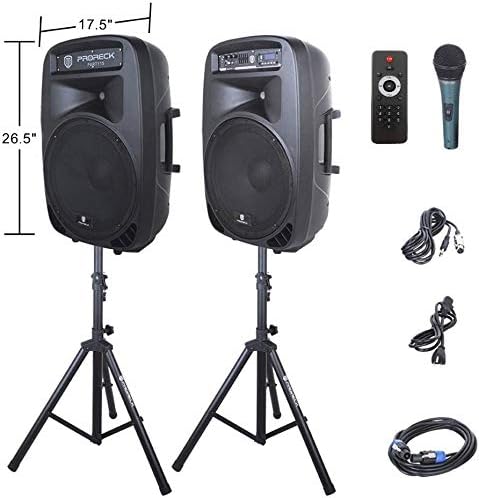
Image: The two included speaker stands.
- Unfold the tripod legs of each speaker stand until they are fully extended and stable.
- Loosen the height adjustment knob on the stand and extend the pole to your desired height. Ensure the safety pin is inserted through the appropriate hole to secure the height.
- Tighten the height adjustment knob firmly.
2. Speaker Placement
- Carefully lift each speaker and place it onto the top pole of a speaker stand. Ensure the speaker is securely seated.
- Position the active speaker (the one with the control panel) near a power outlet.
- Place the passive speaker within reach of the included Speakon cable from the active speaker.
Image: PRORECK Party 15 speakers set up on their stands.
3. Connecting Speakers
- Locate the Speakon output on the rear panel of the active speaker and the Speakon input on the rear panel of the passive speaker.
- Connect one end of the Speakon cable to the active speaker's Speakon output and the other end to the passive speaker's Speakon input. Ensure a secure connection.

Image: Rear panels of the active and passive speakers, highlighting the Speakon connection.
4. Power Connection
- Ensure the master volume knob on the active speaker is turned down to its minimum setting.
- Connect the power cable to the active speaker's power input and then plug it into a suitable electrical outlet.
Operating Instructions
This section details how to operate your PRORECK Party 15 speaker system and utilize its various features.
Control Panel Overview

Image: Detailed view of the active speaker's control panel.
The active speaker features a comprehensive control panel with an LCD display, various input options, volume controls, and an equalizer.
1. Power On/Off
- After connecting the power cable, locate the power switch on the rear panel of the active speaker.
- Flip the switch to the "ON" position to power on the system. The LCD display will illuminate.
- To power off, flip the switch to the "OFF" position.
2. Mode Selection
Press the MODE button on the control panel or remote control to cycle through available input modes: Bluetooth, USB, SD Card, FM Radio, and Line Input.
3. Bluetooth Connectivity
- Select "Bluetooth" mode using the MODE button. The LCD display will show "BLUE".
- On your Bluetooth-enabled device (smartphone, tablet, etc.), search for available Bluetooth devices.
- Select "PRORECK PARTY 15" from the list. Once paired, the speaker will emit a confirmation sound.
- You can now play audio from your device through the speakers.
4. USB/SD Card Playback
- Insert a USB drive or SD card containing MP3 audio files into the respective slot on the control panel.
- The system will automatically switch to USB or SD mode and begin playing the first compatible audio file. If not, press the MODE button to select the correct input.
- Use the PLAY/PAUSE, PREVIOUS, and NEXT buttons on the control panel or remote to manage playback.
5. FM Radio
- Select "FM Radio" mode using the MODE button.
- Press the PLAY/PAUSE button to initiate an automatic scan for available FM stations. The system will save detected stations.
- Use the PREVIOUS and NEXT buttons to navigate through the saved stations.
6. Microphone Usage
- Connect the wired microphone to the 1/4'' MIC input on the control panel.
- Adjust the "MIC VOL" knob to control the microphone's volume level.
- Ensure the main volume is set appropriately to avoid feedback.
7. Remote Control Functions
Image: The included remote control.
The remote control allows for convenient operation from a distance (up to 20 feet). Functions include:
- MODE: Switch between input modes.
- PLAY/PAUSE: Play or pause audio playback.
- PREVIOUS/NEXT: Skip tracks or navigate FM stations.
- VOL+/VOL-: Adjust master volume.
- EQ: Cycle through equalizer presets.
- Numeric buttons for direct track selection (in USB/SD mode).
8. Equalizer Adjustment
The control panel features a 5-band graphic equalizer. Adjust the sliders to fine-tune the audio output to your preference. Experiment with different settings to achieve the desired sound for various music genres or vocal performances.
9. LED Lights

Image: PRORECK Party 15 speakers demonstrating various LED light colors.
The PRORECK Party 15 speakers are equipped with built-in LED lights that activate with sound. These lights enhance the party atmosphere. There is a dedicated switch on the rear of the active speaker to turn the LED lights on or off.
Maintenance
Proper maintenance ensures the longevity and optimal performance of your speaker system.
- Cleaning: Use a soft, dry cloth to clean the exterior of the speakers. Do not use abrasive cleaners, waxes, or solvents.
- Storage: When not in use for extended periods, store the speakers in a cool, dry place, away from direct sunlight and extreme temperatures.
- Ventilation: Ensure the ventilation openings are clear of dust and debris to prevent overheating.
- Cables: Regularly check all cables for signs of wear or damage. Replace any damaged cables immediately.
Troubleshooting
If you encounter issues with your PRORECK Party 15 system, refer to the following common problems and solutions.
| Problem | Possible Cause | Solution |
|---|---|---|
| No power | Power cable not connected; Power switch off; Outlet malfunction. | Ensure power cable is securely connected and plugged into a working outlet. Check power switch on rear panel. |
| No sound from speakers | Volume too low; Incorrect input mode; Speakon cable loose/damaged; Audio source issue. | Increase master volume. Select correct input mode. Check Speakon cable connection between active and passive speakers. Verify audio source is playing. |
| Bluetooth not pairing | Speaker not in Bluetooth mode; Device too far; Device already paired to another speaker. | Ensure speaker is in Bluetooth mode ("BLUE" on display). Move device closer to speaker. Disconnect device from other Bluetooth connections. |
| Microphone not working | Mic volume too low; Microphone not connected properly; Microphone faulty. | Increase "MIC VOL" knob. Ensure microphone is fully inserted into the 1/4'' input. Test with another microphone if available. |
| Distorted sound | Volume too high; Input signal too strong; Equalizer settings. | Reduce master volume or input source volume. Adjust equalizer settings. |
| LED lights not working | LED switch off; Volume too low for activation. | Ensure the LED switch on the rear panel is in the "ON" position. Increase volume to activate sound-reactive lights. |
Specifications
| Model Name | PARTY 15 |
| Speaker Type | Woofer |
| Speaker Size | 15 Inches |
| Speaker Maximum Output Power | 2000 Watts P.M.P.O (Peak Music Power Output) |
| Connectivity Technology | Wired, Wireless (Bluetooth) |
| Wireless Communication Technology | Bluetooth |
| Bluetooth Range | 10 Meters (approx. 33 feet) |
| Special Features | LED Light, FM Radio, USB Port, SD Card Reader, Digital LCD Display |
| Inputs | 1/4'' Mic, RCA Line Inputs, USB, SD Card |
| Outputs | Speakon Output (for passive speaker), RCA Line Output |
| Material | Acrylonitrile Butadiene Styrene (ABS) |
| Product Dimensions (each speaker) | 19"D x 30"W x 29"H (approximate, likely including handles/feet) |
| Item Weight (total) | 81.6 Pounds |
| Power Source | Corded Electric |
Warranty and Support
PRORECK products come with a limited warranty. For specific warranty terms and conditions, please refer to the warranty card included with your product or visit the official PRORECK website. For technical support, troubleshooting assistance, or parts inquiries, please contact PRORECK customer service through their official channels.
Manufacturer: PRORECK AUDIO
Related documentsPARTY 15


Ask a question about this manual
Ask about setup, troubleshooting, compatibility, parts, safety, or missing instructions. Manuals+ will review the question and use this page’s manual context to help answer it.