
Monster MH ISRT WLS IE BK BT WW
Monster iSport Superslim Bluetooth Wireless In-Ear Headphones User Manual
Model: MH ISRT WLS IE BK BT WW
Product Overview
The Monster iSport Superslim Bluetooth Wireless In-Ear Headphones are designed for active lifestyles, offering a super slim, low-profile design with exceptional wireless sound quality. They feature a patented Sport clip for a secure fit during physical activity and provide total noise isolation for an immersive audio experience.

Image: The Monster iSport Superslim headphones, featuring two black earbuds connected by a flat cable. An inline remote control is visible on the cable, positioned closer to the right earbud.
Setup
Charging the Headphones
Before first use, fully charge your Monster iSport Superslim headphones. A micro-USB charging cable is included in the package.
- Locate the micro-USB charging port, typically on the inline remote control.
- Connect the micro-USB cable to the headphones and the other end to a USB power source (e.g., computer USB port, wall adapter).
- The indicator light will show charging status (refer to the specific light behavior in your quick start guide for details).
- A full charge provides approximately 5 hours of battery life.
Pairing with a Bluetooth Device
The headphones use Bluetooth connectivity for wireless audio. Ensure your device is within the 10-meter Bluetooth range.
- Ensure the headphones are turned off.
- Press and hold the multi-function button on the inline remote until the indicator light flashes rapidly (usually blue and red), indicating pairing mode.
- On your Bluetooth-enabled device (smartphone, tablet, etc.), go to the Bluetooth settings and enable Bluetooth.
- Search for available devices. "Monster iSport Superslim" or a similar name should appear in the list.
- Select the headphones from the list to connect. Once connected, the indicator light will typically turn solid blue or flash slowly.
Fitting the Earbuds
Proper fit is crucial for sound quality and comfort, especially during sports. The headphones come with patented Sport clips and multiple eartip sizes.
- Experiment with different eartip sizes to find the best seal for your ear canal. A good seal provides optimal bass response and noise isolation.
- Position the Sport clip within your ear's concha (outer ear bowl) to secure the earbud in place. Adjust until comfortable and stable.
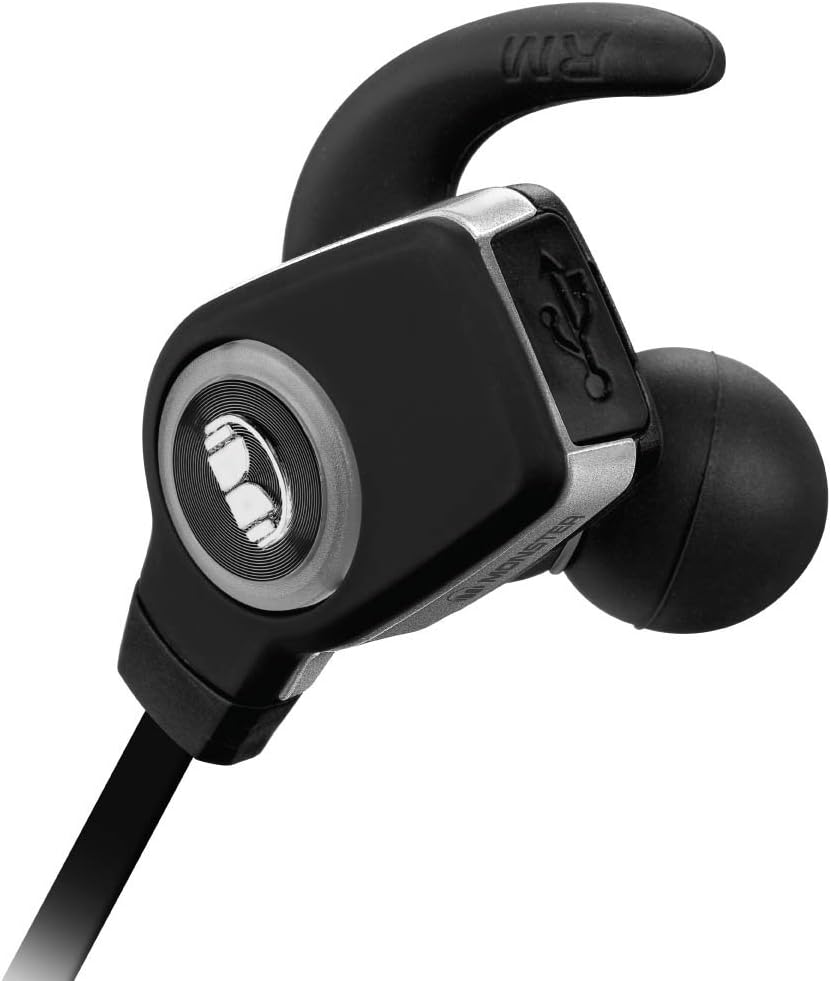
Image: A detailed view of a single Monster iSport Superslim earbud, highlighting its ergonomic shape and the integrated Sport clip designed for a secure fit.
Operating Instructions
The inline remote control allows for easy management of audio playback and calls.

Image: The front side of the inline remote control for the Monster iSport Superslim headphones, featuring clearly visible volume up (+) and volume down (-) buttons, and a central multi-function button.

Image: The reverse side of the inline remote control, displaying the Monster logo and branding.
Power On/Off
- Power On: Press and hold the multi-function button until the indicator light illuminates.
- Power Off: Press and hold the multi-function button until the indicator light turns off.
Music Playback Control
- Play/Pause: Press the multi-function button once.
- Next Track: Double-press the multi-function button.
- Previous Track: Triple-press the multi-function button.
- Volume Up: Press the '+' button.
- Volume Down: Press the '-' button.
Call Management
- Answer/End Call: Press the multi-function button once.
- Reject Call: Press and hold the multi-function button for 2 seconds.
- Redial Last Number: Double-press the multi-function button when not on a call.
Maintenance
Proper care ensures the longevity and performance of your headphones.
- Cleaning: Gently wipe the earbuds and cable with a soft, dry cloth. For eartips, remove them and clean with mild soap and water, then dry thoroughly before reattaching.
- Storage: When not in use, store the headphones in the included travel pouch to protect them from dust and damage. Avoid extreme temperatures.
- Water Resistance: The headphones are water resistant, making them suitable for sports and exercise. However, they are not designed for submersion. Avoid exposing them to excessive moisture or direct water jets.
- Battery Care: To preserve battery life, avoid fully discharging the headphones frequently. Charge them regularly, even if not in constant use.
Troubleshooting
If you encounter issues, try the following solutions:
| Problem | Solution |
|---|---|
| Headphones won't turn on. | Ensure the headphones are charged. Connect to a power source and allow time to charge. |
| Cannot pair with device. |
|
| No sound or low volume. |
|
| Sound crackling or cutting out. |
|
Specifications
- Model: MH ISRT WLS IE BK BT WW
- Connectivity: Bluetooth (apt-X + AAC)
- Ear Placement: In-Ear
- Control Type: Media Control, Remote
- Noise Control: Sound Isolation
- Battery Life: Up to 5 hours
- Bluetooth Range: Up to 10 meters (33 feet)
- Water Resistance: Water Resistant (suitable for sports)
- Material: Plastic
- Dimensions: 6 x 1.63 x 8.75 inches (Product)
- Item Weight: 7.52 ounces
- Included: Micro-USB charging cable, travel pouch, various eartips and Sport clips.
Warranty and Support
For detailed warranty information, product registration, or technical support, please refer to the documentation included with your product or visit the official Monster website. Keep your proof of purchase for warranty claims.
Manufacturer: Monster Power, LLC
Related documentsMH ISRT WLS IE BK BT WW


Ask a question about this manual
Ask about setup, troubleshooting, compatibility, parts, safety, or missing instructions. Manuals+ will review the question and use this page’s manual context to help answer it.