
1. Introduction
Thank you for choosing the VicTsing Clip-On 3-in-1 Camera Lens Kit. This kit enhances your mobile photography experience by providing three distinct lenses: a Fisheye lens for wide, distorted perspectives, a 12X Macro lens for detailed close-up shots, and a 24X Super Macro lens for extreme magnification of tiny subjects. This manual provides instructions for proper setup, operation, and maintenance to ensure optimal performance and longevity of your lens kit.
2. Package Contents
Please verify that all items listed below are included in your package:
- Fisheye Lens
- 12X Macro Lens (screwed onto the 24X Super Macro Lens)
- 24X Super Macro Lens (base for 12X Macro Lens)
- Universal Clip (2 pieces)
- Lens Caps (for protection)
- Cleaning Cloth
- Carrying Case with Carabiner

Image: All components included in the VicTsing 3-in-1 Camera Lens Kit.
3. Product Overview
The VicTsing lens kit provides versatile options for mobile photography. Each lens offers a unique perspective:
- Fisheye Lens: Captures a wide, hemispherical image, creating a strong visual distortion for artistic effects.
- 12X Macro Lens: Designed for close-up photography, allowing you to capture intricate details of small objects.
- 24X Super Macro Lens: Provides extreme magnification for capturing the finest details of very small subjects. This lens features a transparent layer to assist with focusing distance.

Image: Visual representation of the Fisheye, 12X Macro, and 24X Super Macro lenses with example photography.
4. Setup and Installation
4.1 Attaching the Lenses to the Clip
- Select the desired lens. The 12X Macro lens and 24X Super Macro lens are initially screwed together. To use the 12X Macro lens independently, gently unscrew it counter-clockwise from the 24X Super Macro lens. The 24X Super Macro lens cannot be used independently without the 12X Macro lens attached to it.
- Screw the chosen lens clockwise onto the threaded opening of the universal clip until it is securely fastened.
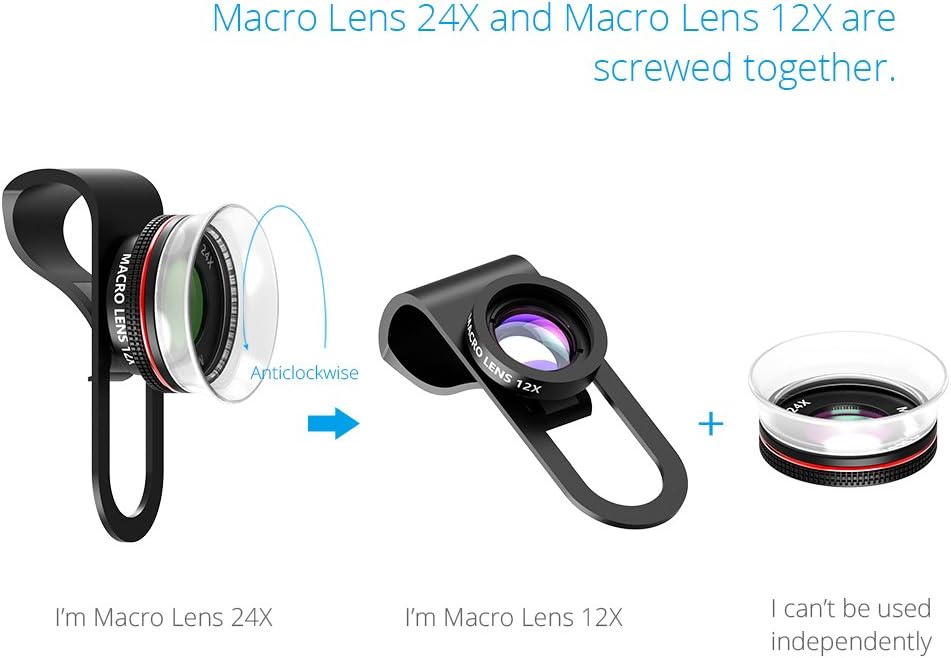
Image: Instructions for separating the 12X Macro lens from the 24X Super Macro lens.
4.2 Attaching the Clip to Your Device
- Ensure your smartphone or tablet camera lens is clean.
- Carefully position the universal clip over your device's camera lens. Align the attached VicTsing lens directly over your device's camera lens.
- The clip features soft cushions to protect your device from scratches. Ensure the clip is firmly but gently secured, covering the device's camera lens completely.
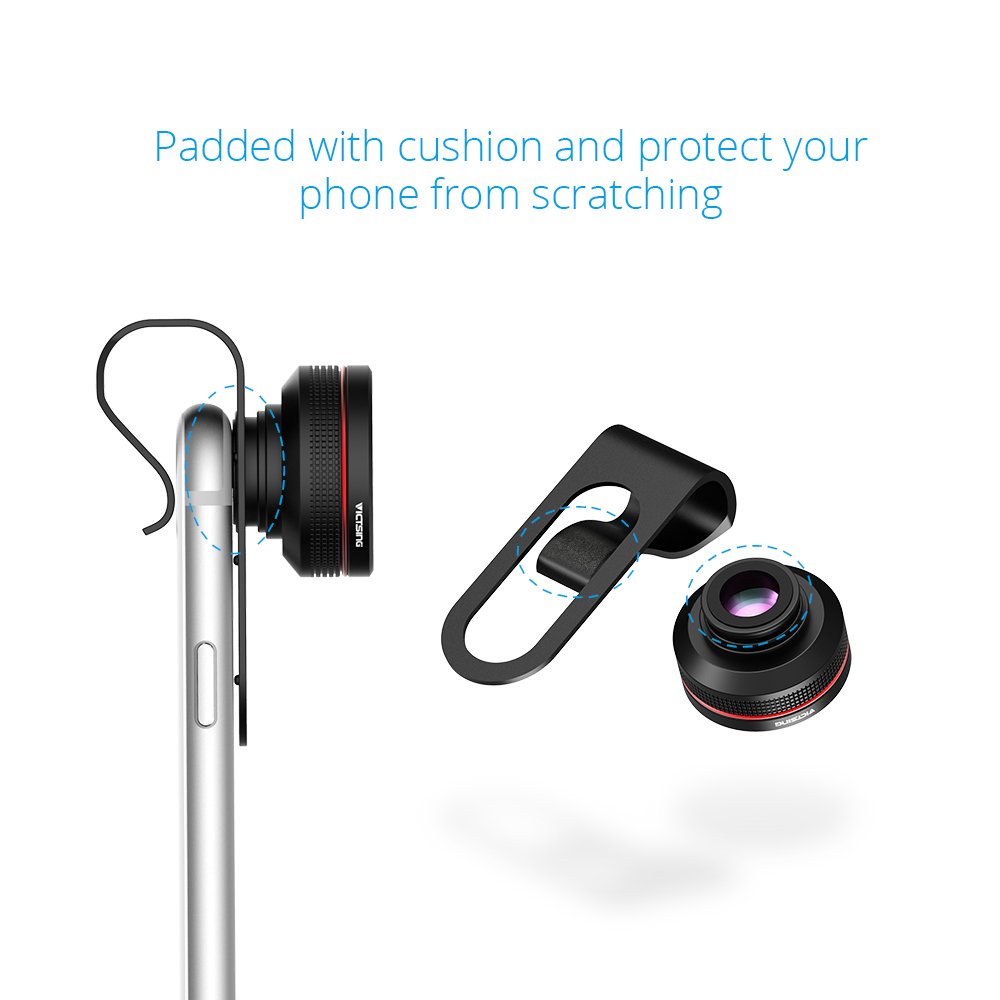
Image: Proper attachment of the universal clip to a smartphone, highlighting the protective cushions.

Image: Front and back views of the lens kit attached to a smartphone.
5. Operating Instructions
5.1 General Usage Tips
- Ensure the external lens is perfectly centered over your phone's camera to avoid vignetting (dark corners) or blurry edges.
- For best results, use in well-lit environments. External lenses can sometimes interfere with your phone's flash.
- Clean lenses regularly with the provided cleaning cloth to prevent dust and smudges from affecting image quality.
- Compatible with various devices including Apple iPhone 4S, iPhone 6 Plus, Samsung Galaxy S3, S4, S5, S6, and S6 Edge.
5.2 Using the Fisheye Lens
Attach the Fisheye lens to the universal clip and align it with your phone's camera. This lens is ideal for capturing expansive landscapes, group photos, or creative shots with a unique, spherical distortion. Experiment with different angles to achieve desired effects.

Image: Example of a photo taken with the Fisheye lens, showing a wide-angle view of boats on a lake.
5.3 Using the 12X Macro Lens
To use the 12X Macro lens, ensure it is unscrewed from the 24X Super Macro lens and attached directly to the clip. This lens allows you to capture detailed close-up images of small subjects like flowers, insects, or textures. Hold your phone steady and move closer to the subject until it is in focus. The depth of field will be shallow, so precise focusing is key.

Image: Example of a photo taken with the 12X Macro lens, highlighting fine details of a butterfly.
5.4 Using the 24X Super Macro Lens
To use the 24X Super Macro lens, ensure the 12X Macro lens is screwed onto it. This combined unit is then attached to the universal clip. The 24X Super Macro lens is designed for extreme close-up photography. It features a transparent layer around the lens. To achieve focus, gently place this transparent layer directly onto the subject you wish to photograph. This fixes the optimal focusing distance. Due to the high magnification and shallow depth of field, a tripod and good lighting are highly recommended for stable and clear images.

Image: The 24X Super Macro lens attached to a smartphone, demonstrating its use for extreme close-up shots.
6. Maintenance
- Cleaning Lenses: Use the provided microfiber cleaning cloth to gently wipe dust and smudges from the lens surfaces. Avoid using abrasive materials or harsh chemicals, which can damage the lens coating.
- Storage: When not in use, store the lenses in the protective carrying case to prevent scratches and dust accumulation. Ensure lens caps are on.
- Handling: Handle lenses by their metal barrels, avoiding touching the glass surfaces directly.
7. Troubleshooting
- Blurry Images:
- Ensure the lens is clean and free of smudges.
- Verify the external lens is perfectly aligned and centered over your phone's camera.
- For macro lenses, adjust the distance to your subject carefully. For 24X Super Macro, ensure the transparent layer is touching the subject.
- Ensure sufficient lighting.
- Dark Corners (Vignetting):
- Re-align the external lens to be perfectly centered over your phone's camera.
- Some slight vignetting may occur with certain phone models or lens combinations due to the nature of clip-on lenses.
- Difficulty Focusing:
- Your phone's autofocus may struggle with extreme macro shots. Try manually tapping on the screen to focus on your desired subject.
- For 24X Super Macro, the focus distance is very precise; use the transparent layer as a guide.
- Clip Not Fitting Securely:
- Ensure the clip is fully opened and positioned correctly.
- The clip is designed to accommodate most phone cases, but very thick or unusually shaped cases may require removal for optimal fit.
8. Specifications
| Brand | VicTsing |
| Model Number | VS1-AC026BVT |
| Lens Types | Fisheye, 12X Macro, 24X Super Macro |
| Maximum Focal Length | 15 Millimeters |
| Lens Design | Zoom |
| Color | Black |
| Item Weight | 3.5 Ounces |
| Compatible Devices | Apple iPhone 4S, iPhone 6 Plus, Samsung Galaxy S3, S4, S5, S6, S6 Edge |
9. Warranty and Support
For warranty information or technical support, please refer to the product packaging or contact your retailer. Keep your purchase receipt as proof of purchase for any warranty claims.