
Introduction
This manual provides comprehensive instructions for the safe and efficient operation, maintenance, and troubleshooting of your KitchenAid 2.0 cu. ft. Over-the-Range Microwave with Sensor Cooking. Please read all instructions carefully before using the appliance and retain this manual for future reference.

Image: Front view of the KitchenAid 2.0 cu. ft. Over-the-Range Microwave in Stainless Steel.
Important Safety Instructions
When using electrical appliances, basic safety precautions should be followed, including the following:
- Read all instructions before using the appliance.
- Do not operate the oven if the door or door seals are damaged.
- Do not heat liquids or other foods in closed containers as they are liable to explode.
- Do not attempt to tamper with or make any adjustments or repairs to the door, control panel, safety interlock switches, or any other part of the oven.
- Only allow children to use the oven without supervision when adequate instructions have been given so that the child is able to use the oven in a safe way and understands the hazards of improper use.
- Do not use corrosive chemicals or vapors in this appliance.
- Always ensure proper ventilation during operation.
Setup
Unpacking and Placement
Carefully remove all packaging materials. Ensure the microwave is placed on a flat, stable surface or properly installed over a range. Refer to the separate installation instructions for detailed mounting procedures. Ensure adequate clearance around the appliance for proper ventilation.

Image: KitchenAid microwave installed above a range in a kitchen setting.
Turntable Installation
Place the turntable support ring in the center of the microwave oven cavity. Position the glass turntable plate securely on the support ring. Ensure the turntable rotates freely.
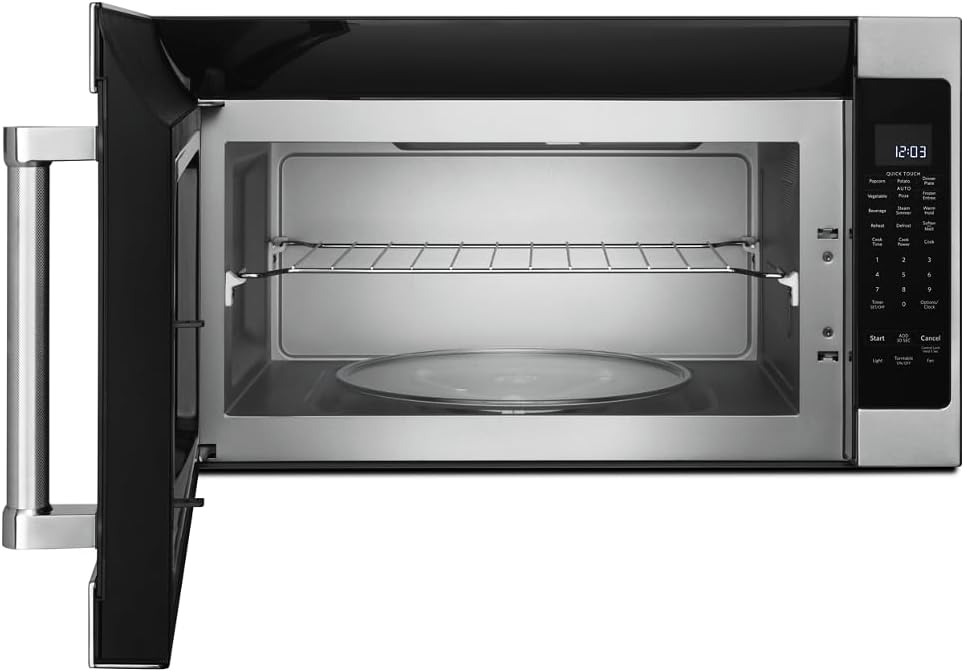
Image: Interior view of the microwave showing the glass turntable and support ring.
Operating Instructions
Basic Operation
- Setting the Clock: Press 'Options/Clock', then enter the current time using the number pad. Press 'Options/Clock' again to confirm.
- Quick Start: Press 'Start' to begin cooking immediately for 30 seconds at 100% power. Press 'Add 30 Sec' to add 30 seconds to the cooking time.
- Cook Time: Press 'Cook Time', enter the desired cooking time, then press 'Start'.
- Cook Power: After setting 'Cook Time', press 'Cook Power', enter the desired power level (1-10, 10 being 100%), then press 'Start'.
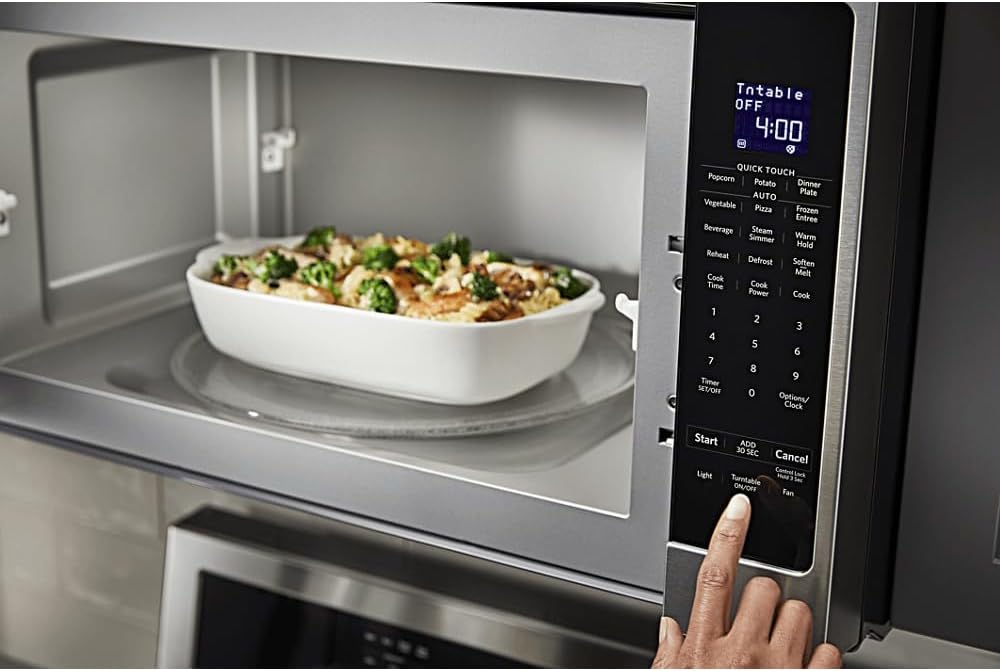
Image: Detailed view of the microwave's control panel with various cooking options.
Quick Touch Functions
The microwave features several one-touch cooking options:
- Popcorn: For automatic popcorn popping.
- Potato: For baking potatoes.
- Pizza: For reheating pizza slices.
- Beverage: For heating drinks.
- Reheat: For reheating various food items.
- Defrost: For defrosting food by weight or time.
Sensor Cooking
The sensor cooking feature automatically adjusts cooking time and power levels based on the food's moisture content. Select the desired sensor cooking option (e.g., 'Vegetable', 'Frozen Entree', 'Dinner Plate') and press 'Start'. The microwave will detect when the food is cooked.

Image: Interior of the microwave showing food items on the turntable and a removable rack.
Special Features
- Steam Simmer: For steaming or simmering foods.
- Warm Hold: Keeps cooked food warm for an extended period.
- Soften/Melt: For softening butter, melting chocolate, or other similar tasks.
- Light: Controls the under-cabinet light.
- Turntable On/Off: Allows you to stop the turntable rotation for larger dishes.
- Fan: Controls the exhaust fan speed.

Image: A person's hand operating the control panel of the KitchenAid microwave.
Maintenance
Cleaning the Interior
Clean the interior of the microwave regularly with a mild detergent and a soft cloth. For stubborn food splatters, place a bowl of water with lemon slices inside and microwave for a few minutes to loosen residue, then wipe clean.
Cleaning the Exterior
Wipe the exterior surfaces, including the control panel and door, with a soft cloth and mild detergent. For stainless steel surfaces, use a stainless steel cleaner and polish in the direction of the grain.
Filter Maintenance
The microwave is equipped with grease filters and may have a charcoal filter. Clean the grease filters monthly by washing them in hot, soapy water or in a dishwasher. Replace the charcoal filter (if present) approximately every 6 to 12 months, depending on usage.
Troubleshooting
If you experience issues with your microwave, consult the following common problems and solutions:
| Problem | Possible Cause | Solution |
|---|---|---|
| Microwave does not start | Door not closed properly; Power cord unplugged; Blown fuse/tripped circuit breaker. | Ensure door is securely closed; Check power connection; Reset circuit breaker or replace fuse. |
| Food not heating evenly | Food not stirred/rotated; Incorrect power level; Turntable not rotating. | Stir or rotate food during cooking; Adjust power level; Ensure turntable is correctly placed and functioning. |
| Unusual noises during operation | Turntable not seated correctly; Foreign object in cavity. | Re-seat turntable; Check for and remove any obstructions. |
If the problem persists after attempting these solutions, please contact customer support.
Specifications
| Feature | Detail |
|---|---|
| Brand | KitchenAid |
| Model Number | KMHS120ESS |
| Product Dimensions (D x W x H) | 16.13" x 30" x 17.13" |
| Capacity | 2.0 Cubic Feet |
| Wattage | 1000 watts |
| Material | Stainless Steel |
| Installation Type | Over-the-Range |
| Special Feature | Turntable, Sensor Cooking |
| Controller Type | Button |
| Number of Programs | 10 |
| Timer Function | Available |
| Included Components | Glass Turntable, Turntable Support Ring, Removable Rack |
Warranty and Support
Warranty Information
This KitchenAid appliance comes with a limited warranty. Please refer to the warranty card included with your product for specific terms, conditions, and duration of coverage. Keep your proof of purchase for warranty claims.
Customer Support
For technical assistance, service, or to order replacement parts, please contact KitchenAid Customer Service. Contact details can typically be found on the manufacturer's website or on your product registration card.
Online Support: Visit the official KitchenAid website for FAQs, product registration, and service scheduling.
Telephone Support: Refer to your product documentation for the appropriate customer service phone number in your region.


