
Introduction
This manual provides essential information for the safe and efficient operation of your RCF Evox 12 Portable Array Powered Active Speaker System. Please read this manual thoroughly before using the product to ensure proper setup, operation, and maintenance. Retain this manual for future reference.
Product Overview
The RCF EVOX 12 is a high-performance 1400-watt PA System designed for live sound applications. It features a powerful 15-inch subwoofer and a 4-inch top array, delivering balanced and clear audio. The system is built with durable components, offering a maximum Sound Pressure Level (SPL) of 130dB. Integrated Digital Signal Processing (DSP) optimizes sound performance. Its design includes built-in wheels and a handle for enhanced portability, making it suitable for small to medium-sized event environments.
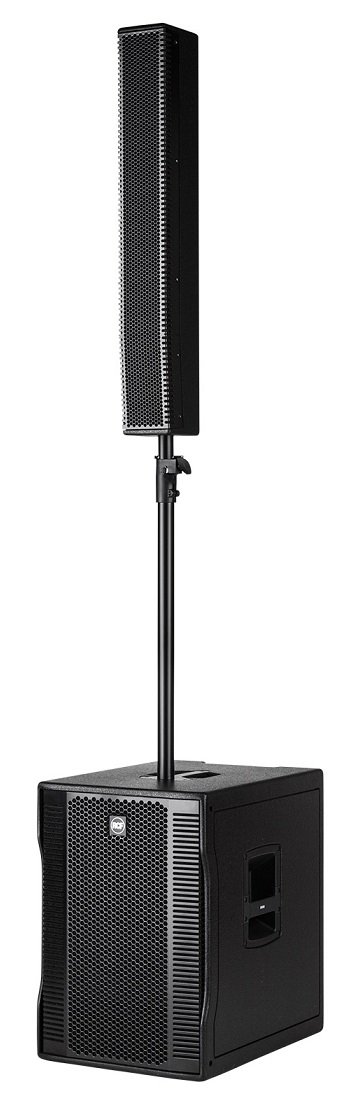
Image: Front view of the RCF Evox 12 Portable Array Powered Active Speaker System, showcasing the subwoofer unit with the RCF logo and the speaker grille.
What's in the Box
Upon unpacking, verify that all listed components are present and in good condition:
- 1 x EVOX 12 Subwoofer Unit
- 1 x EVOX 12 Column Array (Top Speaker)
- 1 x Speaker Pole for mounting the column array
- 1 x Power Adaptor
- 2 x RCF Bags (for transport and protection)
- 1 x User Manual (this document)
Setup Instructions
- Placement: Position the EVOX 12 subwoofer on a stable, flat surface. Ensure adequate ventilation around the unit.
- Mounting the Column Array: Insert the speaker pole into the designated pole mount on top of the subwoofer unit. Secure the pole firmly. Carefully attach the column array speaker to the top of the speaker pole. Ensure it is stable and locked into place.
- Power Connection: Connect the power adaptor to the EVOX 12 subwoofer's power input and then to a suitable AC power outlet.
- Audio Input: Connect your audio source (mixer, instrument, microphone) to the XLR input connectors on the subwoofer unit. The EVOX 12 supports XLR connectivity.
- System Power On: Before powering on, ensure all volume controls are set to minimum. Power on your audio source devices first, then power on the EVOX 12 system.
Operating Instructions
- Volume Control: Gradually increase the master volume control on the EVOX 12 subwoofer to the desired listening level. Adjust individual input levels on your audio source as needed.
- DSP Presets: The EVOX 12 features onboard DSP. Refer to the control panel for available presets (e.g., Flat, Boost, Playback, Club) and select the one that best suits your application and environment.
- Input Gain: Adjust the input gain for each connected source to prevent clipping and ensure optimal signal-to-noise ratio.
- Power Off Sequence: When finished, first turn down the master volume on the EVOX 12, then power off the system, followed by your audio source devices.
Maintenance
- Cleaning: Use a soft, dry cloth to clean the exterior surfaces of the speaker system. Avoid using abrasive cleaners or solvents.
- Storage: When not in use, store the EVOX 12 in a dry, cool environment, preferably in its protective bags, to prevent dust accumulation and physical damage.
- Cable Management: Ensure all cables are properly coiled and secured during transport and storage to prevent damage.
- Inspection: Periodically inspect cables, connectors, and the speaker pole for any signs of wear or damage. Replace damaged components immediately.
Troubleshooting
| Problem | Possible Cause | Solution |
|---|---|---|
| No sound output |
|
|
| Distorted sound |
|
|
| System not powering on |
|
|
Specifications
| Brand | RCF |
| Model Number | EVOX 12 |
| Speaker Maximum Output Power | 1400 Watts |
| Signal-to-Noise Ratio (SPL) | 130 dB |
| Subwoofer Diameter | 15 Inches |
| Tweeter Diameter | 1 Inches |
| Connectivity Technology | XLR (Wired) |
| Audio Output Mode | Stereo |
| Mounting Type | Freestanding, Wheel Mount |
| Additional Features | Portable, Onboard DSP |
| Power Source | Corded Electric |
| Specific Uses | Events and Performances |
| Color | Black |
| Water Resistance Level | Not Water Resistant |
Warranty and Support
The RCF Evox 12 Portable Array Powered Active Speaker System comes with a 90-day limited warranty. This warranty covers manufacturing defects under normal use. For warranty claims or technical support, please contact RCF customer service or your authorized dealer. Keep your proof of purchase for warranty validation.
For further assistance, you may visit the official RCF website or consult their online resources for FAQs and additional support documentation.


