
1. Introduction
The K&F Concept Flash Speedlite KF-882 is an advanced external flash unit designed for Canon DSLR cameras, offering versatile lighting solutions for various photographic needs. This E-TTL compatible speedlite functions as both a master and slave unit, providing flexible control over your lighting setup. It features a high guide number, rapid recycle time, and high-speed synchronization capabilities, making it suitable for capturing fast-moving subjects and working in diverse lighting conditions.
Key features include:
- Guide No. GN58 (ISO 100, 180mm) for powerful illumination.
- 1/8000s high-speed synchronization function to freeze motion.
- Wireless Master/Slave functionality and S1/S2 optical light flashing modes.
- Large LCD screen with backlight for easy information display in low light.
- Fast 2.9-second recycle time for continuous shooting.
2. Product Components and Overview
Familiarize yourself with the various parts of your KF-882 Speedlite for optimal use.
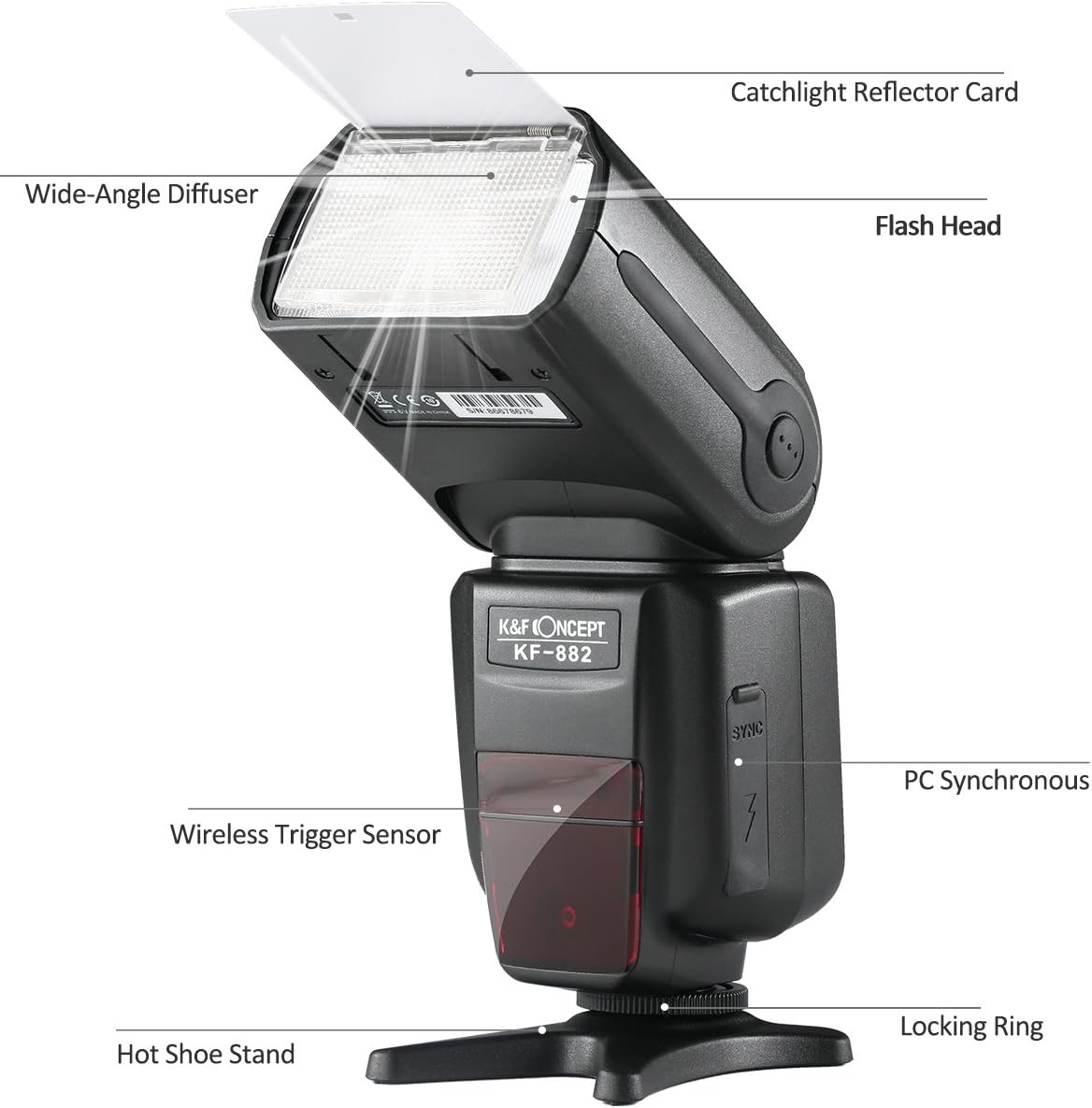
Figure 2.1: Labeled components of the K&F Concept KF-882 Speedlite. This image highlights the Flash Head, Wide-Angle Diffuser, Catchlight Reflector Card, Wireless Trigger Sensor, PC Synchronous port, Locking Ring, and Hot Shoe Stand.

Figure 2.2: Detailed view of the KF-882's LCD display and control panel. This shows the LCD Display, Wireless Button, Test/Charging Indicator, Mode Switch Button, Flash Button/Charge Lamp, Mount Pin, On/Off button, Adjustment Button, and the High-Speed/Back Screen Shift Button.
3. Getting Started (Setup)
3.1 Battery Installation
The KF-882 Speedlite operates on four AA batteries. For best performance and recycle times, use high-quality alkaline or Ni-MH rechargeable batteries.
- Locate the battery compartment on the side of the speedlite.
- Slide the battery compartment cover open.
- Insert four AA batteries according to the polarity indicators (+/-) inside the compartment.
- Close the battery compartment cover securely.

Figure 3.1: View of the battery compartment, hot shoe mount, and external power port.
3.2 Mounting the Speedlite
To attach the KF-882 to your camera's hot shoe:
- Ensure both the camera and the speedlite are turned off.
- Slide the speedlite's hot shoe mount fully into your camera's hot shoe.
- Rotate the locking ring clockwise until it is securely tightened. Do not overtighten.
- To remove, rotate the locking ring counter-clockwise and slide the speedlite off.
The speedlite also comes with a mini stand for off-camera use.
4. Operating Modes
The KF-882 offers several operating modes to suit different photographic scenarios. Press the MODE button to cycle through the available modes.

Figure 4.1: Examples of the LCD display in E-TTL, Manual, and Multi modes.
4.1 E-TTL Mode (Automatic Flash)
In E-TTL (Evaluative Through-The-Lens) mode, the speedlite automatically determines the optimal flash output based on the camera's metering system. This is the most common mode for general photography.
- Set the speedlite to E-TTL mode using the MODE button.
- The LCD will display "E-TTL".
- The flash output is automatically adjusted by the camera. You can use Flash Exposure Compensation (FEC) on your camera or the speedlite to fine-tune the brightness.
4.2 Manual (M) Mode
Manual mode allows you to set the flash output power manually, from 1/1 (full power) to 1/128 power in 1/3 stop increments. This mode offers precise control over lighting.
- Set the speedlite to M mode using the MODE button.
- Use the adjustment buttons to select the desired flash output power.
4.3 Multi (Stroboscopic) Mode
Multi mode fires the flash multiple times during a single exposure, creating a stroboscopic effect for capturing motion sequences.
- Set the speedlite to Multi mode using the MODE button.
- Adjust the flash output, frequency (Hz), and number of flashes using the adjustment buttons.
4.4 Wireless Master/Slave Functionality
The KF-882 supports wireless master and slave functions, allowing you to control or be controlled by other compatible flash units.
- Master Mode: The KF-882 can act as a master unit to control other slave speedlites.
- Slave Mode: The KF-882 can be triggered by a master flash unit (e.g., your camera's built-in flash or another speedlite).
- Refer to your camera's manual for specific settings related to wireless flash control.
4.5 S1/S2 Optical Slave Modes
These modes allow the KF-882 to be triggered by another flash without a direct connection.
- S1 Mode: The speedlite fires when it detects the first flash from a master unit. Ideal for manual flash triggering.
- S2 Mode: The speedlite ignores the pre-flash (if any) from a master unit and fires on the main flash. Useful for cameras that emit a pre-flash for red-eye reduction or TTL metering.
4.6 High-Speed Synchronization (HSS)
The KF-882 supports high-speed synchronization up to 1/8000s, allowing you to use flash at shutter speeds faster than your camera's native flash sync speed. This is useful for overpowering ambient light or using wide apertures in bright conditions.
- Activate HSS on your camera's flash settings (refer to your camera manual).
- The speedlite will automatically switch to HSS mode when detected.
4.7 Zoom Function
The flash head's zoom position can be set automatically or manually to match the focal length of your lens, optimizing light coverage.
- Auto Zoom: The speedlite automatically adjusts the zoom position based on the camera's lens focal length.
- Manual Zoom: Press the ZOOM button and use the adjustment buttons to manually set the zoom position (e.g., 24mm, 35mm, 50mm, 70mm, 80mm, 105mm, 135mm, 180mm).

Figure 4.2: The flash head can be rotated and tilted for bounce flash photography.
5. Care and Maintenance
Proper care and maintenance will extend the life of your KF-882 Speedlite.
- Cleaning: Use a soft, dry cloth to clean the speedlite body. For stubborn dirt, slightly dampen the cloth with water. Do not use organic solvents or strong cleaning agents.
- Storage: When not in use for extended periods, remove the batteries to prevent leakage. Store the speedlite in a cool, dry place, away from direct sunlight and extreme temperatures. The included protective bag is ideal for storage and transport.
- Battery Care: Always use fresh, high-quality batteries. If using rechargeable batteries, ensure they are fully charged before use.

Figure 5.1: The KF-882 Speedlite with its protective bag and soft diffuser.
6. Troubleshooting
If you encounter issues with your KF-882 Speedlite, refer to the following common problems and solutions:
| Problem | Possible Cause | Solution |
|---|---|---|
| Speedlite does not power on. | Batteries are dead or incorrectly inserted. | Replace batteries or check polarity. |
| Flash does not fire. | Speedlite not securely mounted; camera not recognizing flash; flash in sleep mode; low battery. | Ensure secure connection; check camera flash settings; press test button to wake; replace batteries. |
| Flash output is too bright/dark. | Incorrect flash exposure compensation (FEC) or manual power setting. | Adjust FEC on camera or speedlite; adjust manual power setting. |
| Long recycle time. | Batteries are low or of poor quality; high power output setting. | Replace batteries with fresh, high-quality ones; use lower power settings when possible. |
| Flash head does not zoom correctly. | Zoom function set to manual; obstruction. | Set zoom to auto; check for obstructions. |
If the problem persists, please contact K&F Concept customer support.
7. Technical Specifications
| Feature | Specification |
|---|---|
| Model Number | KF-882 (KF22.004) |
| Guide Number | GN58 (ISO 100, 180mm) |
| Flash Mode | E-TTL, M, Multi |
| Wireless Mode | Master, Slave, S1, S2 |
| Flash Sync Speed | Up to 1/8000s (High-Speed Sync) |
| Recycle Time | Approx. 2.9 seconds |
| Zoom Range | Auto, 24-180mm (manual) |
| Vertical Rotation Angle | -7 to 90 degrees |
| Horizontal Rotation Angle | 0 to 180 degrees |
| Power Source | 4 x AA size batteries (Alkaline or Ni-MH) |
| Color Temperature | 5600K |
| Dimensions (L x W x H) | 22.86 x 10.41 x 10.41 cm (Parcel Dimensions) |
| Weight | 600 g |
| Compatible Mountings | Canon DSLR |
| Included Components | Protect bag, Mini stand, White Soft Diffuser |
8. Warranty and Support
K&F Concept products are designed for reliability and performance. For warranty information, please refer to the documentation included with your purchase or visit the official K&F Concept website. For technical support, troubleshooting assistance, or service inquiries, please contact K&F Concept customer service through their official channels.
You can find more information and support resources by visiting the K&F Concept Store on Amazon.