
Introduction
Thank you for purchasing the SAMI RS-2913 Portable AM/FM Radio. This compact and lightweight radio is designed for convenient listening on the go. Please read this manual carefully before using the device to ensure proper operation and to maximize its lifespan. Keep this manual for future reference.
Important Safety Information
- Do not expose the radio to extreme temperatures, direct sunlight, or high humidity.
- Avoid dropping or subjecting the radio to strong impacts.
- Do not attempt to disassemble or modify the radio. This will void the warranty.
- Use only the specified battery type (2 x AAA batteries). Ensure correct polarity when inserting batteries.
- Remove batteries if the radio will not be used for an extended period to prevent leakage.
- Clean the radio with a soft, dry cloth. Do not use liquid cleaners or aerosols.
- Listen at moderate volume levels to protect your hearing.
Package Contents
Please check that all items are present:
- SAMI RS-2913 Portable AM/FM Radio
- Headphones (silicone headphones)
- User Manual (this document)
Note: 2 x "AAA" batteries are not included and must be purchased separately.
Product Overview
Familiarize yourself with the components of your SAMI RS-2913 radio:
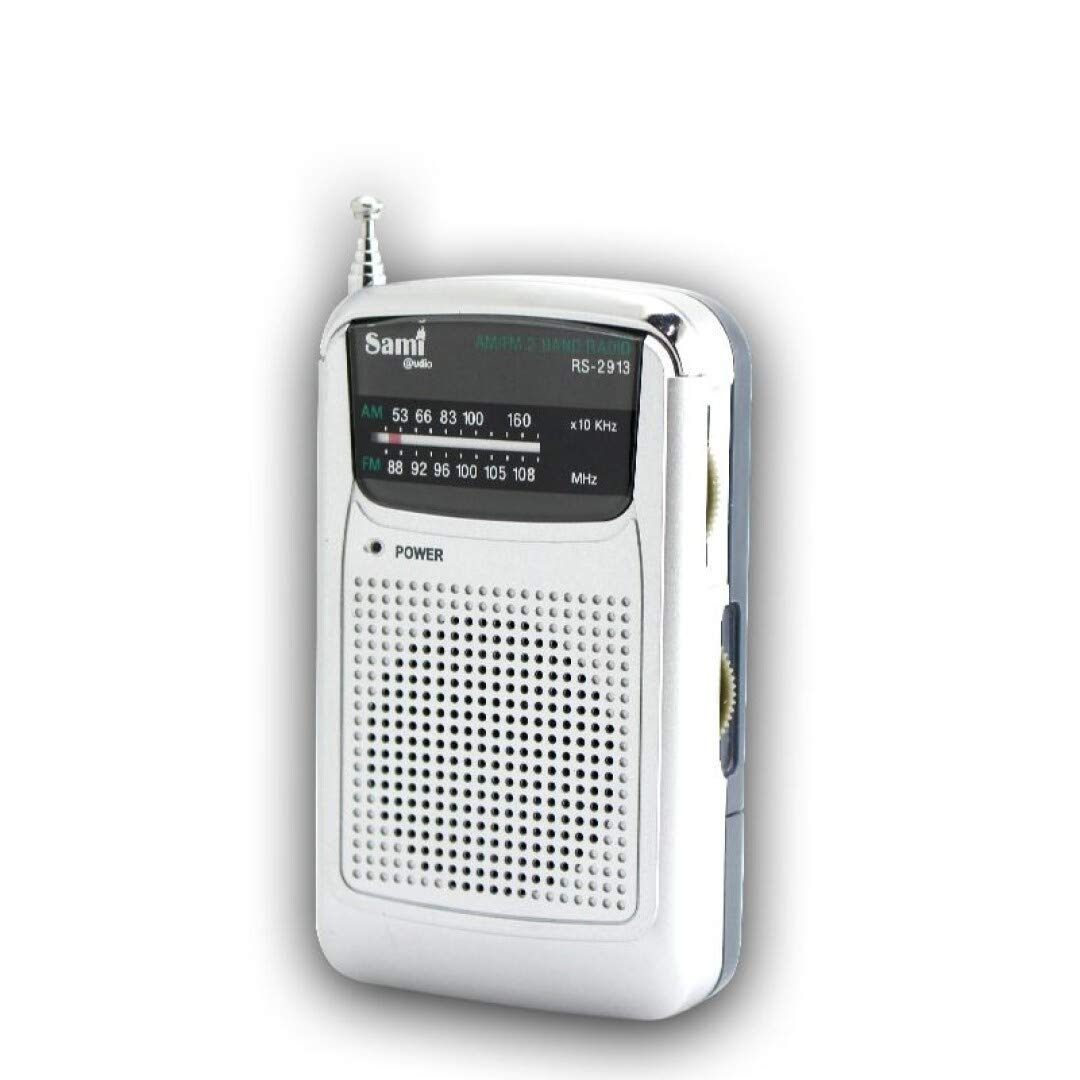
Image 1: Front view of the SAMI RS-2913 Portable AM/FM Radio. The image highlights features such as AM/FM 2-band receiver, high-quality integrated circuit, belt clip, included headphones, high-quality reception, power indicator, telescopic antenna, and the requirement for 2 x AAA batteries (not included). The model number RS-2913 is visible on the display area, along with frequency scales for AM (53-160 x10 KHz) and FM (88-108 MHz). The power button and speaker grille are also visible on the front.
- Telescopic Antenna: For improved radio signal reception.
- Tuning Dial/Display: Shows the selected frequency for AM and FM bands.
- Power Indicator (LED): Illuminates red when the radio is powered on.
- Power Button: To turn the radio on or off.
- Speaker: Integrated speaker for audio output.
- Headphone Jack: 3.5mm port for connecting the included headphones.
- Volume Control: Rotary dial to adjust the audio volume.
- Tuning Knob: Rotary dial to select radio stations.
- Band Selector Switch: To switch between AM and FM bands.
- Battery Compartment: Located on the back, for 2 x AAA batteries.
- Belt Clip: For attaching the radio to clothing or a bag.
Setup
1. Battery Installation
- Locate the battery compartment cover on the back of the radio.
- Slide or lift the cover to open the compartment.
- Insert 2 x "AAA" batteries, ensuring the correct polarity (+ and -) as indicated inside the compartment.
- Close the battery compartment cover securely.
Note: Always use fresh batteries for optimal performance.
2. Headphone Connection
If you wish to listen privately, connect the included headphones to the 3.5mm headphone jack located on the side of the radio.
Operating Instructions
1. Powering On/Off
- To turn the radio ON, press the POWER button. The red LED power indicator will illuminate.
- To turn the radio OFF, press the POWER button again. The red LED power indicator will turn off.
2. Selecting a Band (AM/FM)
Use the BAND SELECTOR SWITCH (usually on the side or top) to choose between AM and FM radio bands.
3. Tuning to a Station
- Extend the TELESCOPIC ANTENNA for better FM reception. For AM reception, the radio has an internal antenna, but rotating the radio might improve signal quality.
- Slowly rotate the TUNING KNOB to scan for radio stations.
- Observe the frequency scale on the display to identify the station's frequency.
4. Adjusting Volume
Rotate the VOLUME CONTROL dial (typically on the side) to increase or decrease the audio output level.
5. Using the Belt Clip
The integrated belt clip on the back of the radio allows you to conveniently attach the device to your belt, pocket, or bag for hands-free portability.
Maintenance
- Cleaning: Wipe the radio with a soft, dry, lint-free cloth. Do not use abrasive cleaners, waxes, or solvents.
- Storage: When not in use for extended periods, store the radio in a cool, dry place, away from direct sunlight and extreme temperatures. Remove batteries before storage.
- Battery Replacement: Replace batteries when the sound becomes weak or distorted, or the power indicator light dims.
Troubleshooting
| Problem | Possible Cause | Solution |
|---|---|---|
| No sound or very low volume. |
|
|
| Poor reception or static. |
|
|
| Power indicator (LED) does not light up. |
|
|
Specifications
- Model: RS-2913
- Tuner Type: Analog
- Radio Bands: AM/FM (2-band receiver)
- Frequency Range:
- AM: 530 - 1600 KHz
- FM: 88 - 108 MHz
- Power Source: 2 x AAA batteries (not included)
- Audio Output: Integrated speaker, 3.5mm headphone jack
- Antenna: Telescopic (FM), Internal (AM)
- Included Accessories: Silicone headphones
- Dimensions (approx.): 9.3 x 5.6 x 2.8 cm (Length x Width x Depth)
- Weight (approx.): 100 g
Warranty and Support
For warranty information, please refer to the warranty card included with your purchase or contact your retailer. For technical support or inquiries, please contact SAMI customer service through their official website or the contact details provided with your product documentation.
