
Introduction
Welcome to the F&D A150X 2.1 Multimedia Bluetooth Speakers user manual. This guide provides essential information for setting up, operating, maintaining, and troubleshooting your new speaker system. Please read these instructions carefully before use to ensure optimal performance and longevity of your product.
Setup
Unpacking
Carefully remove all components from the packaging. Ensure you have the subwoofer, two satellite speakers, remote control, and all necessary cables.
Component Connection
Connect the satellite speakers to the corresponding output ports on the subwoofer. Ensure a secure connection.
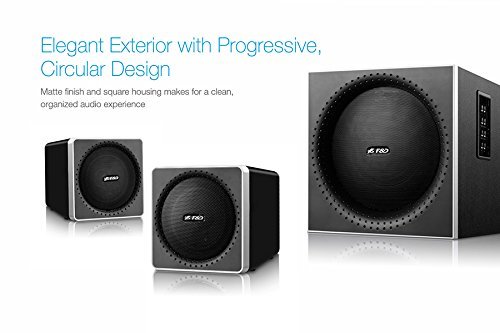
Image: The F&D A150X 2.1 speaker system showing the subwoofer and two satellite speakers. The subwoofer features a progressive circular design.
Power Connection
Connect the power cable to the subwoofer and then plug it into a standard electrical outlet.
Initial Power On
Press the power button on the subwoofer or remote control to turn on the system. The LED indicator will illuminate.
Operating Instructions
Power On/Off
Press the POWER button on the remote control or the main unit to switch the speakers on or off.
Mode Selection
Press the MODE button on the remote or main unit to cycle through available input sources: Bluetooth, AUX, USB, SD, and FM Radio.

Image: The F&D A150X 2.1 Bluetooth speaker system, illustrating connectivity options like Bluetooth and NFC, with a remote control and a smartphone wirelessly connected.
Volume Control
Adjust the master volume using the VOL+ and VOL- buttons on the remote or the rotary knob on the subwoofer.
Bluetooth Pairing
- Switch the speaker system to Bluetooth mode. The Bluetooth indicator will flash.
- Enable Bluetooth on your mobile device (smartphone, tablet, etc.).
- Search for available devices and select "F&D A150X" from the list.
- Once paired, the Bluetooth indicator will stop flashing, and you can play audio from your device.
USB/SD Playback
Insert a USB drive or SD card into the respective slot on the subwoofer. The system will automatically switch to USB/SD mode and begin playback. Use the remote control for track navigation (PREV/NEXT) and play/pause (PLAY/PAUSE).
FM Radio Operation
- Switch the speaker system to FM mode.
- Press and hold the PLAY/PAUSE button to initiate automatic station scanning. The system will save available stations.
- Use the PREV/NEXT buttons to navigate through saved FM stations.
Maintenance
Cleaning
Wipe the speaker surfaces with a soft, dry cloth. Do not use abrasive cleaners, waxes, or solvents. Avoid spraying liquids directly onto the speakers.
Storage
When not in use for extended periods, store the speakers in a cool, dry place, away from direct sunlight and extreme temperatures.
Safety Precautions
Do not expose the unit to rain or moisture. Do not open the speaker enclosures; refer servicing to qualified personnel. Ensure proper ventilation around the subwoofer.
Troubleshooting
| Problem | Possible Cause | Solution |
|---|---|---|
| No power | Power cable not connected; Power outlet faulty | Check power cable connection; Try a different power outlet. |
| No sound | Volume too low; Incorrect input mode; Cables loose | Increase volume; Select correct input mode (Bluetooth, AUX, USB, SD, FM); Ensure all cables are securely connected. |
| Bluetooth not connecting | Speakers not in pairing mode; Device Bluetooth off; Interference | Ensure speakers are in Bluetooth pairing mode; Turn on Bluetooth on your device; Move closer to the speakers; Restart both devices. |
| Poor FM reception | Weak signal; Antenna position | Adjust the position of the FM antenna; Perform an auto-scan again. |
Specifications
| Feature | Detail |
|---|---|
| Brand | F&D |
| Model Name | A150X |
| Wattage | 14 watts (satellite), 14 watts (subwoofer) |
| Frequency Response | 50Hz-118Hz (subwoofer), 200Hz-20kHz (satellite) |
| Connectivity | Bluetooth, NFC, USB, AUX, Wireless |
| Compatible Devices | Smartphone, Tablet |
| Audio Output Mode | Surround |
| Speaker Configuration | 2.1 Channel |
| Material | Wood |
| Item Weight | 3.7 kg |
Warranty and Support
Warranty Information
This F&D A150X speaker system comes with a 1-year warranty from the date of purchase. Please retain your purchase receipt as proof of purchase for warranty claims. The warranty covers manufacturing defects under normal use.
Customer Support
For technical assistance, service, or warranty inquiries, please contact F&D customer support through their official website or authorized service centers. Do not attempt to repair the unit yourself.


