
1. Introduction
Thank you for purchasing the F&D F3333U 5.1 Home Theatre Speaker System. This manual provides important information regarding the setup, operation, maintenance, and troubleshooting of your new speaker system. Please read this manual thoroughly before using the product to ensure proper functionality and to maximize your listening experience. Keep this manual for future reference.
2. Safety Instructions
- Power Source: Ensure the power supply voltage matches the requirements specified on the speaker system. Use only the provided power cord.
- Ventilation: Do not block any ventilation openings. Allow adequate space around the speakers for proper airflow to prevent overheating.
- Water and Moisture: Do not expose the speaker system to rain, moisture, or dripping/splashing liquids. Do not place objects filled with liquids, such as vases, on the apparatus.
- Heat Sources: Keep the speaker system away from heat sources such as radiators, heat registers, stoves, or other apparatus (including amplifiers) that produce heat.
- Cleaning: Unplug the speaker system from the power outlet before cleaning. Use a dry, soft cloth only. Do not use liquid cleaners or aerosol cleaners.
- Servicing: Do not attempt to service this product yourself. Refer all servicing to qualified service personnel. Opening the covers may expose you to dangerous voltage or other hazards.
- Placement: Place the speakers on a stable, flat surface to prevent them from falling.
3. Package Contents
Please check the package for the following items:
- 1 x Subwoofer Unit
- 5 x Satellite Speakers
- 1 x Remote Control
- 1 x Audio Input Cable (AUX)
- 1 x FM Antenna Cable
- 1 x User Manual (this document)
4. Product Overview
The F&D F3333U is a 5.1 channel home theatre speaker system designed to deliver immersive audio. It features a powerful subwoofer and five satellite speakers for surround sound. The system includes multiple connectivity options such as AUX, USB, and SD card reader, along with an integrated Digital FM radio.
Main Unit (Subwoofer): Contains the amplifier, control panel, display, and various input/output ports.
Satellite Speakers: Five compact speakers for front left, front right, center, surround left, and surround right channels.
Remote Control: Provides convenient wireless control over all system functions.
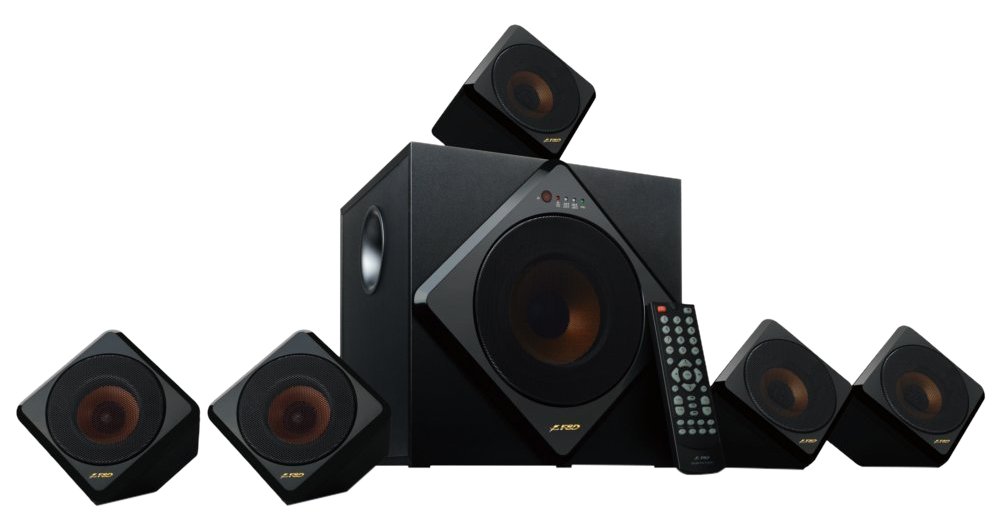
Image 1: F&D F3333U 5.1 Home Theatre Speaker System showing the subwoofer and satellite speakers.
5. Setup
5.1 Speaker Placement
- Subwoofer: Place the subwoofer on the floor, preferably in a corner or near a wall, to enhance bass response.
- Front Speakers (Left & Right): Position these speakers on either side of your TV or listening area, facing towards the listener.
- Center Speaker: Place the center speaker directly above or below your TV, ensuring it is centered with the screen.
- Surround Speakers (Left & Right): Position these speakers to the sides or slightly behind your listening position, at ear level or slightly higher.
5.2 Connecting Speakers
Connect each satellite speaker to the corresponding output terminals on the rear panel of the subwoofer unit. Ensure correct polarity (+ to + and - to -) for optimal sound quality. The terminals are usually color-coded or clearly labeled (FL, FR, CEN, SL, SR).
5.3 Connecting Audio Sources
- AUX Input: Use the provided 3.5mm to RCA audio cable to connect your audio device (e.g., TV, DVD player, smartphone) to the "AUX IN" ports on the subwoofer.
- USB Input: Insert a USB flash drive containing MP3/WMA audio files into the USB port on the front panel.
- SD Card Input: Insert an SD card containing MP3/WMA audio files into the SD card slot on the front panel.
- FM Antenna: Connect the FM antenna cable to the "FM ANT" port on the rear panel for radio reception. Extend the antenna for better signal reception.
5.4 Power Connection
Once all audio and speaker connections are made, plug the power cord of the subwoofer into a suitable AC power outlet.
6. Operating Instructions
6.1 Power On/Off
Press the "POWER" button on the front panel of the subwoofer or on the remote control to turn the system on or off.
6.2 Input Selection
Press the "INPUT" or "MODE" button on the front panel or remote control repeatedly to cycle through available input sources: AUX, USB, SD, FM.
6.3 Volume Control
Use the "VOLUME +" and "VOLUME -" buttons on the front panel or remote control to adjust the master volume. Individual channel volume (e.g., bass, center, surround) may also be adjustable via the remote control.
6.4 FM Radio Operation
- Auto Scan: In FM mode, press and hold the "PLAY/PAUSE" button (or "SCAN" button if available) on the remote control to automatically scan and save available FM stations.
- Manual Tuning: Use the "PREV/CH-" and "NEXT/CH+" buttons to manually tune to specific frequencies or navigate through saved stations.
6.5 USB/SD Playback
- Once a USB drive or SD card is inserted, the system will automatically switch to USB/SD mode and begin playback.
- Use the "PLAY/PAUSE", "PREV", and "NEXT" buttons on the front panel or remote control to control playback.
- The display will show track information or playback time.
6.6 Remote Control Functions
The remote control provides full functionality for the speaker system. Refer to the diagram on the remote control itself for specific button layouts and functions, which typically include:
- Power On/Off
- Input/Mode Selection
- Master Volume Up/Down
- Mute
- Bass/Treble/Center/Surround Volume Adjustment (if applicable)
- Play/Pause, Previous/Next Track (for USB/SD)
- FM Scan, Channel Up/Down (for FM Radio)
7. Maintenance
7.1 Cleaning
Wipe the surfaces of the speakers and subwoofer with a soft, dry cloth. Do not use abrasive cleaners, waxes, or solvents as they may damage the finish. Ensure the system is unplugged before cleaning.
7.2 Storage
If storing the system for an extended period, unplug it from the power outlet and store it in a cool, dry place, away from direct sunlight and extreme temperatures.
8. Troubleshooting
| Problem | Possible Cause | Solution |
|---|---|---|
| No power | Power cord not connected; Power outlet faulty; System not switched on. | Check power cord connection; Try a different outlet; Press the POWER button. |
| No sound | Incorrect input source selected; Volume too low; Audio cable not connected properly; Mute function active. | Select correct input (AUX, USB, SD, FM); Increase volume; Check audio cable connections; Deactivate Mute. |
| Distorted sound | Volume too high; Poor audio source quality; Speaker cables loose. | Reduce volume; Try a different audio source; Check speaker cable connections. |
| FM radio static/poor reception | FM antenna not connected or poorly positioned; Weak signal. | Connect and extend the FM antenna; Reposition the antenna for better reception; Try auto-scanning again. |
| USB/SD not playing | Incorrect file format; USB drive/SD card faulty or not inserted correctly; Maximum capacity exceeded. | Ensure files are MP3/WMA format; Reinsert USB/SD; Try a different USB/SD; Check for supported capacity. |
| Remote control not working | Batteries depleted or inserted incorrectly; Obstruction between remote and sensor; Remote sensor blocked. | Replace batteries; Ensure correct battery polarity; Remove obstructions; Clean remote sensor on subwoofer. |
9. Specifications
| Feature | Detail |
|---|---|
| Speaker Type | 5.1 Home Theatre System |
| Connectivity Technology | Auxiliary, USB |
| Special Features | Digital FM Radio, SD Card Reader |
| Control Method | Remote |
| Number of Audio Channels | 5.1 |
| Wireless Technology Type | Radio Frequency (for remote control) |
| Model Number | F3333U |
| ASIN | B0154M4OHS |
10. Warranty and Support
F&D products are manufactured to high-quality standards. For information regarding warranty coverage, terms, and conditions, please refer to the warranty card included with your purchase or visit the official F&D website. For technical support or service inquiries, please contact F&D customer service through their official channels.
Please retain your proof of purchase for warranty claims.


