Introduction
The EXMAX ATG-100T Wireless Tour Guide System is designed for clear and efficient voice transmission in various group settings. This system allows a speaker (tour guide, interpreter, teacher) to transmit their voice wirelessly to multiple listeners equipped with receivers and earphones. It is ideal for applications requiring discreet communication, overcoming noise and distance challenges, and ensuring your message is heard by the intended audience without disturbing others.
Key features include a transmission distance of 50-60 meters (164-197ft), 99 selectable frequency channels (195MHz-230MHz) for simultaneous multi-group operation, and long-lasting battery life of over 18 hours. The system is lightweight, portable, and supports both microphone and AUX input for the transmitter.

Image: Individuals on a tour, wearing EXMAX ATG-100T receivers and earphones, listening to a guide using the transmitter. This illustrates a typical use case for the system.
What's in the Box
Your EXMAX ATG-100T package includes the following components:
- 1 x ATG-100T Transmitter
- 5 x ATG-100T Receivers
- 1 x Clip-on Microphone for Transmitter
- 5 x Earphones for Receivers
- 1 x Power Adapter
- 6 x USB Charging Cables (retractable)
- 6 x Lanyards
- Charging Station (as per product specifications, though not explicitly shown as a single unit in the main image, it's listed in "Included Components")
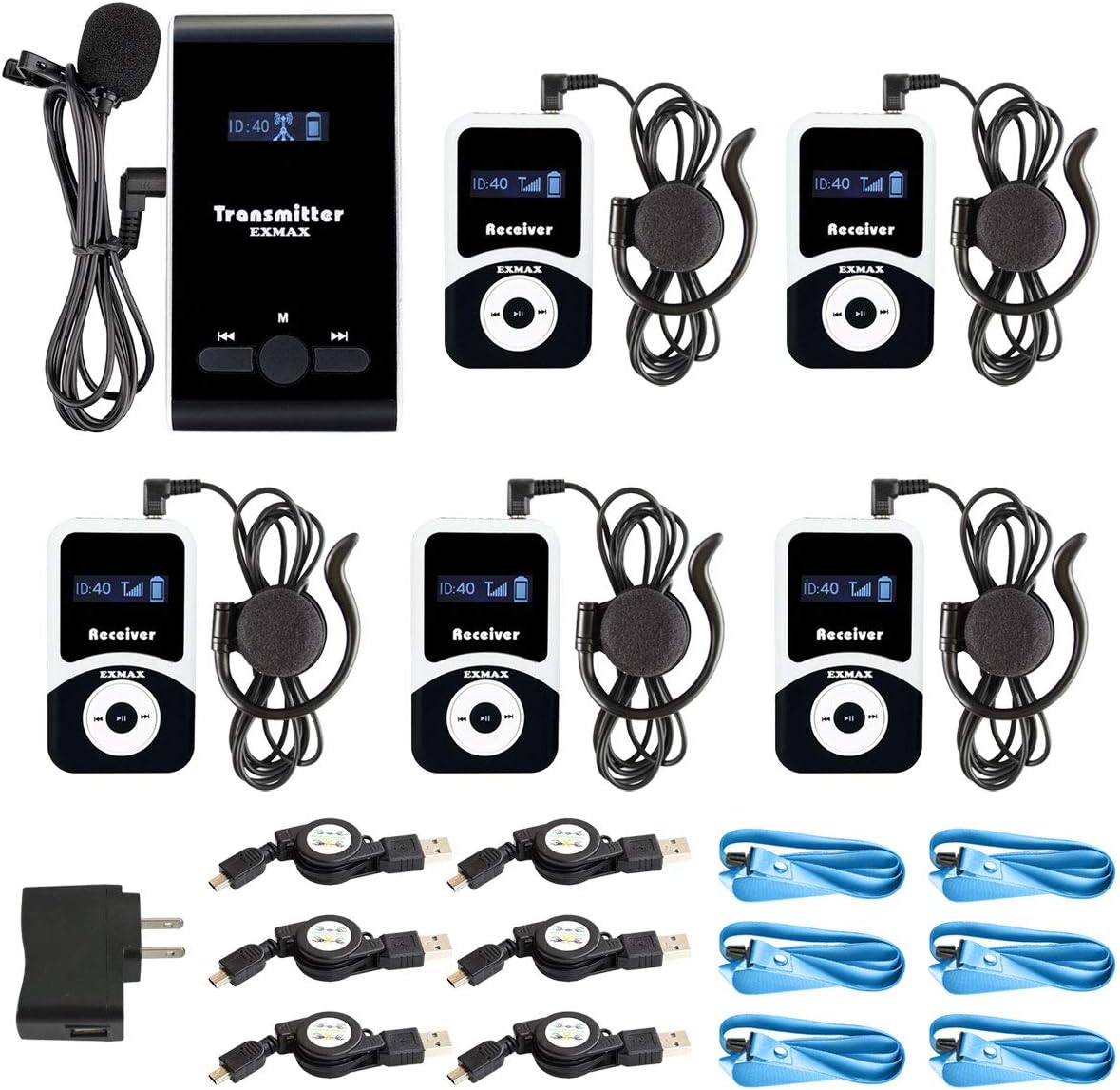
Image: A complete set of the EXMAX ATG-100T system, showing one transmitter unit with its microphone, five receiver units with their earphones, a power adapter, and multiple USB charging cables.
Product Overview
Transmitter (ATG-100T)
The transmitter is used by the speaker to broadcast audio. It features a display for channel ID and battery status, control buttons, and input ports.
- Dimensions: Approximately 99mm (3.89 in) x 55mm (2.16 in) x 15mm (0.59 in)
- Net Weight: 56g
- Ports: 3.5mm Microphone Jack, DC5V Mini USB Charge Port, Lanyard Connector

Image: Close-up of the EXMAX ATG-100T transmitter, highlighting its physical dimensions, the microphone input, DC5V charging port, mini USB port, and lanyard connector. An illustration shows the device being worn around the neck.
Receiver (ATG-100T)
The receiver is used by listeners to hear the transmitted audio. It includes a display, control buttons, and an earphone jack.
- Dimensions: Approximately 72mm (2.83 in) x 42mm (1.65 in) x 12mm (0.47 in)
- Net Weight: 46g
- Ports: 3.5mm Earphone Jack, Mini USB Charge Port, Lanyard Connector

Image: Close-up of the EXMAX ATG-100T receiver, detailing its physical dimensions, the earphone jack, mini USB charging port, and lanyard connector. An illustration shows the device being worn around the neck and an earphone in use.
Setup
Charging the Devices
Before first use, fully charge both the transmitter and receiver units. Each unit has a built-in 900mAh lithium battery, providing over 18 hours of working time after a 4-hour charge.
- Connect the provided USB charging cable to the Mini USB Charge Port on the transmitter or receiver.
- Connect the other end of the USB cable to the power adapter or a compatible USB power source.
- The battery power indicator on the device display will show charging status.
- Once fully charged, disconnect the device from the charging cable.

Image: An EXMAX ATG-100T receiver connected to a power adapter via a USB cable, illustrating the charging process. Also shown are the various cables and accessories with their approximate lengths.
Connecting Accessories
- Transmitter: Plug the clip-on microphone into the 3.5mm Microphone Jack. Ensure the microphone wire is unfolded to enhance signal transmission.
- Receiver: Plug the earphone into the 3.5mm Earphone Jack. Ensure the earphone wire is unfolded as it also functions as an antenna.
- Attach the lanyard to the Lanyard Connector on both the transmitter and receiver for convenient wearing.
Operating Instructions
Power On/Off
To turn on or off, press and hold the power button (middle button) for 2 seconds.
Setting Channel ID
For the system to work correctly, the transmitter and all associated receivers must be set to the same frequency Channel ID. Different groups operating simultaneously should use different Channel IDs to avoid interference.
- Before setting, ensure the earphone is plugged into the receiver and the microphone into the transmitter.
- Turn off the receiver or transmitter (just click the power button to turn on or turn off).
- Keep pressing the power button (long press).
- Then click the left or right button for 1 or 2 seconds. You will see the Channel ID flashing.
- While the ID is flashing, use the left or right button to set the desired Channel ID.
- Click the middle button to confirm the setting.
- Turn the device off and then on again to finalize the setting process.

Image: A detailed diagram showing the EXMAX ATG-100T transmitter and receiver side-by-side, with numbered labels pointing to their buttons and display elements, explaining the process of setting the channel ID.
Volume Adjustment (Receiver)
When receiving a signal from the transmitter, simply click the left or right button on the receiver to turn up or down the volume.
Multi-Group Operation
The system supports 99 frequency channels (195MHz-230MHz), allowing at least 40 groups to work simultaneously without interference. Each group must use a unique Channel ID.

Image: An illustration demonstrating how multiple groups can use the EXMAX ATG-100T system concurrently by assigning different channel IDs (e.g., Channel 01, Channel 02, Channel 03) to each group's transmitter and receivers, preventing cross-talk.

Image: A circular diagram illustrating the wireless connection from a single EXMAX ATG-100T transmitter to multiple receivers, all operating on the same channel ID within the 195-230MHz frequency band. It emphasizes that different groups need different channels.
Usage Scenarios
The EXMAX ATG-100T Wireless Tour Guide System is versatile and suitable for a wide range of applications, including but not limited to:
- Tour Guiding (city tours, museum tours, factory tours, bus tours)
- Wireless Meetings & International Conferences
- Wireless Teaching & Audio Visual Laboratories
- Simultaneous Interpreting & Sermon Interpretation (Church Translation)
- Corporate Hospitality & Presentations
- Industrial Site Field Trips & Work-Study Programs
- Social Distancing Solutions & Assisted Listening
- Exhibitions & Live Explanations
- Governmental Agencies & Public Events

Image: A grid of six photographs depicting different environments where the EXMAX ATG-100T system can be utilized, such as a tour guide speaking to a group, a conference room, a classroom, an interpreting session, a corporate event, and a factory visit.
Specifications
| Feature | Specification |
|---|---|
| Model Name | ATG-100T |
| Brand | EXMAX |
| Connectivity Technology | Wireless (RF) |
| Frequency Range | 195MHz-230MHz |
| Frequency Response | 50 Hz - 18 kHz |
| Signal-to-Noise Ratio (S/N) | ≥90dB |
| Transmission Distance | 50-60 meters (164-197ft) |
| Channels | 99 (allowing at least 40 groups simultaneously) |
| Transmitter Weight | 56g (1.98 ounces) |
| Receiver Weight | 46g (1.62 ounces) |
| Battery Type | Built-in 900mAh Lithium Polymer |
| Battery Life | >18 hours (Transmitter), >20 hours (Receiver) |
| Charging Time | Approx. 4 hours |
| Headphones Jack | 3.5 mm Jack |
| Control Type | Push Button, Volume Control |
| Material | Plastic |
| UPC | 712323627344 |
Troubleshooting
- No Sound from Receiver:
- Ensure both transmitter and receiver are powered on.
- Verify that the transmitter and receiver are set to the same Channel ID.
- Check if the earphone is properly plugged into the receiver.
- Increase the volume on the receiver.
- Ensure the microphone is properly connected to the transmitter and positioned correctly.
- Check battery levels on both devices.
- Interference or Poor Sound Quality:
- Ensure the microphone and earphone wires are fully unfolded, as they act as antennas.
- Change the Channel ID if other wireless devices are operating on the same frequency.
- Ensure there are no major obstructions (thick walls, large metal objects) between the transmitter and receivers.
- Move closer to the transmitter if you are at the edge of the transmission range.
- Devices Not Charging:
- Verify that the USB charging cable is securely connected to both the device and the power source.
- Try a different USB port or power adapter.
- Ensure the charging port on the device is clean and free of debris.
- Short Battery Life:
- Ensure devices are fully charged before use (approx. 4 hours).
- Battery performance may degrade over time with extensive use.
Maintenance
- Cleaning: Use a soft, dry cloth to clean the exterior of the devices. Do not use liquid cleaners or abrasive materials.
- Storage: Store the system in a cool, dry place away from direct sunlight and extreme temperatures.
- Battery Care: For optimal battery life, avoid fully discharging the batteries frequently. If storing for a long period, charge the batteries to about 50% every few months.
- Handling: Handle the devices with care. Avoid dropping them or exposing them to excessive shock or vibration.
- Water Exposure: The devices are not water resistant. Avoid exposure to water or high humidity.
Warranty and Support
EXMAX offers a 2-year warranty for the ATG-100T Wireless Tour Guide System, ensuring quality and customer satisfaction. This warranty covers manufacturing defects and issues arising from normal use.
For any questions, technical support, or warranty claims, please contact EXMAX customer service. You can typically find contact information on the EXMAX official website or through the retailer where you purchased the product. EXMAX provides 24/7 online services for customer assistance.
When contacting support, please have your product model number (ATG-100T) and purchase details ready.


