
1. Introduction
The Phonak TVLink II is an accessory designed to enhance the television listening experience for users of compatible Phonak hearing aids. It wirelessly streams audio from your television directly to your Phonak ComPilot, ComPilot II, or ComPilot Air II streaming accessory, which then transmits the sound to your hearing aids. This manual provides comprehensive instructions for setting up, operating, and maintaining your TVLink II.
2. Safety Information
Please read the following safety instructions carefully before using your Phonak TVLink II:
- Power Supply: Only use the power adapter supplied with the device. Using an unauthorized power adapter may damage the device and void the warranty.
- Water Exposure: Keep the device away from water and moisture. Do not operate it with wet hands.
- Cleaning: Clean the device with a dry, soft cloth. Do not use liquid or aerosol cleaners.
- Temperature: Avoid exposing the device to extreme temperatures (hot or cold) or direct sunlight.
- Disassembly: Do not attempt to open or repair the device yourself. Refer all servicing to qualified personnel.
- Interference: This device complies with FCC rules. However, there is no guarantee that interference will not occur in a particular installation. If this equipment does cause harmful interference to radio or television reception, which can be determined by turning the equipment off and on, the user is encouraged to try to correct the interference by one or more of the following measures: reorient or relocate the receiving antenna, increase the separation between the equipment and receiver, connect the equipment into an outlet on a circuit different from that to which the receiver is connected, or consult the dealer or an experienced radio/TV technician for help.
3. Package Contents
Ensure all items are present in your TVLink II package:
- Phonak TVLink II device
- Power adapter
- Optical audio cable (Toslink)
- RCA audio cable
- 3.5mm audio cable
- User Manual (this document)
4. Device Overview
Familiarize yourself with the components of your Phonak TVLink II:
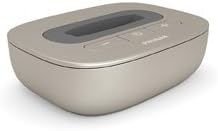
Image 1: Phonak TVLink II. This image shows the Phonak TVLink II, a compact, beige-colored device designed to stream audio from a television to compatible Phonak hearing aids via a ComPilot accessory. The top surface features a dark grey panel with control buttons for power and volume.
Front Panel Controls:
- Power Button: Turns the device on or off.
- Volume Up/Down Buttons: Adjusts the audio streaming volume.
- Status Indicator Light: Displays the device's current status (e.g., power on, pairing, streaming).
Rear Panel Ports:
- Power Input: For connecting the power adapter.
- Optical Audio Input (Toslink): For connecting to TVs with an optical audio output.
- RCA Audio Input (Red/White): For connecting to TVs with RCA audio outputs.
- 3.5mm Audio Input: For connecting to TVs or other audio sources with a 3.5mm headphone jack.
5. Setup
Follow these steps to set up your TVLink II:
5.1. Connect to Power
- Connect the power adapter to the power input port on the rear of the TVLink II.
- Plug the power adapter into a wall outlet. The status indicator light will illuminate.
5.2. Connect to Television
Choose one of the following audio connection methods based on your television's available outputs:
Option A: Optical Audio (Recommended for best quality)
- Connect one end of the optical audio cable to the optical audio output port on your TV.
- Connect the other end of the optical audio cable to the optical audio input port on the rear of the TVLink II.
Option B: RCA Audio
- Connect the red and white plugs of the RCA audio cable to the corresponding red and white audio output ports on your TV.
- Connect the other end of the RCA audio cable to the RCA audio input ports on the rear of the TVLink II.
Option C: 3.5mm Audio
- Connect one end of the 3.5mm audio cable to the headphone jack or 3.5mm audio output on your TV.
- Connect the other end of the 3.5mm audio cable to the 3.5mm audio input port on the rear of the TVLink II.
5.3. Pairing with ComPilot
To stream audio, your TVLink II must be paired with your Phonak ComPilot, ComPilot II, or ComPilot Air II.
- Ensure your TVLink II is powered on.
- Place your ComPilot (or ComPilot II/Air II) within 1 meter (3 feet) of the TVLink II.
- Activate the pairing mode on your ComPilot (refer to your ComPilot user manual for specific instructions, typically involves pressing and holding a button).
- Press and hold the pairing button on the TVLink II (often integrated with the power button or a dedicated small button) until the status indicator light flashes rapidly, indicating pairing mode.
- Once successfully paired, the status indicator lights on both devices will show a steady light, indicating a successful connection.
6. Operating Instructions
6.1. Powering On/Off
- To Power On: Press the Power button on the TVLink II. The status indicator light will turn on.
- To Power Off: Press and hold the Power button until the status indicator light turns off.
6.2. Streaming Audio
- Ensure your TVLink II is powered on and connected to your TV.
- Ensure your ComPilot is powered on and paired with both your hearing aids and the TVLink II.
- Start playing audio on your television.
- Activate the TV streaming program on your ComPilot (refer to your ComPilot manual). You should now hear the TV audio directly in your hearing aids.
6.3. Adjusting Volume
- Use the Volume Up (+) and Volume Down (-) buttons on the TVLink II to adjust the streaming volume.
- You can also adjust the volume via your ComPilot or hearing aid controls, depending on your setup.
7. Maintenance
Proper maintenance ensures the longevity and optimal performance of your TVLink II:
- Cleaning: Wipe the device regularly with a dry, soft, lint-free cloth. Do not use abrasive cleaners, solvents, or alcohol.
- Storage: When not in use for extended periods, store the device in a cool, dry place, away from direct sunlight and extreme temperatures.
- Cable Care: Handle all cables gently. Avoid bending or twisting them sharply, which can damage the internal wires.
8. Troubleshooting
If you encounter issues with your TVLink II, try the following solutions:
| Problem | Possible Cause | Solution |
|---|---|---|
| No power to TVLink II | Power adapter not connected or faulty outlet. | Ensure power adapter is securely connected to both the TVLink II and a working power outlet. Try a different outlet. |
| No audio streaming to ComPilot | TVLink II not paired with ComPilot; incorrect audio input selected on TVLink II; TV audio output settings incorrect. | Re-pair TVLink II with ComPilot (Section 5.3). Check TVLink II status light. Verify TV audio output settings (e.g., external speakers, PCM format for optical). Ensure correct audio cable is securely connected. |
| Poor audio quality or intermittent sound | Interference; low battery on ComPilot; distance too great. | Move TVLink II closer to ComPilot. Ensure ComPilot is fully charged. Minimize other wireless devices nearby. Check for damaged audio cables. |
| Volume too low/high | Volume settings on TVLink II, ComPilot, or TV are incorrect. | Adjust volume using the +/- buttons on the TVLink II. Also check volume settings on your ComPilot and television. |
If the problem persists after trying these solutions, please contact Phonak customer support or your hearing care professional.
9. Specifications
- Model: TVLink II
- ASIN: B0153FKY1Q
- Date First Available: July 28, 2022
- Audio Inputs: Optical (Toslink), RCA (L/R), 3.5mm jack
- Wireless Technology: Proprietary Phonak wireless protocol
- Power Supply: External power adapter (specified by manufacturer)
- Compatibility: Phonak ComPilot, ComPilot II, ComPilot Air II
10. Warranty and Support
The Phonak TVLink II comes with a limited manufacturer's warranty. Please refer to the warranty card included in your original packaging or visit the official Phonak website for detailed warranty terms and conditions.
For technical support, troubleshooting assistance beyond this manual, or service inquiries, please contact your authorized Phonak hearing care professional or visit the Phonak support website:


