
Introduction
This manual provides essential information for the safe and efficient installation, operation, and maintenance of your APC Smart-UPS SRT 8kVA Rack Mount Uninterruptible Power Supply (UPS) with a 208V to 120V Step-Down Transformer. Please read this manual thoroughly before installing or operating the equipment.
The APC Smart-UPS SRT 8kVA is designed to provide protected power to electronic equipment from utility power outages, sags, surges, and small utility fluctuations. The integrated step-down transformer converts 208V input to 120V output for compatible equipment.
Important Safety Instructions
SAVE THESE INSTRUCTIONS - This manual contains important instructions that should be followed during installation and maintenance of the UPS and batteries.
- This UPS is intended for indoor use only.
- Do not operate this UPS in direct sunlight, in contact with fluids, or where there is excessive dust or humidity.
- Connect the UPS power cable directly to a wall outlet. Do not use surge protectors or extension cords.
- Servicing of batteries should be performed or supervised by personnel knowledgeable of batteries and the required precautions. Keep unauthorized personnel away from batteries.
- When replacing batteries, replace with the same type and number of batteries or battery packs.
- Do not dispose of batteries in a fire. The batteries may explode.
- Do not open or mutilate batteries. Released electrolyte is harmful to the skin and eyes. It may be toxic.
- A battery can present a risk of electrical shock and high short circuit current. The following precautions should be observed when working on batteries:
- Remove watches, rings, or other metal objects.
- Use tools with insulated handles.
- Wear rubber gloves and boots.
- Do not lay tools or metal parts on top of batteries.
- Disconnect charging source prior to connecting or disconnecting battery terminals.
Package Contents
Inspect the package upon receipt. Notify the carrier and dealer if there is any damage. The package contains:
- APC Smart-UPS SRT 8kVA UPS Unit
- 208V to 120V Step-Down Transformer
- Rack-mounting hardware
- Serial communication cable
- USB communication cable
- Documentation CD
- Safety instructions
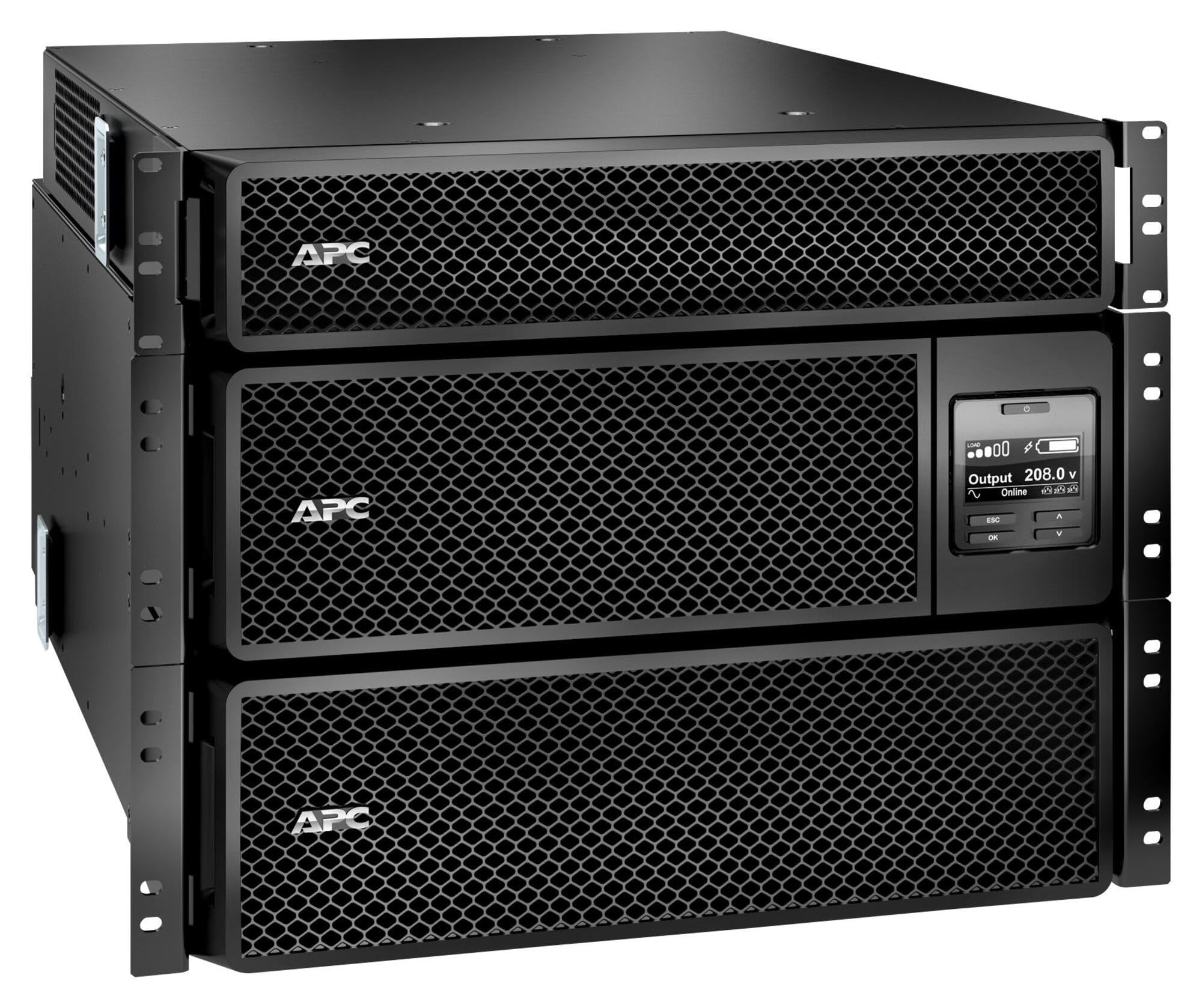
Image: APC Smart-UPS SRT 8kVA Rack Mount UPS with 208V to 120V Step-Down Transformer. This image shows the main UPS unit and the accompanying step-down transformer, typically in a rack-mountable configuration.
Setup
1. Placement
The UPS and transformer are heavy. For rack-mount installations, ensure the rack is stable and capable of supporting the combined weight of the UPS, transformer, and any other equipment. For tower installations, place the unit on a flat, stable surface.
- Maintain at least 20 cm (8 inches) of clearance from the front and rear panels for proper ventilation.
- Avoid placing the unit near heat sources or in direct sunlight.
2. Battery Connection
The UPS is shipped with the internal batteries disconnected for safety. Follow these steps to connect the batteries:
- Remove the front bezel or access panel to expose the battery compartment.
- Connect the internal battery cables as indicated by the labels or instructions inside the compartment. Ensure a secure connection.
- Replace the front bezel or access panel.
3. Power Connection
Connect the UPS to utility power and your equipment.
- Input Power: Connect the UPS input power cord (NEMA L6-30P) to a dedicated 208V AC outlet. Ensure the outlet is properly grounded and rated for the UPS capacity.
- Transformer Connection: Connect the output of the UPS to the input of the 208V to 120V Step-Down Transformer.
- Output Power: Connect your 120V equipment to the 120V output receptacles on the step-down transformer. Do not overload the transformer or the UPS.
- Communication Cables: Connect the serial or USB communication cable from the UPS to your computer or server for monitoring and management.
4. Initial Startup
After all connections are made:
- Press the power ON button on the UPS front panel. The UPS will perform a self-test.
- Allow the UPS to charge its batteries for at least 24 hours before connecting critical loads to ensure full runtime capacity.
- Verify the UPS display shows normal operation status.
Operating the UPS
Front Panel Display and Controls
The front panel features an LCD display and control buttons for monitoring and configuring the UPS. Refer to the detailed user manual on the documentation CD for specific menu navigation.
- ON/OFF Button: Powers the UPS on or off.
- Escape/Menu Button: Navigates back or enters the main menu.
- Up/Down Arrows: Scrolls through menu options or adjusts settings.
- Enter Button: Selects an option or confirms a setting.
- LED Indicators: Provide quick status updates (e.g., On Line, On Battery, Fault).
Normal Operation
During normal operation, the UPS will be in "On Line" mode, providing conditioned power to connected equipment and charging its batteries. The LCD display will show input/output voltage, load percentage, and battery charge level.
Battery Mode
If utility power fails or fluctuates outside acceptable limits, the UPS will automatically switch to battery power. An audible alarm may sound, and the display will indicate "On Battery" mode. The runtime available depends on the load and battery charge level.
Shutdown Procedures
- Graceful Shutdown: Use the PowerChute software (if installed) to gracefully shut down connected equipment before the UPS runs out of battery power.
- Manual Shutdown: Press and hold the OFF button on the front panel until the UPS powers down. Ensure all connected equipment is safely shut down first.
Maintenance
Battery Replacement
The batteries in the UPS are user-replaceable hot-swappable battery modules. Refer to the specific battery replacement instructions provided with your replacement battery kit or on the APC website. Always use genuine APC replacement battery cartridges (RBCs).
- Battery life is typically 3-5 years, but can vary based on temperature and discharge cycles.
- Replace batteries when the UPS indicates a "Replace Battery" warning or when runtime significantly decreases.
Cleaning
Keep the UPS and transformer free of dust and debris. Use a dry cloth to clean the exterior. Do not use liquid cleaners or solvents.
Firmware Updates
Periodically check the APC website for available firmware updates for your UPS model. Firmware updates can provide enhanced features, improved performance, or bug fixes. Follow the instructions provided with the firmware update package carefully.
Troubleshooting
This section provides solutions to common issues. For more complex problems, contact APC Technical Support.
| Problem | Possible Cause | Solution |
|---|---|---|
| UPS will not turn on. | Battery not connected; No input power; UPS fault. | Ensure battery cables are securely connected. Verify input power cable is plugged into a live outlet. If fault persists, contact support. |
| UPS beeps continuously or frequently. | On battery mode; Overload; Low battery. | Check utility power. Reduce connected load. Allow batteries to charge. |
| "Replace Battery" indicator is lit. | Batteries are at end of life or faulty. | Order and install new APC replacement battery cartridges. |
| Connected equipment not receiving 120V. | Transformer not connected or faulty; UPS output issue. | Verify transformer connections. Check UPS output voltage on display. Ensure equipment is plugged into the 120V outlets of the transformer. |
Specifications
The following table outlines the key specifications for the APC Smart-UPS SRT 8kVA Rack Mount with 208V to 120V Step-Down Transformer (SRT8KRMXLT-5KTF).
| Feature | Detail |
|---|---|
| Brand | APC |
| Model Number | SRT8KRMXLT-5KTF |
| Capacity (VA/Watts) | 8000 VA / 8000 W |
| Input Voltage | 208 V AC |
| Output Voltage | 120 V AC (via Step-Down Transformer) |
| Output Current | 66.67 Amps |
| Frequency Range | 50/60 Hz |
| Battery Type | Lead Acid |
| Battery Charge Time | 1.5 Hours |
| Typical Runtime (Full Load) | 5 minutes |
| Form Factor | Rack / Tower Mountable (8U) |
| Product Dimensions (D x W x H) | 28.2" x 17" x 13.9" (71.6cm x 43.2cm x 35.3cm) |
| Item Weight | 341 Pounds (154.7 kg) |
| Output Connections | 1 x NEMA L6-30R, 4 x NEMA 5-20R (via transformer) |
| Enclosure Material | Metal |
| Color | Black |
| Safety Standard | UL 1778 |
Warranty and Support
For detailed warranty information, please refer to the warranty card included with your product or visit the official APC website. APC offers technical support to assist with installation, troubleshooting, and product inquiries.
- Online Support: Visit the APC website for FAQs, documentation, and software downloads.
- Telephone Support: Contact APC Technical Support using the numbers provided on the APC website for your region.
- Product Registration: Register your product online to receive notifications about firmware updates and product information.