
TRENDnet TI-G50
TRENDnet TI-G50 5-Port Hardened Industrial Gigabit DIN-Rail Switch
Model: TI-G50 | Brand: TRENDnet
1. Introduction
The TRENDnet TI-G50 is a robust 5-Port Hardened Industrial Gigabit DIN-Rail Switch designed for demanding industrial environments. It features a 10 Gbps switching capacity and an IP30-rated metal enclosure, ensuring reliable network connectivity in extreme temperatures ranging from -40 to 75 °C (-40 to 167 °F). This unmanaged switch is built to withstand shock and vibration, making it suitable for critical applications requiring high durability and performance.
2. Safety Information
- Power Supply: This device requires a separate power supply (model TI-M6024 recommended). Ensure the power supply meets the specified voltage and current requirements.
- Grounding: Proper grounding is essential for safe operation and to prevent electrical interference. Connect the grounding point to a reliable earth ground.
- Environment: Install the switch in a location that complies with the specified operating temperature and humidity ranges. Avoid exposure to direct sunlight, excessive moisture, or corrosive substances.
- Installation: Follow all local and national electrical codes during installation. Ensure the device is securely mounted to prevent accidental dislodgement.
- Maintenance: Do not open the device enclosure. Refer all servicing to qualified personnel.
3. Package Contents
Verify that all items are present in the package:
- TRENDnet TI-G50 Industrial Gigabit DIN-Rail Switch
- Quick Installation Guide
- Removable Terminal Block
- DIN-Rail Mount
- Wall Mount Plates (2)
4. Product Overview
The TI-G50 features a compact, hardened metal housing designed for durability. Below is an overview of its key components and indicators.
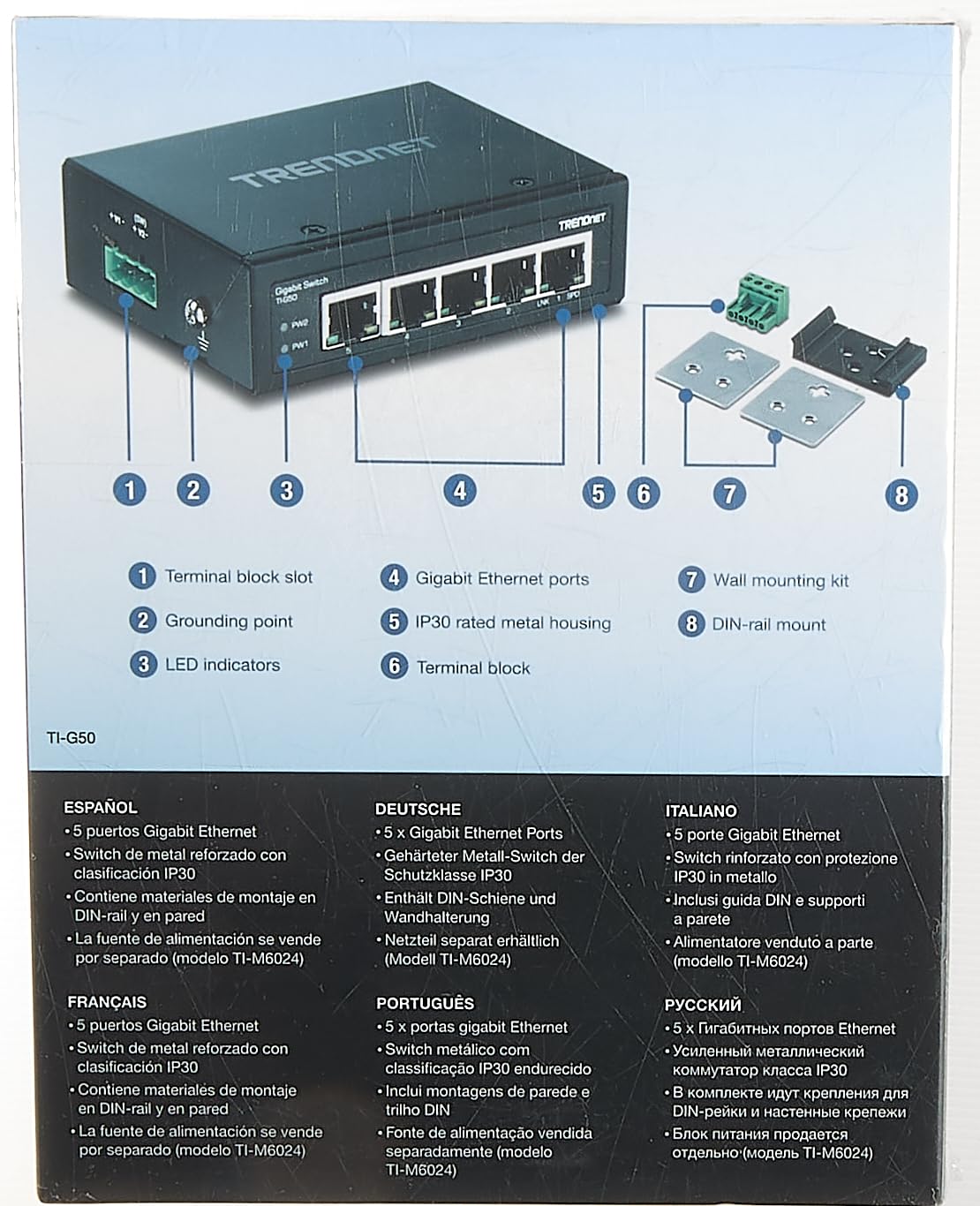
Figure 4.1: TI-G50 Component Diagram. This image illustrates the various parts of the switch, including the power input, Ethernet ports, and mounting accessories.
4.1 Front Panel
- Gigabit Ethernet Ports (1-5): Five 10/100/1000 Mbps auto-negotiating RJ-45 ports for network connections.
- LED Indicators:
- PWR1/PWR2: Indicates power status for redundant power inputs. Lit when power is supplied.
- LINK/SPD (per port): Indicates link status and speed. Green for Gigabit link, Amber for 10/100 Mbps link. Blinking indicates data activity.
4.2 Top Panel
- Terminal Block Slot: Connection point for the removable terminal block, providing dual redundant power inputs.
- Grounding Point: Screw terminal for connecting the device to earth ground.
4.3 Physical Dimensions

Figure 4.2: TI-G50 Dimensions. The compact size of the switch allows for flexible installation in various industrial settings.
5. Setup and Installation
The TI-G50 can be mounted on a DIN-rail or directly to a wall using the included accessories.
5.1 Power Connection
The switch supports dual redundant power inputs (12-48 V DC) via the removable terminal block. A power supply is sold separately (e.g., TRENDnet TI-M6024).
- Ensure the power source is turned off before connecting.
- Connect the positive (+) and negative (-) wires from your DC power supply to the corresponding terminals on the removable terminal block.
- Insert the terminal block into the slot on the top panel of the switch.
- For redundant power, repeat steps 2 and 3 for the second power input.
- Connect the grounding wire from your installation to the grounding screw on the top panel of the switch.
- Turn on the power source. The PWR1/PWR2 LEDs should illuminate.
5.2 DIN-Rail Mounting
Attach the DIN-rail mount to the back of the switch and secure it to a standard DIN-rail.

Figure 5.1: Mounting Accessories. The switch comes with both DIN-rail and wall mount options for versatile installation.
5.3 Wall Mounting
Use the included wall mount plates to secure the switch directly to a flat surface.
- Attach the two wall mount plates to the sides of the switch using the provided screws.
- Mark the desired mounting location on the wall.
- Drill pilot holes and insert appropriate wall anchors if necessary.
- Secure the switch to the wall using screws through the holes in the wall mount plates.
6. Operating the Switch
The TI-G50 is an unmanaged switch, meaning it operates plug-and-play without requiring configuration. Once powered on, it is ready to forward Ethernet traffic.
- Connect your network devices (e.g., computers, servers, IP cameras) to any of the five Gigabit Ethernet ports using standard RJ-45 Ethernet cables.
- The corresponding LINK/SPD LED for each connected port will illuminate, indicating an active network link.
- The LED will blink to show data activity.
Video 6.1: TRENDnet Hardened Industrial Switches Overview. This video provides a general overview of TRENDnet's industrial switch line, highlighting their robust features and applications in harsh environments.
7. Maintenance
Regular maintenance helps ensure the longevity and optimal performance of your TI-G50 switch.
- Cleaning: Periodically clean the exterior of the switch with a soft, dry cloth. Do not use liquid or aerosol cleaners.
- Ventilation: Ensure that the switch's ventilation openings are clear of obstructions to allow for proper heat dissipation.
- Cable Management: Keep network cables organized and free from kinks or excessive tension to prevent damage and maintain signal integrity.
- Firmware: As an unmanaged switch, the TI-G50 does not typically require firmware updates.
8. Troubleshooting
If you encounter issues with your TI-G50 switch, refer to the following common troubleshooting steps:
- No Power:
- Check the power supply connection to the terminal block and ensure it is securely inserted.
- Verify that the power source is active and providing the correct voltage (12-48 V DC).
- Ensure the PWR1/PWR2 LEDs are lit. If not, test with a different compatible power supply.
- No Link Light:
- Ensure the Ethernet cable is securely connected to both the switch port and the network device.
- Verify that the connected network device is powered on and functioning correctly.
- Try a different Ethernet cable.
- Test with a different port on the switch.
- Slow Network Speed:
- Check the LINK/SPD LED for the connected port. If it's Amber, the connection is 10/100 Mbps. Ensure both the switch and the connected device support Gigabit Ethernet.
- Verify the quality of the Ethernet cable. Use Cat5e or Cat6 cables for Gigabit speeds.
- Ensure there are no excessive network broadcasts or loops in your network.
9. Specifications
| Feature | Description |
|---|---|
| Model Number | TI-G50 |
| Ethernet Port Interface | 5 x Gigabit Ethernet ports |
| Switching Capacity | 10 Gbps |
| Enclosure Rating | IP30 Rated Metal Housing |
| Operating Temperature | -40 to 75 °C (-40 to 167 °F) |
| Power Input | Dual Redundant (12-48 V DC, power supply sold separately) |
| Mounting Options | DIN-Rail and Wall Mount |
| Dimensions (L x W x H) | 9 x 3 x 7 inches (Product) |
| Weight | 5.92 ounces |
| Compliance | FCC Part 15 Subpart B Class A, CE EN 55022 Class A, IEC 60068-2-27 (Shock), IEC 60068-2-32 (Freefall), IEC 60068-2-6 (Vibration) |
10. Warranty and Support
TRENDnet stands by the quality of its products.
- Lifetime Protection: The TI-G50 5-Port Hardened Industrial Gigabit DIN-Rail Switch comes with Lifetime Manufacturer Protection from TRENDnet (U.S. and Canada Only). Please refer to the official TRENDnet website for full warranty terms and conditions.
- Technical Support: For technical assistance, contact TRENDnet's English-speaking support team during normal business hours. Contact information can be found on the official TRENDnet website or the product packaging.
- Online Resources: Additional resources, including updated drivers, firmware, and FAQs, may be available on the TRENDnet support website.
Related documentsTI-G50


Ask a question about this manual
Ask about setup, troubleshooting, compatibility, parts, safety, or missing instructions. Manuals+ will review the question and use this page’s manual context to help answer it.