
1. Introduction
Thank you for purchasing the Gotech GTV-7-TFT 7-inch Portable Color TFT LCD TV. This manual provides essential information for the safe and efficient operation of your device. Please read it thoroughly before use and retain it for future reference.
2. Important Safety Instructions
- Do not expose the unit to rain or moisture to prevent fire or electric shock.
- Do not open the casing. Refer all servicing to qualified personnel.
- Avoid placing the unit near heat sources or in direct sunlight.
- Ensure proper ventilation around the unit.
- Use only the specified power adapter.
- Keep the unit away from strong magnetic fields.
- Clean the unit with a soft, dry cloth. Do not use liquid cleaners.
3. Package Contents
Verify that all items are present in the package:
- Gotech GTV-7-TFT Portable TV Unit
- Remote Control
- AC/DC Adapter
- Car Cord (Car Holder not explicitly listed as included, but mentioned as a feature)
- Antenna Jack
- AV Cable
- Detachable Stand

Image 3.1: The retail box for the Gotech GTV-7-TFT Portable TV, showing the product, remote control, and included accessories.
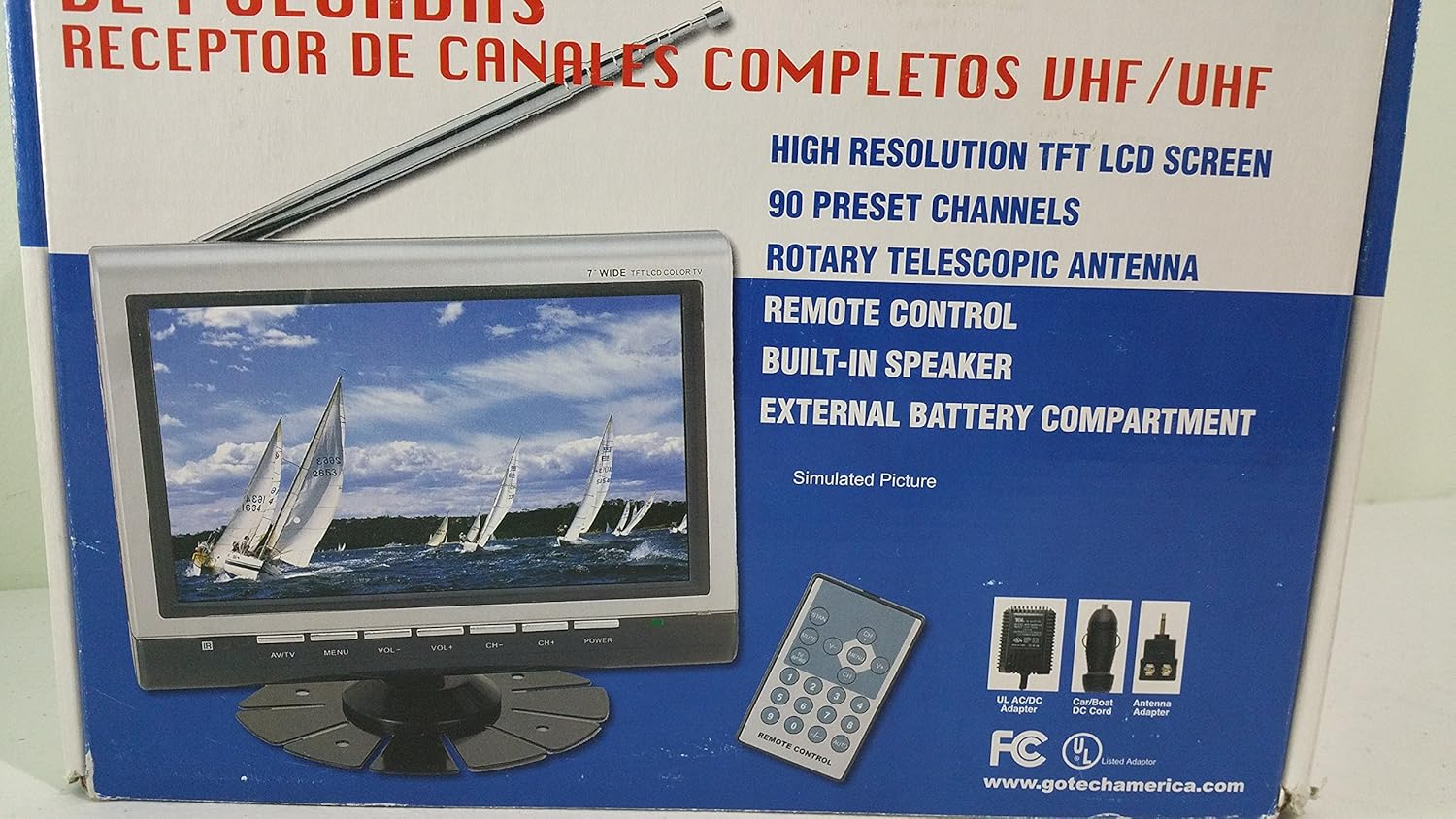
Image 3.2: A closer view of the Gotech GTV-7-TFT TV screen and the remote control, as depicted on the product packaging.
4. Product Overview
4.1 Key Features
- 7-inch High Resolution TFT LCD Screen
- Full Channel VHF/UHF Receiver
- 90 Preset Channels
- Digital Up/Down Tuning
- Auto Channel Programming
- Rotary Telescopic Antenna
- On-Screen Display (OSD) for Picture and Volume Adjustment
- Built-in Speaker
- External Battery Compartment (requires 10x AA batteries, not included)
- Remote Control with Button Cell
- New Detachable Stand with Battery

Image 4.1: Side panel of the Gotech GTV-7-TFT packaging, detailing the product's main features.
5. Setup
5.1 Powering the TV
The GTV-7-TFT can be powered in several ways:
- AC/DC Adapter: Connect the provided AC/DC adapter to the TV's power input and then to a standard wall outlet.
- Car Cord: For in-vehicle use, connect the car cord to the TV's power input and then to your vehicle's 12V power outlet.
- External Batteries: Open the external battery compartment and insert 10x AA size batteries (UM3) according to the polarity indicators. Ensure the batteries are fresh and correctly oriented.
5.2 Connecting the Antenna
Extend the rotary telescopic antenna for optimal signal reception. For improved reception, you may connect an external antenna to the antenna jack using the provided antenna jack adapter.
5.3 Connecting External Devices (AV Input)
To connect external devices such as a DVD player or gaming console, use the provided AV cable. Connect one end to the TV's AV input port and the other end to the AV output ports of your external device. Select the AV input source on the TV to view content from the connected device.
6. Operation
6.1 Power On/Off
Press the POWER button on the TV unit or the remote control to turn the TV on or off.
6.2 Channel Tuning
- Auto Channel Programming: It is recommended to perform an auto channel scan upon first use or when moving to a new location. Access the menu, navigate to the channel setup, and select 'Auto Scan' or 'Auto Program'. The TV will search and store available channels.
- Digital Up/Down Tuning: Use the CH+ and CH- buttons on the TV or remote control to navigate through the preset channels.
6.3 Volume and Picture Adjustment
Use the VOL+ and VOL- buttons on the TV or remote control to adjust the volume. Picture settings (brightness, contrast, color) can be adjusted via the on-screen display (OSD) menu. Press the MENU button to access these options.
6.4 Remote Control
The remote control allows convenient operation from a distance. Ensure the button cell battery is correctly inserted. Point the remote control directly at the TV's infrared sensor.
7. Maintenance
7.1 Cleaning
Wipe the TV screen and casing with a soft, dry, lint-free cloth. Do not use abrasive cleaners, waxes, or solvents as they may damage the finish or screen.
7.2 Storage
If the TV will not be used for an extended period, remove the external batteries to prevent leakage. Store the unit in a cool, dry place away from direct sunlight and extreme temperatures.
8. Troubleshooting
| Problem | Possible Cause | Solution |
|---|---|---|
| No power | Power adapter not connected; Batteries depleted or incorrectly inserted. | Check power connections; Replace or correctly insert batteries. |
| No picture/sound | Incorrect input source; Antenna not connected or extended; No channels scanned. | Select correct input (TV/AV); Extend antenna or connect external one; Perform auto channel scan. |
| Poor reception | Weak signal; Antenna position. | Adjust antenna position; Try an external antenna; Check for local signal strength. |
| Remote control not working | Battery depleted; Obstruction between remote and TV. | Replace remote control battery; Remove any obstructions. |
9. Specifications
| Feature | Detail |
|---|---|
| Model Number | gtv-7-tft |
| Screen Size | 7 inches (17.8 cm) |
| Display Type | TFT LCD Color Display |
| Tuner Type | Full Channel VHF/UHF Receiver |
| Preset Channels | 90 |
| Audio Output Type | Built-in Speaker |
| Control Method | Remote Control |
| Compatible Devices | Television, Speaker |
| Power Source | AC/DC Adapter, Car Cord, External Battery Compartment (10x AA batteries, not included) |
10. Warranty and Support
Specific warranty information and customer support details are not provided within this manual. Please refer to the product packaging or contact your retailer for warranty claims and technical assistance.