
Introduction
Thank you for purchasing the EMOS PT-506 Digital Hanging Scale. This compact and versatile scale is designed for accurate weighing of various items up to 50 kg, making it ideal for luggage, fishing, food, and travel. Please read this manual carefully before use to ensure proper operation and to maximize the lifespan of your device.
Safety Information
- Do not overload the scale beyond its maximum capacity of 50 kg. Overloading can damage the sensor and lead to inaccurate readings.
- Keep the scale away from water and extreme temperatures. This device is not waterproof.
- Avoid dropping the scale or subjecting it to strong impacts, as this may affect its precision.
- Store the scale in a dry, cool place when not in use.
- Keep batteries out of reach of children. If swallowed, seek immediate medical attention.
- Dispose of used batteries according to local regulations.
Package Contents
The EMOS PT-506 Digital Hanging Scale package includes:
- 1 x EMOS PT-506 Digital Hanging Scale
- 1 x Weighing Strap with Metal Connector
- 1 x CR2032 Button Cell Battery (pre-installed or included separately)
- 1 x User Manual
Product Overview
Familiarize yourself with the components of your EMOS PT-506 Digital Hanging Scale.

Image: The EMOS PT-506 Digital Hanging Scale, showing its ergonomic handle and the attached weighing strap with a metal connector.

Image: Technical drawing illustrating the dimensions of the EMOS PT-506 Digital Hanging Scale, including length, width, and thickness.
Key Components:
- LCD Display: Shows weight readings, units, and battery status.
- Power/Unit Button: Used to turn the scale on/off and switch between measurement units (kg/lb).
- Tare Button: Used to reset the scale to zero or subtract the weight of a container.
- Weighing Hook/Strap: For attaching items to be weighed.
- Battery Compartment: Located on the back, houses the CR2032 battery.
Setup
1. Battery Installation
- Locate the battery compartment on the back of the scale.
- Open the battery cover.
- Insert the CR2032 button cell battery with the positive (+) side facing up.
- Close the battery cover securely.
Note: A CR2032 battery is included. If the display shows "Lo" or does not turn on, replace the battery.
Operating Instructions
1. Power On/Off
- To turn on: Press the Power/Unit button once. The display will show "8888" then "0.00 kg" or "0.0 lb".
- To turn off: Press and hold the Power/Unit button for 3 seconds. The scale will also automatically turn off after 1 minute of inactivity to conserve battery.
2. Changing Measurement Units
- With the scale turned on and displaying "0.00", press the Power/Unit button repeatedly to cycle between kilograms (kg) and pounds (lb).
3. Weighing an Item
- Turn on the scale and select your desired unit (kg or lb).
- Attach the item to be weighed to the weighing strap/hook. Ensure the item is securely fastened.
- Hold the scale firmly by the handle, lifting the item off the ground. Keep the scale steady.
- Wait for the reading on the LCD display to stabilize. The weight will be shown.

Image: The EMOS PT-506 Digital Hanging Scale in use, accurately weighing a blue suitcase, demonstrating its application as a luggage scale.

Image: The EMOS PT-506 Digital Hanging Scale weighing a basket filled with apples, showcasing its versatility for weighing various items.
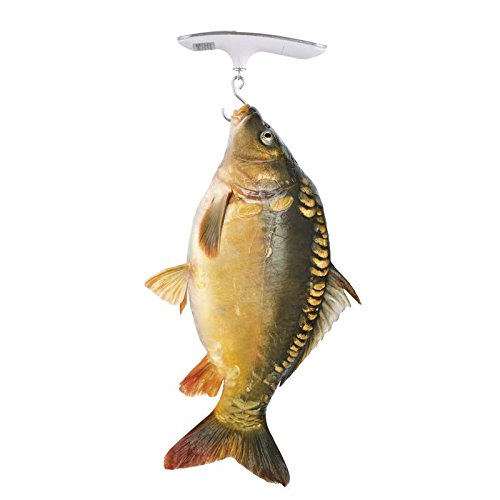
Image: The EMOS PT-506 Digital Hanging Scale weighing a fish, highlighting its utility for fishing and outdoor activities.
4. Tare Function
The Tare function allows you to subtract the weight of a container or an initial item, so you can weigh additional contents accurately.
- Turn on the scale.
- Hang the empty container or initial item on the hook.
- Wait for the weight to stabilize, then press the Tare button. The display will reset to "0.00".
- Add the contents you wish to weigh into the container. The display will show only the net weight of the contents.
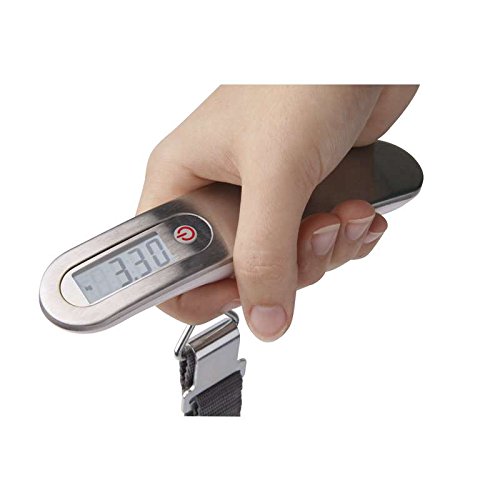
Image: A close-up view of a hand holding the EMOS PT-506 Digital Hanging Scale, with the LCD display showing a weight reading, illustrating ease of use.
Maintenance
- Cleaning: Wipe the scale with a soft, damp cloth. Do not use abrasive cleaners or immerse the scale in water.
- Storage: Store the scale in a dry, cool place. If not used for an extended period, it is recommended to remove the battery to prevent leakage.
- Battery Replacement: When the "Lo" indicator appears on the display, replace the CR2032 battery promptly.
Troubleshooting
| Problem | Possible Cause | Solution |
|---|---|---|
| Scale does not turn on. | Battery is dead or incorrectly installed. | Check battery orientation. Replace with a new CR2032 battery. |
| Display shows "Lo". | Low battery power. | Replace the CR2032 battery. |
| Display shows "O-Ld". | Scale is overloaded. | Remove the item immediately. Do not exceed 50 kg. |
| Inaccurate readings. | Unstable surface, item not hanging freely, or scale not calibrated to zero. | Ensure the scale is held steady and the item hangs freely. Turn the scale off and on again to re-zero. Avoid strong air currents. |
Specifications
| Feature | Detail |
|---|---|
| Model | PT-506 |
| Brand | EMOS |
| Maximum Weighing Capacity | 50 kg (110 lb) |
| Accuracy | 10 g (0.02 lb) |
| Measurement Units | kg / lb |
| Display Type | LCD |
| Power Source | 1 x CR2032 Button Cell Battery |
| Special Features | Tare Function, Auto-Off, Overload Indicator, Low Battery Indicator |
| Material | Acrylonitrile Butadiene Styrene (ABS) |
| Color | White |
| Form Factor | Handheld |
Warranty Information
This product is covered by a standard manufacturer's warranty against defects in materials and workmanship. The warranty period and terms may vary by region. Please retain your proof of purchase for any warranty claims. For specific warranty details, refer to the documentation provided with your purchase or contact EMOS customer support.
Support
For technical assistance, troubleshooting, or general inquiries about your EMOS PT-506 Digital Hanging Scale, please visit the official EMOS website or contact their customer service department. Contact information can typically be found on the product packaging or the EMOS official website.


