
EMOS P5523
EMOS Mechanical Timer Plug - Model P5523
User Manual
1. Introduction
Thank you for choosing the EMOS Mechanical Timer Plug, Model P5523. This device is designed to automatically switch electrical appliances ON and OFF at pre-set times, helping you save energy and automate your home or office. Please read this manual carefully before use to ensure safe and optimal operation.

Figure 1: EMOS Mechanical Timer Plug (Model P5523)
This image shows the EMOS Mechanical Timer Plug from an angled perspective, highlighting its compact design, the central rotating dial for time setting, and the Schuko type F socket. The red manual override switch is visible on the side.
2. Safety Instructions
- This device is equipped with child safety features.
- Do not exceed the maximum load of 3680W (230V/16A). Overloading can cause overheating and fire hazards.
- Only use the timer indoors in dry conditions. Do not expose to water or high humidity.
- Do not disassemble or attempt to repair the device. Refer all servicing to qualified personnel.
- Ensure the timer is fully inserted into a wall socket before connecting an appliance.
- Unplug the timer from the wall socket before cleaning.
- Keep out of reach of children when not in use.
3. Product Features
- Type: Mechanical timer switch
- Maximum Load: 3680W
- Voltage/Current: 230V AC / 16A
- Child Safety: Integrated for enhanced safety
- 24-Hour Cycle: Allows setting multiple ON/OFF periods within a 24-hour cycle.
- Manual Override: Switch to permanently ON or OFF, bypassing timer settings.
- Compact Design: Easy to plug into standard Schuko sockets.
4. Package Contents
The EMOS Mechanical Timer Plug package typically includes:
- 1 x EMOS Mechanical Timer Plug (Model P5523)
- 1 x User Manual (this document)
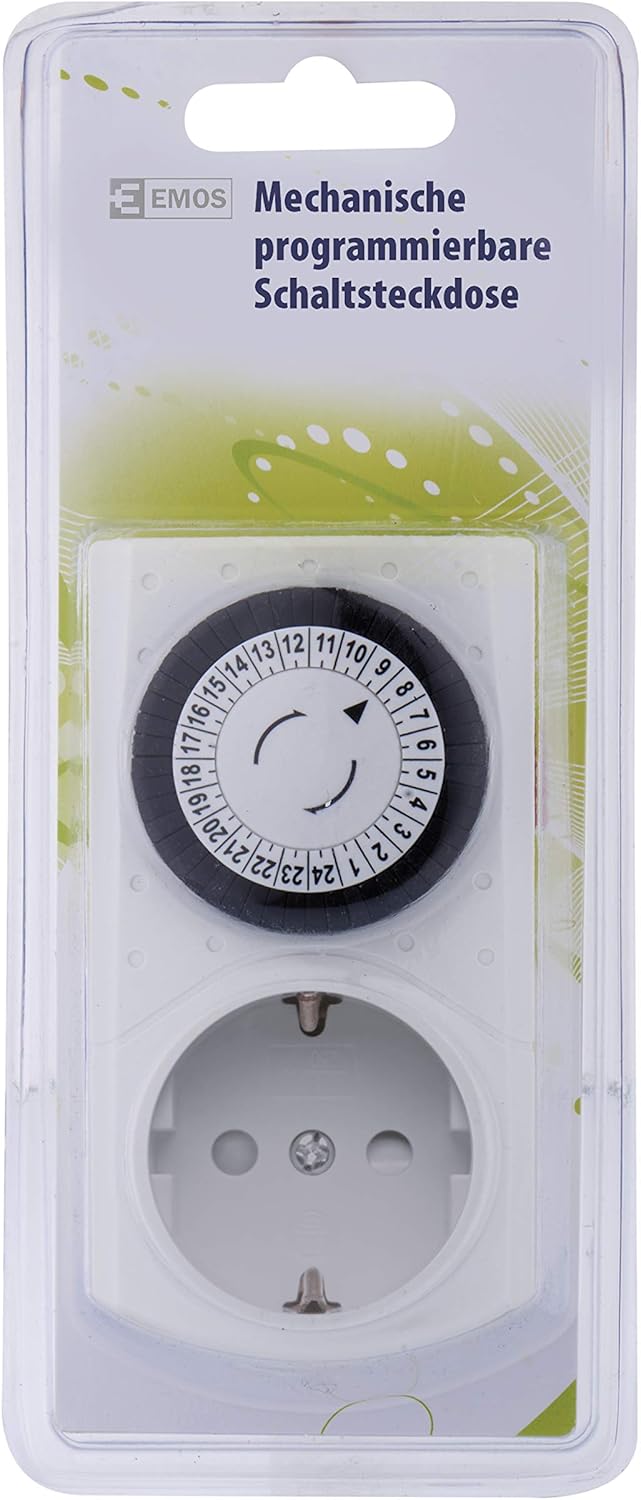
Figure 2: Product in Packaging
This image displays the EMOS Mechanical Timer Plug sealed within its transparent blister packaging, as it would appear when purchased. The packaging shows the EMOS brand logo and product description in German.
5. Setup
- Unpack the Timer: Carefully remove the timer from its packaging.
- Set Current Time:
Rotate the dial clockwise until the current time aligns with the arrow indicator on the timer's face. The dial is marked with hours from 1 to 24.

Figure 3: Timer Dial and Socket
This close-up view focuses on the central rotating dial of the timer, showing the 24-hour markings and the small segments around its perimeter. The Schuko socket is clearly visible below the dial, along with the maximum load rating (3680W 230V~).
- Plug into Wall Socket: Insert the timer into a standard Schuko wall socket. Ensure it is firmly seated.
- Connect Appliance: Plug the appliance you wish to control into the timer's socket.
Compatibility Note:
This timer features a Schuko (Type F) plug and socket, commonly used in Germany, Spain, Netherlands, and Italy. It is not compatible with Type E sockets (e.g., France, Belgium, Poland, Czech Republic) without an adapter.

Figure 4: Regional Compatibility
This image shows the EMOS timer alongside flags of various European countries. Green checkmarks indicate compatibility (Germany, Spain, Netherlands, Italy), while red crosses indicate non-compatibility (France, Poland, Czech Republic, Belgium) due to different socket types.
6. Operating Instructions
- Setting ON/OFF Periods:
The outer ring of the dial consists of small segments. Each segment represents 15 minutes. To set an ON period, push the corresponding segments downwards. To set an OFF period, leave the segments upwards.
For example, to have the appliance turn ON from 8:00 AM to 9:00 AM, push down the four segments between '8' and '9' on the dial.
- Manual Override Switch:
On the side of the timer, there is a red switch. This switch allows you to manually override the timer settings:
- I (ON): The appliance will remain continuously ON, regardless of the timer settings.
- Clock Symbol (Timer Mode): The appliance will operate according to the set ON/OFF periods.

Figure 5: Manual Override Switch
This side view of the EMOS Mechanical Timer Plug clearly shows the red manual override switch. This switch allows users to toggle between continuous power (ON) and timed operation (Clock Symbol).
- Continuous Operation: Once plugged in and settings are made, the timer will continuously cycle through the 24-hour period, activating and deactivating the connected appliance as programmed.
7. Maintenance
- Cleaning: Disconnect the timer from the power outlet before cleaning. Wipe the exterior with a soft, dry cloth. Do not use liquid cleaners or abrasive materials.
- Storage: Store the timer in a cool, dry place when not in use.
- Inspection: Periodically inspect the timer and its plug for any signs of damage. Do not use if damaged.
8. Troubleshooting
| Problem | Possible Cause | Solution |
|---|---|---|
| Appliance does not turn ON/OFF as programmed. |
|
|
| Timer is making unusual noise. | Internal mechanical issue. | Discontinue use immediately and contact customer support. Do not attempt to repair. |
| Timer feels hot to the touch. | Overloaded or faulty appliance/timer. | Unplug immediately. Check if connected appliance exceeds 3680W. If not, discontinue use and contact customer support. |
9. Specifications
| Attribute | Value |
|---|---|
| Brand | EMOS |
| Model Number | P5523 |
| ASIN | B014WKSZGY |
| Type | Mechanical Timer Plug |
| Max Load | 3680W |
| Voltage / Current | 230V AC / 16A |
| Child Safety | Yes |
| Weight | 98 Grams |
| International Article Code (EAN) | 08595025388278 |

Figure 6: Rear View and Socket Details
This image provides a clear view of the back of the EMOS Mechanical Timer Plug, specifically highlighting the Schuko socket. Markings indicating plastic type (PP) are visible, along with the general construction of the socket.
10. Warranty and Support
EMOS products are manufactured to high-quality standards. For information regarding warranty terms, technical support, or spare parts availability, please refer to the contact information provided on the product packaging or visit the official EMOS website.
Please retain your proof of purchase for any warranty claims.
Related documentsP5523


Ask a question about this manual
Ask about setup, troubleshooting, compatibility, parts, safety, or missing instructions. Manuals+ will review the question and use this page’s manual context to help answer it.