
1. Introduction
This manual provides essential information for the proper use and understanding of your UCEC USB 2.0 to RJ45 Ethernet Adapter. This adapter is designed to facilitate specific network connections, primarily for connecting USB ADSL modems or routers with a USB port to an RJ45 network jack. Please read these instructions carefully before use to ensure correct functionality and avoid potential issues.
2. Product Overview
The UCEC USB 2.0 to RJ45 Ethernet Adapter is a compact connector featuring a USB Type A Female port on one end and an RJ45 Male plug on the other. It acts as a physical interface converter for specific networking applications.
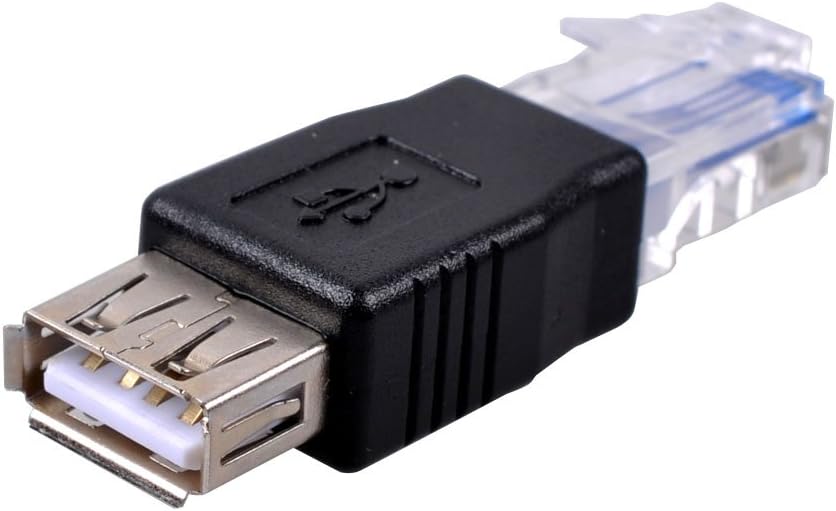
Image 2.1: The UCEC USB 2.0 to RJ45 Ethernet Adapter, showing its compact design. This adapter features a USB Type A Female port and an RJ45 Male plug.

Image 2.2: Detailed view of the adapter's connectors, highlighting the USB A-Female port and the RJ45 (8P8C) Male plug. The USB A-Female port is designed to receive a standard USB Type A cable, while the RJ45 Male plug connects to an Ethernet port.
3. Setup and Connection
This adapter is intended for specific connection scenarios. Follow these guidelines for proper setup:
- Identify the RJ45 Network Jack: The RJ45 male end of the adapter must be inserted into a computer's RJ45 network jack or a compatible network device.
- Connect USB Device: The USB 2.0 female end of the adapter is designed to connect to a USB port of a dialer, router, or an ADSL modem with a USB interface.
- Power Over Ethernet (PoE) Requirement: For certain applications, such as connecting a USB ADSL modem to a router via this adapter, a PoE data switch may be required. Ensure your setup meets this requirement if applicable.

Image 3.1: Illustrative diagram demonstrating applicable devices for the USB to RJ45 adapter. This includes connections to laptops, desktops, interchangers, routers, firewalls, and servers, all utilizing a USB interface on one side and an RJ45 network connection on the other.
4. Operating Instructions
Once connected as described in the Setup section, the adapter facilitates data transfer between the connected USB device and the RJ45 network. It acts as a physical bridge, allowing devices with a USB output for network functions to interface with an Ethernet port.
- Ensure all connected devices (modem, router, computer) are powered on.
- Verify that the USB device is configured to output network data via its USB port.
- The adapter itself does not perform data conversion or protocol translation; it provides a physical connection for compatible devices.
5. Compatibility and Limitations
This adapter is designed for specific applications and has important compatibility considerations:
5.1 Compatible Scenarios:
- Connecting a USB ADSL modem to a router with an RJ45 socket (may require a PoE data switch).
- Connecting a router's USB port to a computer's RJ45 network jack.
- Devices with their own operating system that utilize a USB interface for network transmission (e.g., certain monitoring devices, cameras with network functions, but not for direct computer network video chat).
5.2 Important Limitations:
- Not a USB to Ethernet Adapter for General Use: This adapter cannot be used to connect a standard USB 2.0 device (like a printer or external hard drive) to a computer's RJ45 Ethernet port for network access. It is not a network card.
- No USB 1.1 Support: This adapter does not work with USB 1.1 devices (often referred to as 'printer style USB' in older contexts).
- No Direct USB Device to Computer RJ45: It will not function if you plug a USB 2.0 device into its female end and then connect the RJ45 male end directly to a computer's RJ45 interface, expecting the USB device to be recognized as a network device.

Image 5.1: A crucial note regarding the adapter's functionality. It clarifies that the adapter is not for general USB-to-Ethernet conversion and specifically does not support USB 1.1 devices. Users should understand these limitations to ensure proper application.
6. Troubleshooting
- No Connection/Device Not Recognized:
- Verify that your USB device is designed to output network data via its USB port. This adapter is not a general USB network card.
- Ensure the connected USB device is not USB 1.1. This adapter is compatible with USB 2.0.
- Check if a PoE data switch is required for your specific setup (e.g., USB ADSL modem to router).
- Confirm that the RJ45 male end is securely plugged into an active RJ45 network jack.
- Slow Connection Speed:
- Ensure all cables (USB and Ethernet) are in good condition and properly connected.
- The adapter supports USB 2.0 speeds. Actual network speed will depend on your network infrastructure and the capabilities of the connected devices.
- Physical Damage:
- Inspect the adapter for any visible damage to the connectors or casing. Discontinue use if damage is found.
7. Specifications
| Feature | Detail |
|---|---|
| Product Dimensions (L x W x H) | 11.1 x 2.6 x 0.7 inches (approx. 28.19 x 6.60 x 1.78 cm) |
| Item Weight | 0.32 ounces (approx. 9 grams) |
| Connector Type | USB Type A Female to RJ45 Male |
| Color | Black |
| Compatible Devices | PC (for specific network applications as described) |
| Specific Uses For Product | Connecting USB ADSL modems, routers with USB ports to RJ45 networks |
| Model Number | UCEC |

Image 7.1: Dimensional drawing of the UCEC USB to RJ45 adapter, indicating its length and width for reference. The adapter measures approximately 52mm (2 inches) in length, with the RJ45 end being 11.5mm (0.45 inches) wide and the USB end 13mm (0.51 inches) wide.
8. Warranty and Support
UCEC is committed to product quality and customer satisfaction. This product comes with a 30-day money-back guarantee. For any questions or support needs, please feel free to contact UCEC customer service. Our support team is available 24/7 to assist you.
For further assistance, please visit the official UCEC store or contact customer support through your purchase platform.