1. Introduction
This manual provides detailed instructions for the proper installation, operation, and maintenance of your Pioneer VSX-330 5.1CH AV Receiver. Please read this manual thoroughly before using the receiver to ensure optimal performance and safety. The Pioneer VSX-330 is designed to deliver a rich audio-visual experience with support for Dolby TrueHD, DTS-HD Master Audio, and Ultra HD 4K Passthrough.

Figure 1: Front view of the Pioneer VSX-330 5.1CH AV Receiver, showcasing its sleek design and front panel controls.
2. Safety Information
Always follow these basic safety precautions when using this product to reduce the risk of fire, electric shock, and injury.
- Power Source: Connect the receiver only to an AC outlet of the voltage indicated on the unit.
- Ventilation: Ensure adequate ventilation. Do not block ventilation openings. Allow sufficient space around the unit for proper airflow.
- Water and Moisture: Do not expose the receiver to rain or moisture. Do not place objects filled with liquids, such as vases, on the unit.
- Heat: Keep the receiver away from heat sources such as radiators, heat registers, stoves, or other apparatus that produce heat.
- Cleaning: Unplug the receiver from the wall outlet before cleaning. Use a dry cloth for cleaning.
- Servicing: Do not attempt to service the receiver yourself. Refer all servicing to qualified service personnel.
- Cables: Route all cables carefully to prevent tripping hazards and damage.
3. What's in the Box
Verify that all items listed below are included in the package:
- Pioneer VSX-330 AV Receiver
- Remote control
- AAA size IEC R03 dry cell batteries (x2) for remote control
- AM loop antenna
- FM wire antenna
- Quick start guide
- Safety Brochure
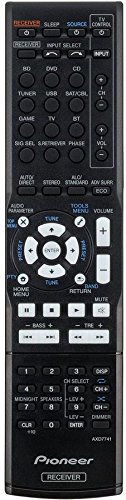
Figure 2: The included remote control for the Pioneer VSX-330 AV Receiver, used for convenient operation.
4. Setup
4.1 Connecting Speakers
The VSX-330 supports a 5.1 channel speaker configuration. Connect your speakers to the corresponding terminals on the rear panel.
- Front Speakers (L/R): Connect to the FRONT L and R terminals.
- Center Speaker: Connect to the CENTER terminal.
- Surround Speakers (L/R): Connect to the SURROUND L and R terminals.
- Subwoofer: Connect a powered subwoofer to the PREOUT SUBWOOFER terminal.
Ensure correct polarity (+ to + and - to -) for all speaker connections to avoid phase issues.
4.2 Connecting Audio/Video Devices
Use HDMI cables for optimal audio and video quality. The receiver features 4 HDMI inputs and 1 HDMI output.

Figure 3: Rear panel of the Pioneer VSX-330 AV Receiver, showing various input and output terminals for audio, video, and speakers.
- HDMI Connections:
- Connect your Blu-ray player, game console, or set-top box to the HDMI IN terminals (DVD, BD, SAT/CBL, GAME).
- Connect your TV to the HDMI OUT terminal. This output supports Audio Return Channel (ARC).
- Digital Audio Connections:
- Use the DIGITAL IN (COAXIAL or OPTICAL) terminals for devices without HDMI, such as CD players or older game consoles.
- Analog Audio/Video Connections:
- Connect older devices using the AV (Composite) IN or AUDIO IN terminals.
- The MONITOR OUT (Composite) can be used to connect to a display for on-screen menu navigation (analogue only).
- USB Connection:
- A front USB port is available for connecting iPod/iPhone devices or USB drives for audio playback.
- Antenna Connections:
- Connect the supplied AM loop antenna to the AM ANTENNA terminal.
- Connect the supplied FM wire antenna to the FM UNBAL 75Ω terminal.
4.3 Initial Power-On and Basic Settings
After all connections are made, plug the receiver into a power outlet. Press the STANDBY/ON button on the front panel or remote control to power on the unit. Use the on-screen display (if connected to a TV via composite video) or the front panel display to configure basic settings such as speaker size, distance, and level.
5. Operation
5.1 Basic Controls
- Power: Press the STANDBY/ON button to turn the receiver on or off.
- Input Selection: Use the INPUT SELECTOR knob on the front panel or the dedicated input buttons (e.g., BD, DVD, SAT/CBL, GAME) on the remote control to switch between connected devices.
- Volume Control: Adjust the master volume using the MASTER VOLUME knob on the front panel or the VOLUME +/- buttons on the remote control.
5.2 Audio Features
The VSX-330 supports various audio formats and enhancements:
- Dolby TrueHD / Dolby Digital Plus / Dolby Pro Logic II: Provides high-definition surround sound.
- DTS-HD Master Audio / DTS Neo:6: Delivers lossless, studio-quality audio.
- DSD Disc (SACD) Playback: Supports 2.8 MHz, 2ch playback via HDMI.
- Advanced Sound Retriever (2ch): Enhances compressed audio formats to near CD quality.
- Auto Level Control (2ch): Compensates for volume differences between audio tracks.
- Phase Control: Optimizes phase characteristics for improved sound imaging.
5.3 Video Features
The receiver handles advanced video signals:
- 3D Ready: Supports 3D content from Blu-ray discs, broadcasts, and games.
- Deep Colour (36-bit) / "x.v. Colour": Provides richer and more vibrant colors.
- Ultra HD Pass-through: Supports 4K/60p/4:2:0/24-bit, 4K/24p/4:4:4/24-bit, and 4K/24p/4:2:2/36-bit video signals.
5.4 Advanced Surround Modes
Select from various surround modes to optimize your listening experience:
- Action, Drama, Advanced Game, Sports, Classical, Rock/Pop
- Front Stage Surround, Extended Stereo
- Phones Surround (for headphone listening)
5.5 ECO Modes
The receiver includes ECO modes to reduce power consumption:
- ECO Mode 1: Reduces power consumption during normal operation.
- ECO Mode 2: Further reduces power consumption, suitable for background listening.
5.6 Tuner Operation
The built-in AM/FM tuner allows you to listen to radio broadcasts. You can store up to 30 presets for your favorite stations.
- Press the TUNER button on the remote or front panel to select the tuner input.
- Use the TUNE +/- buttons to manually tune or the PRESET +/- buttons to select stored stations.
6. Maintenance
Proper maintenance ensures the longevity and performance of your receiver.
- Cleaning: Wipe the exterior surfaces with a soft, dry cloth. Do not use abrasive cleaners, waxes, or solvents.
- Ventilation: Regularly check that the ventilation openings are not obstructed by dust or debris.
- Power Cord: Periodically inspect the power cord for any damage. If damaged, contact qualified service personnel.
- Storage: If storing the unit for an extended period, disconnect it from the power outlet and store it in a cool, dry place.
7. Troubleshooting
Refer to this section for solutions to common issues. If the problem persists, contact customer support.
7.1 No Power
- Ensure the power cord is securely plugged into both the receiver and a working wall outlet.
- Check if the power outlet is functional by plugging in another device.
- Verify that the STANDBY/ON button has been pressed.
7.2 No Sound
- Check all speaker connections for proper polarity and secure fit.
- Ensure the correct input source is selected.
- Increase the master volume.
- Check if the MUTE function is active.
- Verify that the audio cables from your source device are correctly connected to the receiver.
- If using HDMI, ensure your TV's ARC function is enabled and correctly configured if using the TV as the audio source.
7.3 No Video
- Ensure the HDMI cables are securely connected between the source device, receiver, and TV.
- Select the correct input source on the receiver and the correct HDMI input on your TV.
- Check the resolution settings on your source device to ensure compatibility with your TV and receiver.
7.4 Remote Control Not Working
- Replace the batteries with new AAA batteries.
- Ensure there are no obstructions between the remote control and the receiver's remote sensor.
- Point the remote control directly at the receiver.
8. Specifications
| Feature | Specification |
|---|---|
| Brand | PIONEER |
| Model | VSX-330-K |
| Amplification Type | Direct Energy |
| Channels | 5.1 |
| Power Output | 105 W/ch (6 ohms, 1 kHz, THD 1.0%, 1ch Driven) |
| Audio Decoding | Dolby TrueHD, Dolby Digital Plus, Dolby Pro Logic II, DTS-HD Master Audio, DTS Neo:6 |
| DSD Playback | 2.8 MHz, 2ch (via HDMI) |
| DAC | 192 kHz/24-bit |
| HDMI Inputs | 4 |
| HDMI Outputs | 1 (ARC compatible) |
| Video Passthrough | 3D Ready, Deep Colour (36-bit), x.v.Colour, Ultra HD (4K/60p/4:2:0/24-bit, 4K/24p/4:4:4/24-bit, 4K/24p/4:2:2/36-bit) |
| USB Port | 1 (Front, for iPod/iPhone, USB drive) |
| Tuner | AM/FM (30 Presets) |
| Dimensions (W x H x D) | 435 x 168 x 331.5 mm |
| Weight | 7.2 kg |
| Power Source | AC 220-240 V, 50/60 Hz |
| Power Consumption (Operating) | 165 Watts (Maximum) |
9. Warranty and Support
9.1 Warranty Information
This Pioneer VSX-330 AV Receiver comes with a 1 Year Seller Warranty. Please retain your purchase receipt as proof of purchase for warranty claims. The warranty covers manufacturing defects under normal use conditions.
For specific terms and conditions of the warranty, please refer to the warranty card included in your product packaging or contact your seller.
9.2 Customer Support
For technical assistance, troubleshooting beyond this manual, or service inquiries, please contact Pioneer customer support or your authorized dealer.
Manufacturer Contact: Pioneer (1800224244)


