
1. Safety Instructions
Please read these safety instructions carefully before installing or using your appliance. Keep this manual for future reference.
- Electrical Safety: Ensure the appliance is connected to a properly grounded power outlet. Do not use extension cords or multiple socket adapters. Disconnect the appliance from the power supply before cleaning or maintenance.
- Ventilation: Ensure adequate ventilation around the appliance. Do not block ventilation openings. Insufficient ventilation can lead to overheating and reduced efficiency.
- Flammable Materials: Do not store explosive substances such as aerosol cans with a flammable propellant in this appliance.
- Children's Safety: This appliance is not intended for use by persons (including children) with reduced physical, sensory or mental capabilities, or lack of experience and knowledge, unless they have been given supervision or instruction concerning use of the appliance by a person responsible for their safety. Children should be supervised to ensure that they do not play with the appliance.
- Handling: When moving the appliance, always lift it by the base or sides. Avoid tilting it more than 45 degrees. After transport, allow the appliance to stand upright for at least 2-4 hours before plugging it in to allow the refrigerant to settle.
2. Product Overview
The Inventum KK550 is a compact, freestanding refrigerator designed for efficient food storage. It features a single door and a total capacity of 133 liters, making it suitable for small households or as an auxiliary cooling unit.
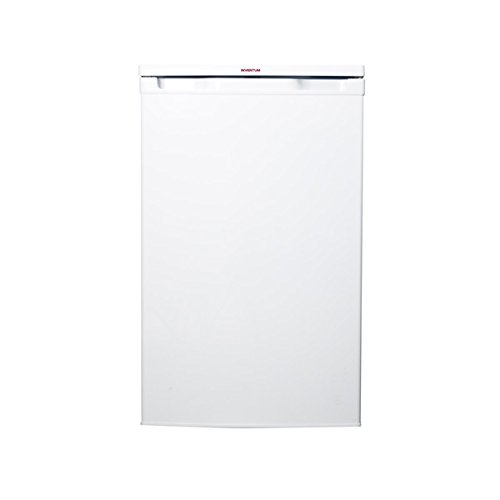
Image 1: Front view of the Inventum KK550 freestanding refrigerator. The appliance is white with a single door and a top-mounted control panel area.
Key components typically include:
- Temperature control dial
- Adjustable shelves
- Door storage compartments
- Crisper drawer (if applicable)
3. Setup
3.1 Unpacking
- Remove all packaging materials, including foam and adhesive tape.
- Inspect the appliance for any transport damage. If damaged, do not plug it in and contact your retailer.
- Keep packaging materials out of reach of children.
3.2 Placement
- Place the refrigerator on a firm, level surface away from direct sunlight, heat sources (e.g., oven, radiator), and extreme cold.
- Ensure there is at least 10 cm (4 inches) of space at the back and sides for proper air circulation.
- Adjust the leveling feet at the bottom of the appliance to ensure it is stable and level.
3.3 First Use
- Before plugging in, clean the interior of the refrigerator with a damp cloth and a mild detergent. Dry thoroughly.
- After cleaning, allow the appliance to stand for at least 2-4 hours before connecting it to the power supply. This allows the refrigerant to stabilize.
- Plug the refrigerator into a dedicated, grounded power outlet.
- Set the temperature control to a medium setting and allow the refrigerator to cool for several hours (e.g., 4-6 hours) before placing food inside.
4. Operating
4.1 Temperature Control
The temperature inside the refrigerator is controlled by a thermostat dial, usually located inside the appliance. The dial typically has settings from 1 (warmest) to 5 or 7 (coldest), or a similar scale. Adjust the dial to achieve the desired cooling level.
- Recommended Setting: For general use, a medium setting (e.g., 3 or 4) is often sufficient.
- Adjusting: Turn the dial towards a higher number for colder temperatures and towards a lower number for warmer temperatures. Allow several hours for the temperature to stabilize after adjustment.
4.2 Food Storage Guidelines
- Do not overload: Avoid packing food too tightly, as this can restrict air circulation and reduce cooling efficiency.
- Cover food: Always cover food to prevent drying out and odor transfer.
- Hot food: Allow hot food to cool down to room temperature before placing it in the refrigerator to avoid increasing the internal temperature and energy consumption.
- Door storage: Use door shelves for items that require less critical cooling, such as condiments and drinks.
5. Maintenance
5.1 Cleaning
Regular cleaning helps maintain hygiene and efficiency.
- Before Cleaning: Always unplug the appliance from the power outlet.
- Interior: Clean the interior with a solution of warm water and a mild, non-abrasive detergent. Rinse with clean water and dry thoroughly. Do not use harsh chemicals or abrasive cleaners.
- Exterior: Wipe the exterior surfaces with a soft, damp cloth. For stubborn stains, use a mild detergent.
- Door Seal: Clean the door gasket regularly to ensure a tight seal.
5.2 Defrosting
This refrigerator model typically requires manual defrosting when ice buildup on the evaporator reaches approximately 5 mm (0.2 inches) thick.
- Preparation: Unplug the refrigerator. Remove all food items and place them in a cooler. Remove all shelves and drawers.
- Defrosting: Leave the refrigerator door open. Place towels on the floor to catch melting ice. You can speed up the process by placing bowls of hot water inside (do not use sharp objects to chip ice).
- After Defrosting: Clean and dry the interior thoroughly. Replace shelves and drawers. Plug the refrigerator back in and allow it to cool for a few hours before returning food.
5.3 Power Outage
In case of a power outage, keep the refrigerator door closed as much as possible to maintain the internal temperature. Food should remain safe for several hours depending on the ambient temperature and how full the refrigerator is.
6. Troubleshooting
Before contacting customer service, please check the following common issues and solutions:
| Problem | Possible Cause | Solution |
|---|---|---|
| Refrigerator does not operate. | No power supply; power cord not plugged in; fuse blown. | Check power connection; check household fuse/circuit breaker. |
| Refrigerator is not cold enough. | Temperature setting too high; door opened too frequently; door not closed properly; excessive food load; poor ventilation. | Adjust temperature setting; ensure door is closed tightly; reduce food load; ensure adequate space around the appliance. |
| Unusual noises. | Appliance not level; objects vibrating against the appliance; normal operating sounds (compressor, refrigerant flow). | Adjust leveling feet; ensure no objects are touching the appliance; normal operating sounds are expected. |
| Water on the floor. | Drain hole blocked; defrost water overflowing. | Clear the drain hole; ensure proper defrosting procedure is followed. |
7. Specifications
| Feature | Specification |
|---|---|
| Model | KK550 |
| Type | Freestanding Refrigerator |
| Capacity | 133 Liters |
| Product Dimensions (W x D x H) | 55 x 58 x 85 cm |
| ASIN | B014PIB9ZM |
| Date of First Availability | June 11, 2022 |
8. Warranty and Support
Warranty information for the Inventum KK550 refrigerator is typically provided with the purchase documentation or can be found on the manufacturer's official website. Please retain your proof of purchase for warranty claims.
For technical support, spare parts, or service requests, please contact Inventum customer service directly. Contact details can usually be found on the product packaging, the manufacturer's website, or your purchase invoice.


