
1. Product Overview
The Defiant Outdoor LED Bluetooth 270 Degree Motion Security Light is designed to provide enhanced outdoor security lighting with advanced features. It integrates LED technology for energy efficiency and long life, eliminating the need for bulb changes. The innovative Bluetooth Smart Technology allows for convenient control of sensor settings directly from your smartphone device, including adjustable dimming. The DualBrite feature offers two levels of lighting: an accent light from dusk-to-dawn and full illumination when motion is detected, optimizing energy use and security.
This light offers a 270-degree motion detection range with up to 70 feet of coverage and can be mounted on a wall or eave. Installation is simplified with a '3 Easy Steps to Connect' process.
2. Safety Information
WARNING: Risk of electric shock. Disconnect power at the fuse or circuit breaker before installation or servicing. All wiring connections must be in accordance with local and national electrical codes. If you are unsure about proper wiring, consult a qualified electrician.
- Ensure the power supply is turned OFF before beginning installation.
- Do not install this fixture on surfaces that are not structurally sound.
- Operating temperature range: -25°C (-13°F) to +50°C (+120°F).
- This product is designed for outdoor use and is weather resistant.
3. Package Contents
Please check to ensure all components are present before beginning installation:
- Defiant Outdoor LED Bluetooth Motion Security Light Unit
- Mounting Hardware (screws, wire nuts, gasket)
- Instruction Manual
4. Installation Guide
4.1. Before You Begin
Tools you may need (not included):
- Phillips head screwdriver
- Wire strippers
- Pliers
- Electrical tape
- Ladder (if necessary)
4.2. Mounting the Light
This fixture can be mounted on a wall or eave. Ensure the mounting surface is stable and can support the weight of the fixture. Follow the '3 Easy Steps to Connect' for quick and safe installation.
Step 1: Prepare Wiring. Turn off power at the circuit breaker. Remove the existing fixture (if any). Pull the electrical wires through the mounting plate.
Step 2: Mount Fixture. Secure the mounting plate to the junction box. Connect the fixture wires to the house wires (black to black, white to white, ground to ground) using wire nuts. Carefully push wires into the junction box and attach the fixture to the mounting plate.
Step 3: Seal and Adjust. Apply silicone sealant around the fixture base to prevent water entry. Adjust the lamp heads and motion sensor to the desired angles.

Figure 4.2.1: Front view of the Defiant Outdoor LED Bluetooth Motion Security Light, showing the adjustable lamp heads and motion sensor.
4.3. Initial Setup and App Connection
After installation, restore power to the fixture. To utilize the Bluetooth Smart Technology, download the Defiant app on your smartphone. The app allows for easy adjustment of sensor settings without needing to climb ladders.
- The app works with iPhone 4S or later.
- The app works with Android version 4.3 or later.
- Your phone requires Bluetooth version 4.0 or later.
5. Operating Instructions
5.1. Bluetooth App Control
Once the light is installed and powered, open the Defiant app on your compatible smartphone. The app will guide you through connecting to your security light. Through the app, you can:
- Adjust motion detection sensitivity.
- Set the duration of the light after motion is detected.
- Control the dimming feature for the accent light.
- Manage the DualBrite settings.
5.2. Motion Sensing
The light features a 270-degree motion detection angle with a range of up to 70 feet. The sensor is designed to detect movement within this area and activate the full brightness of the light. Sensitivity can be fine-tuned via the mobile app to prevent false triggers from small animals or distant objects.
5.3. DualBrite Feature
The DualBrite feature provides two levels of lighting for energy efficiency and continuous security:
- Accent Light: From dusk-to-dawn, the light will emit a low-level accent illumination, providing subtle ambient light and deterring potential intruders.
- Full Light: When motion is detected within the sensor's range, the light will automatically switch to full brightness (2300 lumens) for a set duration, providing maximum visibility and security.
6. Maintenance
To ensure optimal performance and longevity of your security light, follow these maintenance guidelines:
- Cleaning: Periodically clean the fixture with a soft, damp cloth. Do not use abrasive cleaners or solvents, as they may damage the finish or electrical components.
- Inspection: Regularly inspect the wiring and mounting for any signs of wear, damage, or loose connections. Ensure the fixture remains securely mounted.
- Sensor Area: Keep the motion sensor lens clear of dirt, dust, and obstructions (e.g., spiderwebs, leaves) to ensure accurate detection.
- LEDs: The integrated LED technology means there are no bulbs to change. If the LEDs fail, the entire fixture may need replacement.
7. Troubleshooting
If you experience issues with your Defiant security light, refer to the following table for common problems and solutions:
| Problem | Possible Cause | Solution |
|---|---|---|
| Light does not turn on. | No power; faulty wiring; sensor blocked. | Check circuit breaker. Verify wiring connections. Clear any obstructions from the sensor. |
| Light stays on continuously. | Continuous motion detected; sensor sensitivity too high; wiring issue. | Adjust sensor sensitivity via the app. Ensure no constant heat sources or movement are in the detection zone. Check wiring. |
| Light turns on during the day. | Photocell malfunction; light sensor blocked. | Ensure the photocell (light sensor) is not covered or in a shaded area. |
| Motion not detected reliably. | Sensor angle incorrect; sensitivity too low; obstructions. | Adjust sensor angle. Increase sensitivity via the app. Remove any obstructions. |
| Cannot connect to the light via Bluetooth app. | Phone compatibility; Bluetooth off; light not in pairing mode. | Ensure your phone meets requirements (iPhone 4S+, Android 4.3+, Bluetooth 4.0+). Turn Bluetooth on. Power cycle the light. |
8. Product Specifications
Detailed specifications for the Defiant Outdoor LED Bluetooth 270 Degree Motion Security Light:
| Specification | Value |
|---|---|
| Model Number | DFI-5985-WH |
| Brand | Defiant |
| Light Output | 2300 Lumens (2350 Lumens stated in description) |
| Wattage | 28 watts (28.53 Watt Equivalence) |
| Color Temperature | 5000K (Actual Color Temperature) |
| Motion Detection Range | 270 degrees, up to 70 ft. |
| Power Source | Hardwired (110 Volts) |
| Material | Plastic |
| Color | White |
| Product Dimensions | 9"L x 7"W x 10"H |
| Item Weight | 1.6 Pounds |
| Operating Temperature | -25°C (-13°F) to +50°C (+120°F) |
| Control Method | App (Proprietary App) |
| Smart Home Protocol | Bluetooth |
| UPC | 016963159853 |
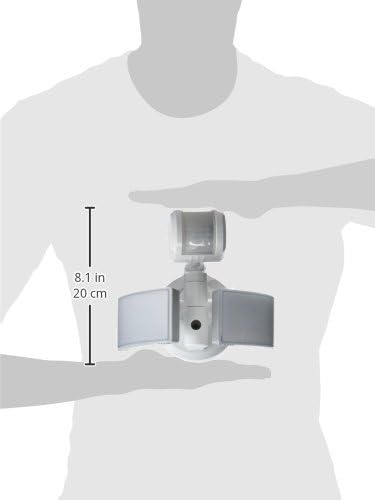
Figure 8.1: Dimensions of the Defiant Outdoor LED Bluetooth Motion Security Light.
9. Warranty and Support
Specific warranty details for the Defiant Outdoor LED Bluetooth 270 Degree Motion Security Light are not provided in this manual. For warranty information, please refer to the product packaging or contact Defiant customer support directly.
For technical assistance, troubleshooting beyond this guide, or to inquire about replacement parts, please contact Defiant customer service. You may find contact information on the manufacturer's website or on the product packaging.


