
1. Introduction
The ICP DAS X003 is a self-test module designed for industrial applications. This manual provides essential information for the proper installation, operation, and maintenance of the device. Please read this manual thoroughly before using the X003 module to ensure safe and efficient operation.
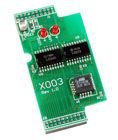
Image Description: A green circuit board, identified as the ICP DAS X003 Self-Test Module, featuring integrated circuits and connectors. The board is labeled "X003 Rev 1.0".
2. Safety Information
Always follow local safety regulations and guidelines when installing or operating the X003 module. Ensure power is disconnected from the system before making any electrical connections or performing maintenance. Failure to do so may result in personal injury or damage to the equipment.
3. Product Overview
The X003 is a specialized module primarily used for self-testing purposes within industrial control systems. Its compact design facilitates integration into various existing setups, providing diagnostic capabilities to ensure system integrity and performance.
4. Setup and Installation
4.1 Unpacking
Carefully unpack the X003 module and inspect it for any signs of physical damage. If any damage is observed, contact your supplier immediately and do not attempt to install the module.
4.2 Mounting
The X003 module is designed for secure mounting within an appropriate industrial enclosure or system rack. Ensure the mounting location provides adequate ventilation to prevent overheating and allows for easy access for wiring and maintenance.
4.3 Wiring and Connections
Connect the X003 module to your system according to the pinout diagrams and connection specifications provided in the product's technical documentation. Verify that all connections are secure, correctly polarized, and meet the specified voltage and current requirements.
- Power Supply: Connect the appropriate DC power supply to the module's power input terminals. Ensure the voltage and current ratings match the module's requirements.
- Data Interface: Connect the module to the host system's data bus or control interface. Refer to the technical specifications for the correct communication protocol and pin assignments.
5. Operating Instructions
5.1 Powering On
Once all connections are verified and secure, apply power to the X003 module. Observe any indicator LEDs for initial status. The module should typically show a power-on self-test sequence.
5.2 Self-Test Execution
The X003 module performs its self-test functions either automatically upon power-up or upon receiving a specific command from the host system, depending on its configuration. Consult the accompanying software guide or technical datasheet for details on initiating and interpreting self-test results.
5.3 Status Indicators
The module may include LED indicators to display its operational status, communication activity, or test results. Refer to the product datasheet for a detailed description of each LED's behavior and what it signifies.
6. Maintenance
6.1 Cleaning
Keep the module clean and free from dust, dirt, and debris. Use a soft, dry, lint-free cloth for cleaning the exterior. Do not use liquid cleaners, solvents, or abrasive materials, as these can damage the module's components or finish.
6.2 Firmware Updates
Periodically check the official ICP DAS website for available firmware updates for the X003 module. Follow the provided instructions carefully when performing any firmware updates to ensure proper functionality and to avoid bricking the device.
7. Troubleshooting
7.1 No Power
- Check all power supply connections to ensure they are secure and correctly wired.
- Verify that the power source is active and providing the correct voltage and current as specified for the X003 module.
- Inspect the power cable for any damage.
7.2 Module Not Responding
- Verify all data interface connections between the module and the host system.
- Check the host system's communication settings (e.g., baud rate, parity, data bits) to ensure they match the module's configuration.
- Perform a power cycle on the module (turn off, wait 10 seconds, then turn on).
- Consult the host system's diagnostic tools for communication errors.
7.3 Incorrect Test Results
- Review the test setup and ensure it precisely matches the required conditions and parameters for the self-test.
- Consult the product datasheet or software manual for expected test outcomes and error codes.
- Ensure the module's firmware is up to date.
8. Specifications
8.1 General Specifications
| Feature | Detail |
|---|---|
| Model Number | X003 |
| Brand | ICP DAS |
| Manufacturer | ICP DAS |
| Item Weight | 3 Pounds |
| ASIN | B014K1H1HO |
| Date First Available | August 14, 2014 |
9. Warranty and Support
9.1 Warranty Information
For detailed warranty terms and conditions applicable to the ICP DAS X003 module, please refer to the official ICP DAS website or contact your authorized distributor. It is recommended to retain your proof of purchase for warranty claims.
9.2 Technical Support
If you encounter issues that cannot be resolved using the troubleshooting guide in this manual, please contact ICP DAS technical support. Visit the official ICP DAS website for up-to-date contact information, FAQs, and additional technical resources.
You can also visit the ICP DAS Store on Amazon for more product information and support options.
