
Product Overview and Features
The WinBridge WB001 is a portable voice amplifier designed to enhance your voice projection in various settings. It is ideal for teachers, tour guides, coaches, and anyone needing clear and amplified communication.
- Voice Amplification: Projects your voice clearly across a room, suitable for small groups and presentations.
- Adjustable Headset Microphone: Features a gooseneck design for stable positioning near your mouth, ensuring clear audio capture.
- Portable PA System: Doubles as a portable PA system capable of playing music from Bluetooth, TF cards, and flash drives.
- Wearable Design: Includes a belt strap with clips for versatile wearing options, such as around the neck or through belt loops.
- Long Battery Life: Built-in rechargeable Lithium Polymer battery provides 5-8 hours of continuous amplification.
Package Contents
- 1*Voice Amplifier
- 1*Headset Microphone
- 1*Strap
- 1*Charging Cable
- 1*Manual
Setup Guide
Follow these steps to set up your WinBridge WB001 Voice Amplifier for first use.
- Charge the Device: Connect the provided charging cable to the DC 5V input port on the side of the amplifier and plug the other end into a USB power source. The LED indicator will show charging status.
- Connect the Headset Microphone: Insert the 3.5mm jack of the headset microphone into the 'MIC' input port on the side of the amplifier. Position the microphone boom near your mouth for optimal voice capture.
- Attach the Strap (Optional): If desired, attach the provided strap to the clips on the amplifier. You can wear it around your neck, cross-body, or secure it to your belt using the integrated belt clip.
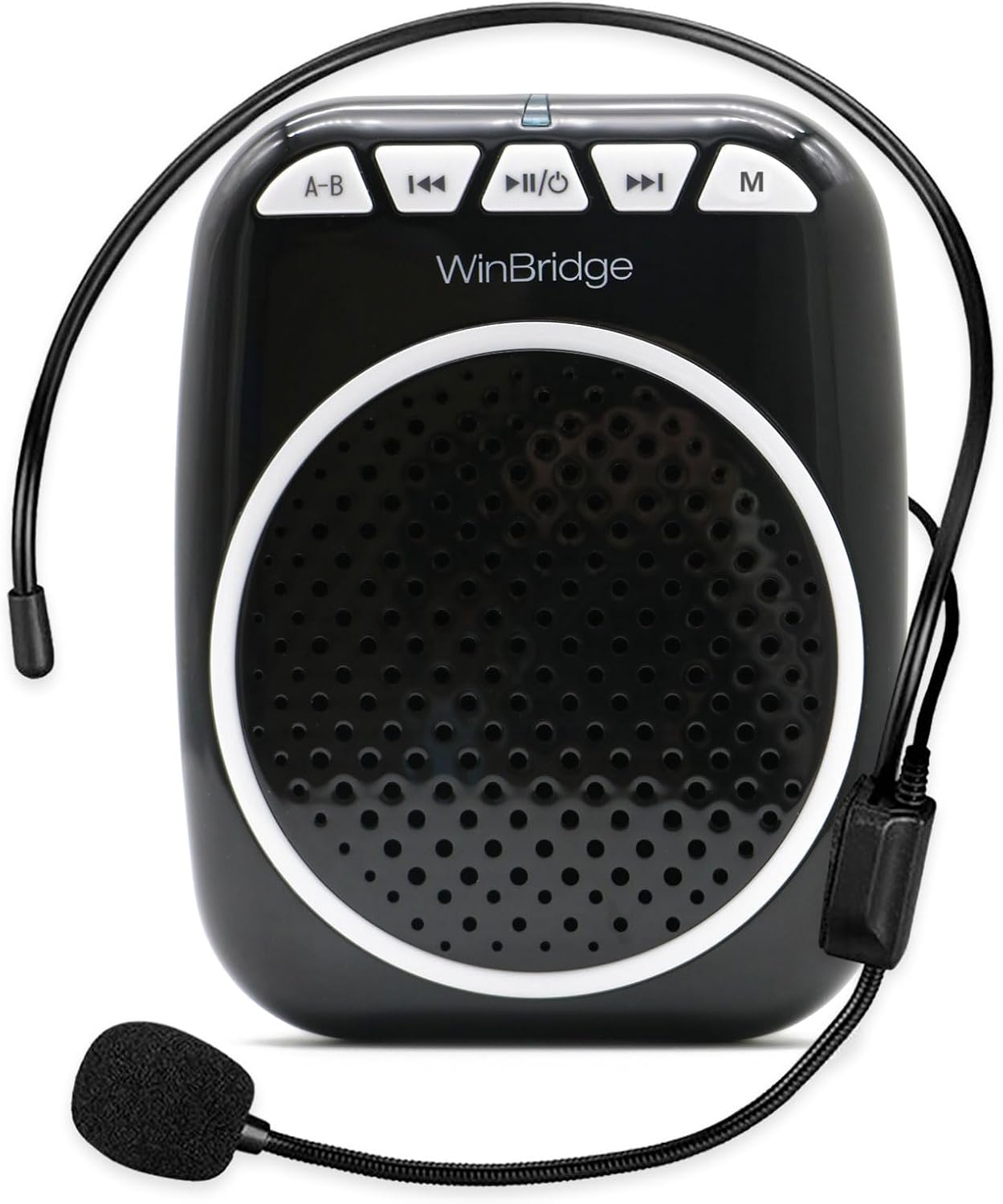
Figure 1: WinBridge WB001 Voice Amplifier with Headset Microphone.
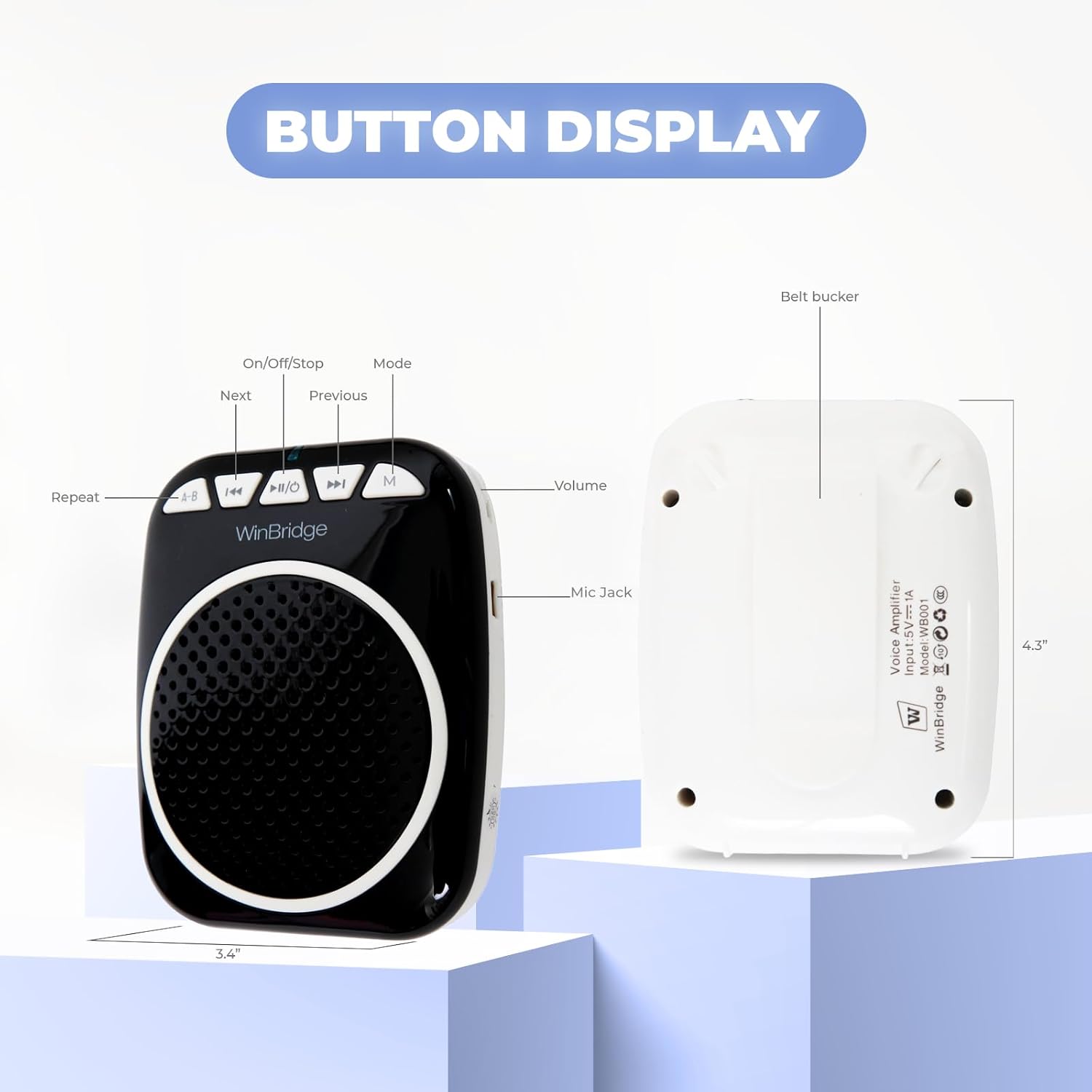
Figure 2: Side view of the amplifier highlighting the charging and microphone input ports.

Figure 3: Various methods for wearing the voice amplifier using the included strap and belt clip.
Operating Instructions
Familiarize yourself with the amplifier's controls and functions for effective use.
- Power On/Off: Press and hold the power button (⏻) on the top panel to turn the device on or off. A blue LED indicator will light up when the device is on.
- Adjust Volume: Use the volume control knob on the side of the amplifier to increase or decrease the amplification level. Start with a lower volume and gradually increase it to avoid feedback.
- Using the Microphone: Ensure the headset microphone is securely plugged in and positioned correctly. Speak clearly into the microphone for amplified sound.
- Media Playback:
- TF Card/USB Drive: Insert a TF card or USB drive containing MP3 or WAV audio files into the respective slots. The amplifier will automatically begin playing media.
- Bluetooth: Press the 'M' (Mode) button to switch to Bluetooth mode. Pair with your device (e.g., smartphone) to stream audio wirelessly.
- Playback Controls: Use the play/pause (⏵/⏸), previous track (⏮), and next track (⏭) buttons to control media playback.

Video 1: Official demonstration of WinBridge WB001 features, including media playback and microphone use.
Care and Maintenance
- Cleaning: Use a soft, dry cloth to clean the surface of the amplifier. Avoid using harsh chemicals or abrasive materials.
- Storage: Store the device in a cool, dry place away from direct sunlight and extreme temperatures.
- Battery Care: To prolong battery life, charge the device regularly, even if not in frequent use. Avoid fully discharging the battery before recharging.
- Microphone Handling: Handle the headset microphone gently. Avoid bending the boom excessively or pulling on the cable.
Troubleshooting Guide
If you encounter any issues with your WinBridge WB001, refer to the following common solutions:
| Problem | Possible Cause | Solution |
|---|---|---|
| No Sound/Low Volume | Device is off; Volume is too low; Microphone not connected properly; Battery is low. | Ensure device is on; Increase volume; Re-plug microphone; Charge the battery. |
| Feedback (High-pitched noise) | Microphone too close to the speaker; Volume too high; Microphone pointed directly at speaker. | Increase distance between mic and speaker; Lower volume; Adjust mic position away from speaker. |
| Device not charging | Charging cable faulty; Power adapter faulty; Charging port damaged. | Try a different charging cable; Use a different USB power adapter; Contact customer support if port is damaged. |
| Media playback issues | Incorrect file format; Corrupted file; USB/TF card not inserted correctly. | Ensure files are MP3/WAV; Try a different file/card; Re-insert USB/TF card. |
Product Specifications
| Specification | Detail |
|---|---|
| Model Number | WB001 |
| Output Wattage | 5 Watts |
| Item Weight | 4.9 ounces (139 Grams) |
| Power Source | Battery Powered (1 Lithium Metal battery included) |
| Connectivity Technology | AUX, Bluetooth |
| Compatible Devices | USB Driver, TF Card |
| Item Dimensions (L x W x H) | 3.35 x 1.18 x 4.33 inches |
| Color | Black and White Mixture |
Warranty and Customer Support
Your WinBridge WB001 Portable Voice Amplifier comes with a worry-free 12-month warranty.
For any issues, questions, or assistance, please feel free to contact our friendly customer service team.
Customer Support Hotline: +1(833)966-2881