
Introduction
This manual provides detailed instructions for the Inateck Bluetooth 4.1 Sport Headset, Model P20 (BH1001). Please read this guide thoroughly before using the product to ensure proper operation and to maximize your listening experience. This headset is designed for active lifestyles, offering wireless audio with a secure fit and integrated microphone.
1. Setup
1.1 Package Contents
Verify that all items are present in the package:
- Inateck Bluetooth Sport Headset (P20 / BH1001)
- USB Charging Cable
- Multiple pairs of silicone ear tips (various sizes)
- Carrying Pouch
- User Manual (this document)
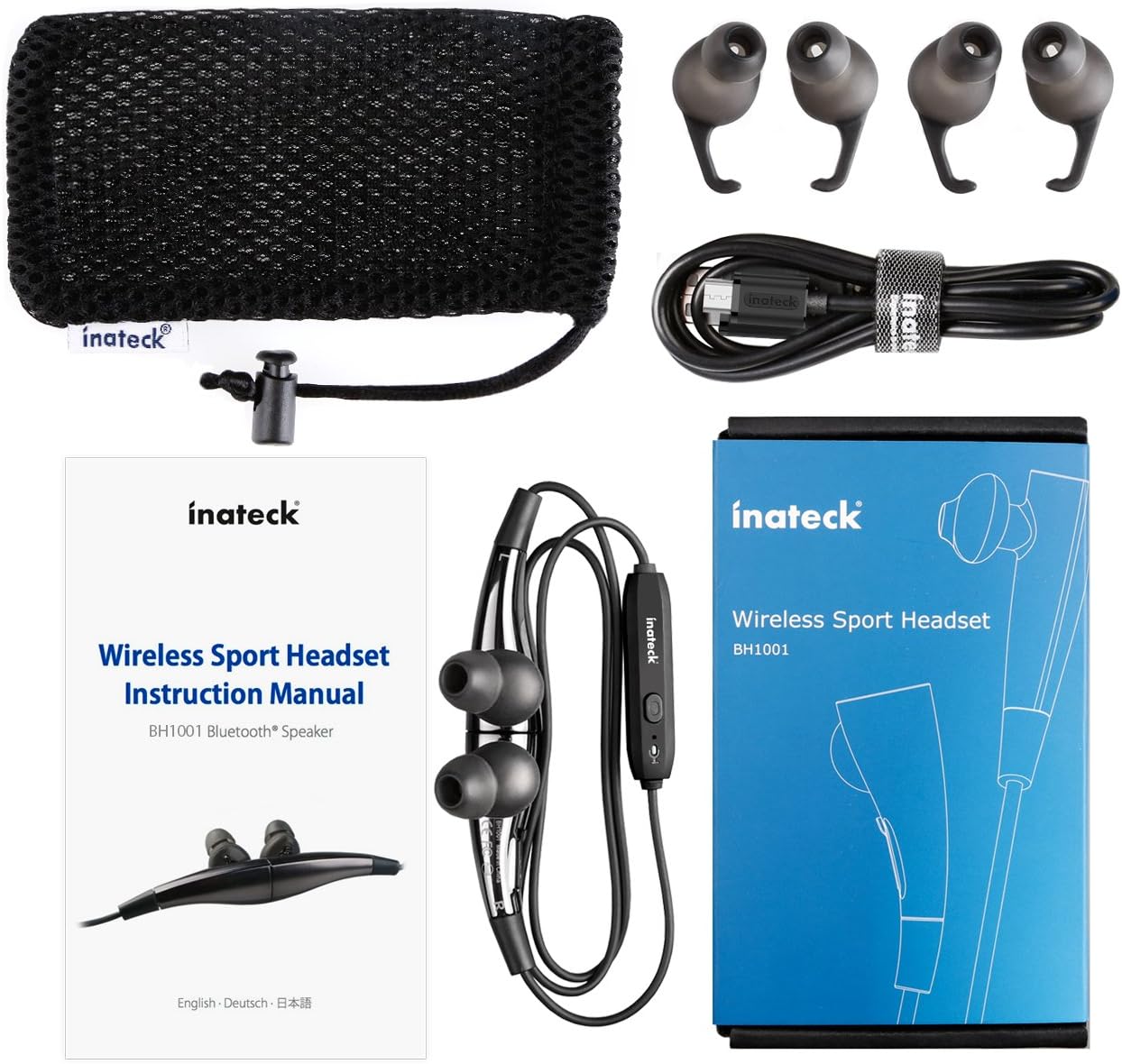
Figure 1.1: Contents of the Inateck Bluetooth Sport Headset package.
1.2 Charging the Headset
Before first use, fully charge the headset. A full charge takes approximately 3 hours and provides at least 8 hours of music playback.
- Locate the Micro USB charging port on the headset.
- Connect the small end of the provided USB charging cable to the headset's Micro USB port.
- Connect the larger end of the USB cable to a USB power source (e.g., computer USB port, USB wall adapter).
- The status indicator light will illuminate during charging. It will change color or turn off once charging is complete.

Figure 1.2: Charging the Inateck Bluetooth Sport Headset via Micro USB.
1.3 Pairing with a Bluetooth Device
To connect your headset to a smartphone or other Bluetooth-enabled device:
- Ensure the headset is turned off.
- Press and hold the Multifunction Key (MFB) on the inline control unit for approximately 5-7 seconds until the status indicator light flashes red and blue alternately. This indicates pairing mode.
- On your Bluetooth device, enable Bluetooth and search for new devices.
- Select "Inateck BH1001" or "Inateck P20" from the list of available devices.
- Once paired, the status indicator light on the headset will flash blue slowly, and you may hear an audible confirmation.
- The headset will automatically attempt to reconnect to the last paired device when turned on.

Figure 1.3: Inateck Headset paired with a mobile device for music playback.
2. Operating Instructions
2.1 Headset Controls
The inline control unit provides easy access to various functions:

Figure 2.1: Overview of the Inateck Headset control unit.
- Multifunction Key (MFB):
- Press and hold (5-7s): Power On/Off, Enter Pairing Mode
- Short press: Play/Pause music, Answer/End call
- Long press (during incoming call): Reject call
- Volume Up (+) / Next Track:
- Short press: Increase volume
- Long press: Skip to next track
- Volume Down (-) / Previous Track:
- Short press: Decrease volume
- Long press: Go to previous track
- Micro USB Port: For charging the headset.
- Status Indicator: Displays power, pairing, and charging status.
- Microphone: For hands-free calls.
2.2 Wearing the Headset
Select the ear tips that provide the most comfortable and secure fit for your ears. The headset is designed to be worn with the cable behind your neck, ensuring stability during physical activity.

Figure 2.2: Proper wearing of the Inateck Sport Headset for active use.
2.3 Magnetic Earbuds Feature
The earbuds feature integrated magnets. When not in use, you can connect the two earbuds together, forming a necklace around your neck. This action automatically pauses music playback and prevents the headset from falling off.

Figure 2.3: Magnetic earbuds feature for secure wearing around the neck.

Figure 2.4: Headset worn as a necklace using the magnetic feature.
3. Maintenance
- Cleaning: Wipe the headset with a soft, dry cloth. Do not use abrasive cleaners or solvents.
- Ear Tips: Regularly remove and clean the silicone ear tips with mild soap and water. Ensure they are completely dry before reattaching.
- Storage: When not in use, store the headset in the provided carrying pouch to protect it from dust and damage. Avoid extreme temperatures.
- Water Resistance: The headset is designed to be water-resistant for sports and exercise (e.g., sweat, light rain). Do not submerge it in water or expose it to heavy rain.
4. Troubleshooting
4.1 Cannot Power On
Ensure the headset is fully charged. Connect it to a power source using the USB cable and allow it to charge for at least 30 minutes before attempting to power on again.
4.2 Cannot Pair with Device
- Ensure the headset is in pairing mode (status indicator flashing red and blue alternately).
- Make sure Bluetooth is enabled on your device and it is within range (typically 10 meters or 33 feet).
- Turn off and on the Bluetooth function on your device.
- If previously paired, try "forgetting" or "unpairing" the headset from your device's Bluetooth settings and then re-pair.
- Ensure no other Bluetooth devices are interfering with the connection.
4.3 No Sound or Poor Sound Quality
- Check the volume level on both the headset and your connected device.
- Ensure the headset is properly paired and connected to your device.
- Move closer to your device to reduce potential interference or range issues.
- Ensure the ear tips are correctly seated in your ears for optimal sound delivery.
- Reboot both the headset and your connected device.
4.4 Intermittent Connection
- Ensure there are no physical obstructions between the headset and your device.
- Avoid placing your device in areas where the signal might be blocked (e.g., deep pockets, behind thick walls).
- Minimize interference from other wireless devices (Wi-Fi routers, other Bluetooth devices).
- Keep the headset and your device within the recommended Bluetooth range.
5. Specifications
| Brand | Inateck |
| Model Name | P20 |
| Model Number | BH1001 |
| Connectivity Technology | Bluetooth 4.1 |
| Form Factor | In-Ear |
| Ear Placement | Intra-aural |
| Headphone Jack | USB (for charging) |
| Water Resistance Level | Waterproof (suitable for sweat/light rain) |
| Special Features | Sports and exercise, integrated microphone, magnetic earbuds |
| Item Weight | 78 Grams |
| Control Type | Volume Control, Multifunction Button |
| Material | Plastic |
6. Warranty Information
Inateck products typically come with a limited warranty. For specific warranty terms and conditions applicable to your Inateck Bluetooth Sport Headset, please refer to the warranty card included in your product packaging or visit the official Inateck website. Keep your proof of purchase for warranty claims.
7. Customer Support
If you encounter any issues not covered in this manual or require further assistance, please contact Inateck customer support. You can usually find contact information, FAQs, and additional resources on the official Inateck website:
Website: www.inateck.com
Please have your product model (P20 / BH1001) and purchase details ready when contacting support.