
SANWA SD-165
SANWA Ventilation Fan SD-165
User Manual
1. Important Safety Instructions
Read all instructions carefully before installation and operation. Failure to follow these instructions may result in property damage, injury, or death. Keep this manual for future reference.
- Hazardous Environments: This fan is designed for natural ventilation in environments with hazardous and explosive materials. Ensure proper grounding and compliance with all local and national electrical codes.
- Installation: Installation must be performed by a qualified professional in accordance with all applicable codes and standards. Ensure the mounting surface is structurally sound to support the fan's weight.
- Electrical Safety: Disconnect power before servicing or cleaning the unit. Ensure all wiring connections are secure and insulated.
- Moving Parts: Keep hands, clothing, and other objects away from moving parts during operation.
- Maintenance: Regular inspection and maintenance are crucial for safe and efficient operation. Do not operate the fan if any parts are damaged or missing.
- Ventilation Path: Ensure the ventilation path is clear and unobstructed to prevent airflow restrictions.
2. Product Overview
The SANWA Ventilation Fan SD-165 is engineered for robust and reliable natural ventilation, specifically designed for challenging environments such as hazardous materials warehouses and oil garages. Its construction ensures effective air circulation to mitigate risks associated with volatile substances.
Key Features:
- Designed for general hazardous material warehouses and oil garages.
- Provides natural ventilation for safety and air quality.
- Durable construction for long-term performance in demanding conditions.
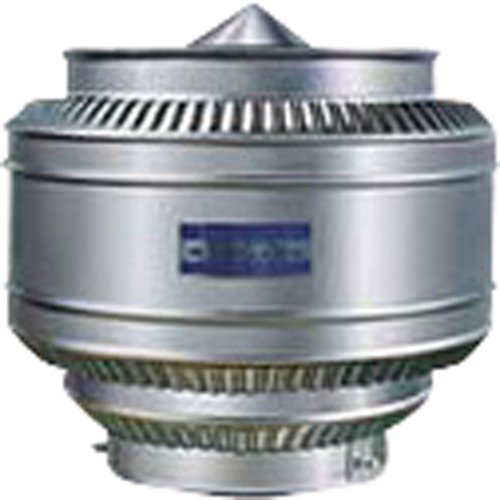
This image displays the SANWA Ventilation Fan SD-165, highlighting its robust design suitable for industrial applications. The fan features a protective grille and a sturdy frame, indicating its suitability for demanding environments.
3. Setup
Proper installation is critical for the safe and effective operation of the SANWA Ventilation Fan SD-165. Consult a qualified professional for installation.
Installation Steps:
- Site Selection: Choose a location that allows for optimal airflow and is structurally capable of supporting the fan's weight and vibration. Ensure compliance with local building codes for ventilation systems in hazardous areas.
- Mounting: Securely mount the fan to the chosen surface using appropriate hardware. Ensure the fan is level and stable to prevent excessive vibration and noise.
- Ductwork Connection (if applicable): If connecting to ductwork, ensure all connections are sealed to prevent air leakage and maintain system efficiency.
- Electrical Connection: Connect the fan to the power supply according to the wiring diagram provided with the unit and local electrical codes. Ensure proper grounding. (Note: Specific wiring diagrams are not provided in this manual. Refer to the separate electrical guide or consult a certified electrician.)
- Final Inspection: Before initial operation, visually inspect all connections, mounting hardware, and ensure no obstructions are present in the airflow path.
4. Operating Instructions
The SANWA Ventilation Fan SD-165 is designed for continuous or intermittent operation to maintain air quality in designated areas.
Basic Operation:
- Power On: Once installed and electrically connected, activate the power switch or circuit breaker supplying power to the fan.
- Verify Operation: Listen for normal operating sounds and observe airflow. The fan should operate smoothly without excessive noise or vibration.
- Continuous Use: For continuous ventilation, leave the power on.
- Power Off: To stop operation, deactivate the power switch or circuit breaker.
Note: This fan is intended for natural ventilation. It does not typically have speed controls or advanced operational modes. Its primary function is to facilitate air movement passively or with minimal active control.
5. Maintenance
Regular maintenance ensures the longevity and optimal performance of your SANWA Ventilation Fan SD-165. Always disconnect power before performing any maintenance.
Maintenance Schedule:
- Monthly Inspection:
- Check for any unusual noises or vibrations during operation.
- Inspect the fan blades and housing for dust, debris, or corrosion.
- Verify that all mounting hardware is secure.
- Quarterly Cleaning:
- Disconnect power to the unit.
- Carefully clean fan blades and interior surfaces using a soft brush or cloth. Avoid using harsh chemicals.
- Ensure all grilles and screens are free of obstructions.
- Annual Professional Check:
- Have a qualified technician inspect the motor, bearings, and electrical connections.
- Check for wear and tear on all components.
6. Troubleshooting
If you encounter issues with your SANWA Ventilation Fan SD-165, refer to the table below for common problems and solutions. Always disconnect power before attempting any repairs.
| Problem | Possible Cause | Solution |
|---|---|---|
| Fan does not start | No power supply; Loose electrical connection; Motor fault. | Check power source and circuit breaker; Inspect and secure wiring; Contact qualified service personnel. |
| Excessive noise or vibration | Loose mounting hardware; Debris in fan blades; Worn bearings. | Tighten mounting bolts; Clean fan blades; Contact qualified service personnel for bearing replacement. |
| Reduced airflow | Obstructed intake/exhaust; Dirty fan blades; Incorrect installation. | Clear obstructions; Clean fan blades; Review installation guidelines or consult a professional. |
| Overheating motor | Insufficient ventilation around motor; Prolonged heavy use; Motor fault. | Ensure adequate air circulation around the motor; Reduce operating time if possible; Contact qualified service personnel. |
7. Specifications
Detailed technical specifications for the SANWA Ventilation Fan SD-165.
| Model Number | SD-165 |
| Part Number | SD165 |
| Item Weight | 2.64 pounds (approx. 1.2 kg) |
| Package Dimensions | 11.81 x 11.81 x 11.81 inches (approx. 30 x 30 x 30 cm) |
| Item Package Quantity | 1 |
| ASIN | B014GN4A3O |
| Date First Available | October 19, 2015 |
8. Warranty and Support
Specific warranty information for the SANWA Ventilation Fan SD-165 is not provided in this document. Please refer to your purchase documentation or contact the retailer/manufacturer directly for warranty details and customer support.
For technical assistance or spare parts, please contact SANWA customer service through their official website or authorized distributors.
Ask a question about this manual
Ask about setup, troubleshooting, compatibility, parts, safety, or missing instructions. Manuals+ will review the question and use this page’s manual context to help answer it.