
1. Introduction
Welcome to the user manual for your Osprey Farpoint 55 Travel Backpack. This backpack is engineered for comfortable and efficient travel, featuring a LightWire frame suspension system and a versatile design. This guide will help you understand its features, set it up correctly, operate it effectively, maintain its condition, and troubleshoot any issues.
2. Setup
Proper setup ensures maximum comfort and load distribution. The Farpoint 55 features a LightWire frame suspension that transfers the load from the harness to the hipbelt, and a mesh backpanel for ventilation.
2.1 Adjusting the Harness and Hipbelt
The harness and hipbelt are designed for a comfortable fit. Adjust the shoulder straps so the pack sits snugly on your back, with the hipbelt resting on your hips to bear the majority of the weight. The mesh on the harness and hipbelt helps reduce chafing.
2.2 Attaching the Detachable Daypack
The Farpoint 55 includes a detachable daypack. This daypack can be zipped onto the main pack for consolidated travel or detached for shorter excursions. It features its own harness, a laptop/tablet sleeve, and a scratch-free stash pocket.
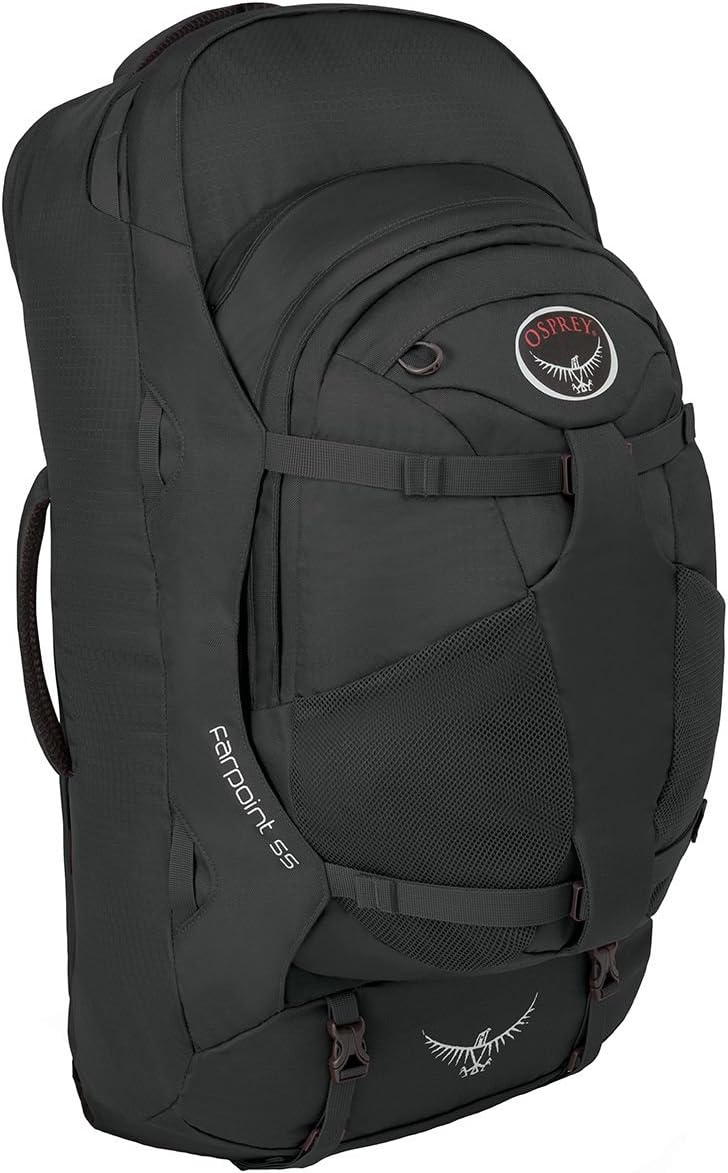
Figure 1: Osprey Farpoint 55 Travel Backpack with detachable daypack.
2.3 Stowaway Harness for Transport
For checking your backpack during air travel or when not in use, the entire suspension system (backpanel, shoulder straps, and hipbelt) can be stowed away under a zippered panel. This creates a sleek silhouette and protects the straps from damage.

Figure 2: The stowaway backpanel harness and hipbelt system.
3. Features Overview
The Farpoint 55 is equipped with several features to enhance your travel experience:
- Large, Lockable U-zip Duffel-Style Access: Provides wide access to the main compartment for easy packing and unpacking.
- Lockable Sliders on Main Compartment Zipper: Allows for secure closure of the main compartment with a travel lock (not included).
- Detachable Daypack: Features a dedicated laptop and tablet sleeve and a scratch-free stash pocket for essentials.
- Stowaway Backpanel, Shoulder Straps, and Hipbelt: Protects the harness system during transit or storage.
- Dual Front Compression Straps: Helps stabilize the load and reduce bulk.
- Dual Front Mesh Pockets: Convenient for storing water bottles or other quick-access items.
- Padded Top and Side Handles: Offers comfortable carrying options when not worn as a backpack.
- Two Internal Compression Straps: Secures contents within the main compartment to prevent shifting.
- Internal Front Flap Zippered Mesh Pocket: Ideal for organizing small items.
- External Gear Attachment Points: For lashing on additional gear.

Figure 3: Lockable sliders on the main compartment zipper for added security.

Figure 4: Zippered front panel slash pocket for quick access items.
4. Operating Your Backpack
4.1 Packing the Main Compartment
Utilize the large U-zip opening to pack your belongings efficiently. Place heavier items closer to your back for better balance. Use the internal compression straps to secure your load and prevent shifting during movement.

Figure 5: Main compartment showing internal compression straps.
4.2 Using the Detachable Daypack
The detachable daypack can be worn separately for day trips. For added security and balance when traveling with both packs, the daypack can be attached to the front of the main pack's harness, allowing you to carry it on your chest.
4.3 Securing Your Belongings
Always use the lockable sliders on the main compartment zipper with a TSA-approved lock when checking your bag or leaving it unattended. Ensure all external straps are tightened to compress the load and prevent snagging.
4.4 Product Tour and Features Explanation
Video 1: An official product tour of the Osprey Farpoint/Fairview Series, highlighting key features and design elements.
4.5 Top Features of the Farpoint 55
Video 2: A detailed look at the top three features of the Osprey Farpoint 55, demonstrating practical usage.
5. Maintenance
To ensure the longevity of your Osprey Farpoint 55 backpack, follow these maintenance guidelines:
- Cleaning: The manufacturer recommends Hand Wash Only. Use mild soap and cool water. Do not use harsh detergents or bleach.
- Drying: Air dry the backpack completely in a shaded area. Do not machine dry or expose to direct sunlight for extended periods, as this can damage the fabric.
- Storage: Store your backpack in a cool, dry place away from direct sunlight when not in use. Ensure it is clean and completely dry before storing to prevent mold or mildew.
- Zipper Care: Periodically clean zippers with a small brush and lubricate them with a zipper lubricant to ensure smooth operation.
6. Troubleshooting
Here are some common issues and their potential solutions:
- Discomfort while carrying: Ensure the harness and hipbelt are properly adjusted to your body. The hipbelt should bear most of the weight. Distribute contents evenly within the pack.
- Zippers sticking: Clean the zipper teeth and apply a silicone-based zipper lubricant. Avoid forcing stuck zippers.
- Straps getting tangled during transit: Utilize the stowaway backpanel feature to tuck away all straps before checking the bag or placing it in overhead compartments.
- Contents shifting: Use the internal and external compression straps to tighten the load and keep items secure.
7. Specifications
| Color | Volcanic Grey |
| Backpack Design | Daypack Backpack |
| Sport Type | Hiking |
| Product Style | Farpoint 55 Travel Backpack |
| Brand Name | Osprey |
| Age Range Description | Adult |
| Item Weight | 3.8 Pounds |
| Model Name | Farpoint 55 |
| Number of Items | 1 |
| UPC | 845136039711, 845136029187 |
| Included Components | Osprey Farpoint 55 Travel Backpack |
| Manufacturer | Osprey |
| Other Special Features | Waterproof |
| Recommended Uses | Leisure, Sport |
| Compatible Device Size Maximum | 15 Inches (for laptop/tablet sleeve) |
| Water Resistance Level | Water Resistant |
| Number of Compartments | 1 (main) |
| Material Type | Nylon, Ripstop |
| Product Care Instructions | Hand Wash Only |
| Storage Volume | 55 Liters |
| Item Dimensions (D x W x H) | 13"D x 24"W x 13"H |
| Size | Small-Medium |
8. Warranty and Support
Osprey products are known for their durability and quality. For specific warranty information and to register your product, please visit the official Osprey website. For any support needs, including repairs or replacement parts, contact Osprey customer service directly through their website or the contact information provided with your purchase. Always refer to the manufacturer's official channels for the most accurate and up-to-date warranty and support details.


