
1. Introduction
The Epson Home Cinema 1040 projector is designed to deliver bright, Full HD 1080p widescreen entertainment for your home. This portable and user-friendly projector boasts a dynamic contrast ratio of up to 15,000:1, along with 3000 lumens of color brightness and 3000 lumens of white brightness. It offers versatile connectivity options including two HDMI ports (one with MHL support) and a built-in speaker, making it simple to enjoy high-definition content right out of the box. You can project images up to 300 inches on virtually any wall or screen, transforming your living space into a home theater.
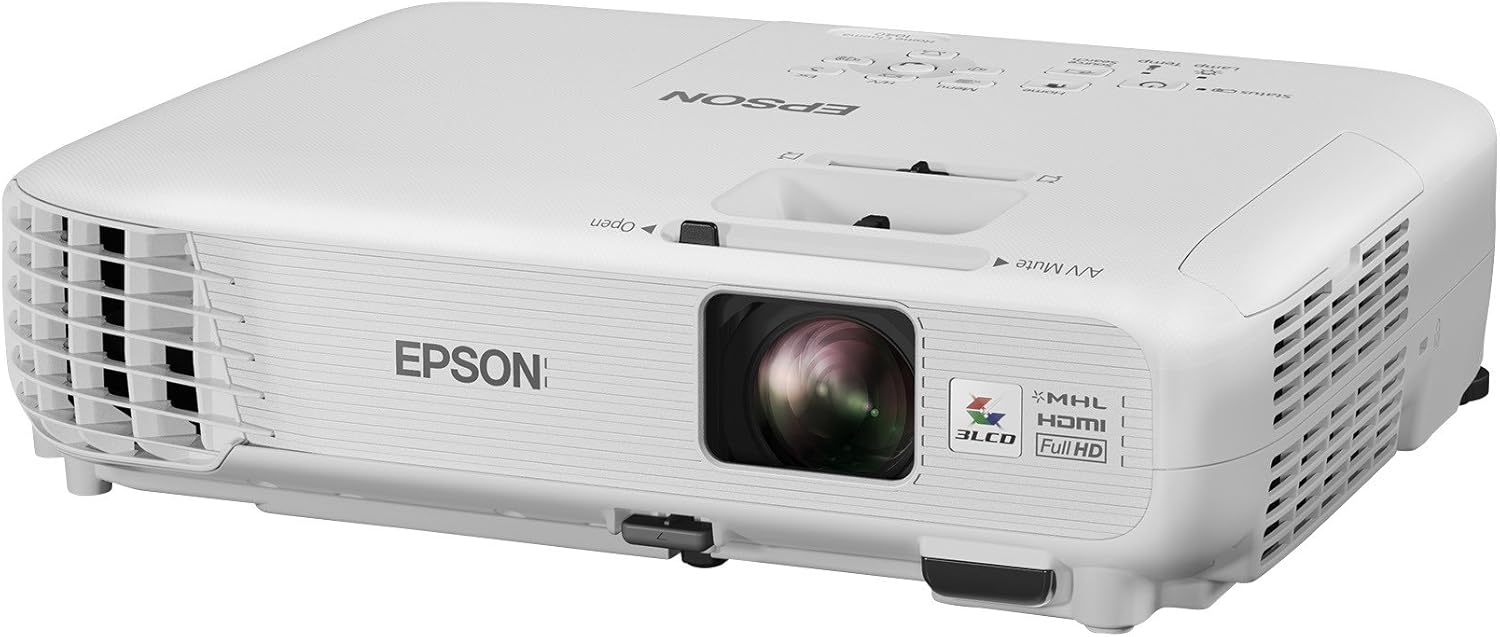
Figure 1.1: Front-side view of the Epson Home Cinema 1040 Projector, showcasing its compact design and lens.
2. What's in the Box
Upon opening your Epson Home Cinema 1040 package, you should find the following components:
- Epson Home Cinema 1040 Projector with built-in speaker
- Power Cable
- Remote Control with Batteries
- CD-ROM with Projector Software
- Quick Setup Guide
3. Key Features
The Epson Home Cinema 1040 projector offers a range of features designed for an optimal home theater experience:
- Screen Size Range: Capable of projecting an 80-inch image from 8 feet away, or a 119-inch image from 12 feet away, with a maximum projection size of 300 inches.
- Brightness: Features 3000 lumens of Color Brightness and 3000 lumens of White Brightness for vibrant and clear images in various lighting conditions.
- Contrast Ratio: Delivers a high contrast ratio of 15,000:1 for deep blacks and bright whites.
- Keystone Correction: Includes automatic vertical and manual horizontal keystone correction for easy image alignment.
- Lamp Life: Enjoy extended viewing with a lamp life of up to 10,000 hours in ECO mode and up to 5000 hours in Normal mode.
- Connectivity: Equipped with versatile input options including 2 HDMI (1 MHL), 1 RCA (composite), 1 RCA (1 audio L/R), 1 VGA D-sub 15 pin (computer input/component), 1 USB Type A, and 1 USB Type B.
- Built-in Speaker: An integrated speaker provides audio without the need for external sound systems.
4. Setup Guide
Follow these steps to set up your Epson Home Cinema 1040 projector:
- Placement: Position the projector on a stable, flat surface or mount it to the ceiling. Ensure the projector is centered with your screen or projection surface. For optimal image size, refer to the 'Screen Size Range' in the Key Features section.
- Power Connection: Connect the supplied power cable to the projector's AC inlet and then to a grounded electrical outlet.
- Connect Devices: Use appropriate cables (HDMI, VGA, RCA) to connect your video sources (Blu-ray player, gaming console, streaming device, computer) to the corresponding input ports on the back of the projector.

Figure 4.1: Rear view of the projector, highlighting the various input ports for connecting external devices.
- Power On: Press the power button on the projector or the remote control to turn on the unit. The power indicator light will illuminate.
- Focus and Zoom: Adjust the focus ring and zoom lever located near the lens until the projected image is sharp and fills your screen.
- Keystone Correction: If the image appears trapezoidal, use the keystone correction feature (either automatic or manual adjustment via the projector's menu or remote) to square the image.
5. Operating Instructions
Operating your Epson Home Cinema 1040 is straightforward:
- Input Selection: Use the 'Source Search' button on the remote control or the projector's control panel to cycle through available input sources (HDMI1, HDMI2/MHL, Computer, Video, USB).
- Menu Navigation: Press the 'Menu' button to access the projector's settings. Use the arrow keys to navigate and 'Enter' to select options.
- Volume Control: Adjust the volume using the dedicated volume buttons on the remote control.
- Image Adjustments: Within the menu, you can fine-tune image settings such as brightness, contrast, color mode, and aspect ratio to suit your viewing preferences.

Figure 5.1: Top view of the projector, displaying the intuitive control panel for direct operation.
Figure 5.2: The remote control for the Epson Home Cinema 1040 Projector, providing full functionality from a distance.
6. Maintenance
Proper maintenance ensures the longevity and optimal performance of your projector:
- Lamp Replacement: The projector lamp has a finite lifespan. When the 'Lamp Temp' indicator lights up or the image becomes dim, it's time to replace the lamp. Refer to the full user manual for detailed lamp replacement instructions.
- Filter Cleaning: Regularly clean the air filter to prevent dust buildup, which can affect performance and lamp life.
- Lens Cleaning: Gently wipe the projector lens with a soft, lint-free cloth designed for optical surfaces. Avoid abrasive cleaners.
- General Cleaning: Keep the projector's exterior clean by wiping it with a soft, dry cloth. Do not use liquid or aerosol cleaners.
7. Troubleshooting
If you encounter issues with your projector, try these common troubleshooting steps:
- No Image: Ensure the projector is powered on, the correct input source is selected, and all cables are securely connected. Check if the lens cap is removed.
- Dim Image: Verify the lamp mode (ECO vs. Normal) and consider if the lamp needs replacement. Ensure the air filter is clean.
- Image Distorted/Blurred: Adjust the focus and keystone correction. Ensure the projector is placed on a stable surface and not vibrating.
- No Sound: Check the volume level on the projector and your connected device. Ensure audio cables are properly connected if not using HDMI.
- Overheating: Ensure proper ventilation around the projector. Clean the air filter if it's clogged.
For more detailed troubleshooting, please refer to the complete user manual.
8. Specifications
Detailed technical specifications for the Epson Home Cinema 1040 Projector:
| Feature | Specification |
|---|---|
| Brand Name | Epson |
| Model Number | V11H772020 |
| Display Resolution | 1920x1200 (Full HD 1080p compatible) |
| White Brightness | 3000 Lumens |
| Color Brightness | 3000 Lumens |
| Contrast Ratio | 15,000:1 |
| Lamp Life | Up to 10,000 hours (ECO mode), 5000 hours (Normal mode) |
| Connectivity Technology | 2 HDMI (1 MHL), 1 RCA (composite), 1 RCA (1 audio L/R), 1 VGA D-sub 15 pin, 1 USB Type A, 1 USB Type B |
| Speaker Type | Built-In |
| Item Weight | 5.7 pounds |
| Product Dimensions | 14.6 x 14.3 x 6.2 inches |
| Color | White |
9. Warranty and Support
Epson provides comprehensive support for its products:
- Warranty: The Epson Home Cinema 1040 projector comes with a 2-Year Limited Warranty. Please refer to the official Epson warranty documentation for full terms and conditions.
- User Manual: A detailed User Manual (PDF) is available for download. For in-depth information on setup, operation, and troubleshooting, please consult the official document: Epson Home Cinema 1040 User Manual (PDF).
- Online Support: Visit the official Epson website for additional support, FAQs, driver downloads, and contact information.


